


Key Points
- SAP data migration best practices start before migration day: profiling and archiving data during the pre-migration phase prevent most cutover failures.
- The three migration approaches (greenfield, brownfield, and Selective Data Transition) each carry distinct data migration scope and complexity implications for your project.
- Business Partner deduplication and CVI mapping are among the most error-prone steps in any SAP S/4HANA migration, and most project teams underestimate the effort required.
- Archiving historical SAP data before migration reduces what your team must cleanse, shortens cutover windows, and prevents data debt from entering S/4HANA.
- After migration, the old SAP ECC environment cannot simply be switched off; compliance requirements mean historical data must remain accessible for years.
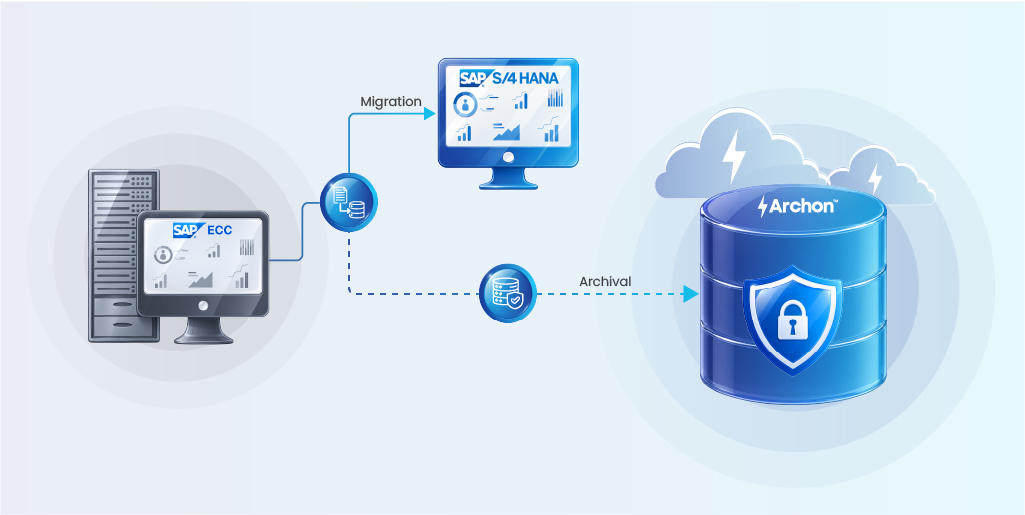
- Archon helps organizations archive legacy SAP data before migration, cut over time, and fully decommission old systems while keeping historical records accessible for audit.
A leading aerospace and aviation company was carrying an SAP ECC database growing at 80 gigabytes every month without any archiving strategy and retention policies. More than 100 custom development objects, none of them assessed, none configured. And an S/4HANA migration approaching.
The problem was not the migration itself. The problem was the data.
What happened next illustrates what every SAP team needs to know about SAP data migration best practices: applying them before migration day, not after, is what determines whether a project succeeds or stalls.
Archon was brought in before the migration began. The result: a 35% reduction in overall ECC database size, an ongoing SAP archiving cadence to control the 80 GB/month growth rate, and an S/4HANA migration program that could finally proceed on a right-sized, governed environment.
SAP ECC mainstream maintenance ends December 31, 2027. Thousands of organizations are still running on ECC, many under real time pressure. The teams that will struggle most are not the ones who started planning late. They are the ones who treated migration as a technology problem when it is fundamentally a data problem.
This guide covers the complete picture:
- Choosing the right migration approach for your data landscape
- Executing the step-by-step migration process
- Applying the ten practices that distinguish successful SAP migrations
- Selecting the right tools for each phase
- Navigating the most common challenges
- Managing your legacy SAP environment after migration is complete
What Is SAP Data Migration?
SAP data migration is the process of moving business data from legacy systems into SAP S/4HANA or an SAP Cloud solution. It covers extracting data from the source, transforming it to meet S/4HANA’s structural requirements, cleansing it for quality, and loading it into the target system.
It is worth separating migration from two related terms that often get conflated:
- Data conversion restructures data to match a new format. Converting customer and vendor records to the Business Partner model is a conversion step within the migration.
- Data integration manages continuous data flows between connected systems. Integration is ongoing; migration is a defined, one-time event with a start and an end.
Three Categories of Data You Are Moving
Every SAP migration involves three distinct data categories, and each carries different handling requirements.
- Master data includes customers, vendors, materials, general ledger accounts, cost centers, and profit centers. These records define how your business operates in S/4HANA, and they receive the most scrutiny during migration. Poor master data quality is the leading cause of go-live failures.
- Transactional data covers open purchase orders, sales orders, financial documents, and any record with unresolved business activity. Not all historical transactional data needs to migrate. Only open items typically transfer; closed historical transactions belong in an enterprise archive, not in your new system.
- Dynamic data includes current inventory levels, active contracts, and real-time balances. This data must be correct at the moment of cutover. Even a small discrepancy causes operational disruption from day one.
Why the 2027 Deadline Makes SAP Data Migration Urgent Now
SAP ECC 6.0 mainstream maintenance ends December 31, 2027. Organizations that miss this deadline face support gaps, security vulnerabilities, and expensive custom maintenance contracts.
What makes the data challenge significant: most ECC systems have been running for 15 to 20 years. That means 15 to 20 years of:
- Duplicate records (the same vendor entered multiple times across divisions)
- Inconsistent field usage across business units and regions
- Incomplete master data that was never fully validated
- Custom fields and Z-tables that have no equivalent in S/4HANA’s cleaner data model
Research from Horváth’s 2025 S/4HANA study found that SAP migration projects take on average 30% longer than planned. (Source: Horváth 2025 S/4HANA Study — link to primary report recommended.)
Gartner estimates that poor data quality costs organizations an average of $12.9 million annually. That cost does not disappear at go-live. It compounds inside your new system if problems are not addressed before migration.
The time for extended planning is shrinking. The window for a well-prepared migration is now.
Is your SAP data ready for S/4HANA?
Most migration projects underestimate data quality gaps. Archon helps you identify and archive what does not need to migrate before the project clock starts.
Choosing Your Migration Approach: Greenfield, Brownfield, and Selective Data Transition
The SAP migration approach you choose shapes everything: how much data needs to migrate, how long the cutover takes, and how clean your S/4HANA environment is on day one. There are three paths.

Greenfield (New Implementation)
A greenfield migration starts fresh. You configure S/4HANA from scratch and migrate only the data your business actively needs. Historical data stays behind in the legacy system or moves to a separate archive.
What it means for your data:
- Only open items and current master data migrate
- Historical transactional data does not transfer to S/4HANA
- You have the opportunity to build from clean, validated data
- Migration volume is significantly lower than a brownfield
Best for: Organizations using migration as a business transformation opportunity, those with heavily customized ECC systems they want to simplify, or companies expanding into new markets.
Brownfield (System Conversion)
A brownfield migration converts your existing ECC system to S/4HANA in place. Configurations, customizations, and data all carry over.
What it means for your data:
- All existing data migrates, including years of historical records
- Data quality problems in ECC transfer directly to S/4HANA
- Requires extensive pre-migration cleansing work
- Higher risk if legacy data quality is poor
Best for: Organizations that want to preserve existing processes and institutional knowledge with minimal business disruption.
Selective Data Transition (Hybrid)
Selective Data Transition (SDT) takes a targeted approach. You selectively migrate specific entities, company codes, or business units to a new S/4HANA system while leaving the rest behind.
What it means for your data:
- You control exactly what migrates and what does not
- Scope is defined and bounded, which reduces cutover complexity
- Historical data for migrating entities can be included or archived
- Requires careful scoping to avoid data gaps
Best for: Large enterprises, carve-out scenarios, mergers, or organizations that want to migrate in phases rather than all at once.
Comparison at a Glance
| Factor | Greenfield | Brownfield | Selective Data Transition |
|---|---|---|---|
| Data volume migrated | Low (open items only) | High (full history) | Controlled by scope |
| Pre-migration cleansing effort | Lower | Higher | Medium |
| Historical data handling | Archive or leave in ECC | Migrates to S/4HANA | Selective — by entity |
| Business disruption | Higher (process redesign) | Lower | Medium |
| Best for | Transformation, clean start | Preserving ECC investment | Carve-outs, phased, complex landscapes |
For a detailed comparison including the Bluefield approach, see the SAP S/4HANA migration approaches guide.
If you are considering a Selective Data Transition, the SAP selective data transition guide walks through the scoping process in detail.
Not sure which migration approach fits your organization? Our team can assess your data landscape and help you choose between greenfield, brownfield, and SDT with a clear view of what to migrate, archive, and retire.
The SAP Data Migration Process, Step by Step
Regardless of your migration approach, the underlying process follows six phases. The quality of each phase determines the success of the next phase.

Phase 1: Assess and Scope
Before moving a single record, understand what you have.
- Identify all source systems: ECC instances, legacy databases, third-party applications
- Catalog data objects: which master data, transactional data, and configuration needs to migrate
- Establish migration scope: what migrates, what archives, what gets deleted
- Define data ownership for each object
- Set cutover objectives: downtime tolerance, go-live date, rollback criteria
This phase is where migration timelines are won or lost. Organizations that rush scope definition spend months correcting decisions made in days.
Phase 2: Extract and Profile
With scope defined, extract data from source systems and profile it for quality.
- Run data profiling across all master data domains
- Identify completeness gaps (mandatory S/4HANA fields with no source data)
- Flag duplicate records, especially Business Partner candidates
- Map source fields to S/4HANA target fields
- Document field-level transformation rules before any cleansing starts
A practical rule: profile before you cleanse. Profiling before tells you what you actually face. Profiling after only tells you what you fixed.
Phase 3: Cleanse and Transform
This is the most time-consuming phase and the most consistently underestimated.
- Deduplicate customer and vendor records using Customer-Vendor Integration (CVI) mapping
- Standardize address formats to SAP-compatible structures
- Complete mandatory S/4HANA fields (national ID, contact method, business partner category)
- Reconcile chart of accounts across company codes
- Apply ETL (extract, transform, load) logic to convert data into S/4HANA format
- Build a staging layer between source data and the SAP Migration Cockpit
The staging layer is critical. It gives your team a checkpoint before data reaches S/4HANA. Errors caught in a staging environment are far cheaper to fix than errors caught in production.
Phase 4: Load and Validate
Load transformed data into S/4HANA using the Migration Cockpit or alternative tools, then validate thoroughly.
- Run simulation loads (Migration Cockpit supports test runs without committing data)
- Compare record counts before and after loading
- Execute business validation: Do open orders balance? Do financial documents reconcile?
- Run parallel system tests where the data model allows
- Involve business users in sign-off, not just the technical team
Technical validation catches format errors. Business validation catches the problems that cause operational disruptions after go-live.
Phase 5: Cutover and Go-Live
Cutover is the defined window when production switches from ECC to S/4HANA. This is the highest-risk phase.
- Freeze ECC transactions at a defined cutover point
- Execute the final production load with delta data (incremental data synchronization to capture the gap since the last test load)
- Run final reconciliation checks
- Perform a go/no-go assessment against predefined criteria
- Activate S/4HANA for production use
Cutover windows are typically two to five days for mid-size organizations. Complex landscapes require longer. Every additional hour of system downtime has a direct business cost.
Phase 6: Stabilize and Post-Migration Management
Go-live is not the finish line. The first 90 days after cutover carry the highest risk of data quality degradation.
- Monitor data quality in S/4HANA production
- Address migration lags: records that did not transfer correctly
- Establish data governance policies to prevent re-accumulation of poor-quality data
- Decide what to do with the legacy SAP ECC system (covered in detail below)
10 SAP Data Migration Best Practices That Actually Work
These are not generic recommendations. Each one addresses a failure mode seen in real SAP migration projects.
1. Archive Historical Data Before You Migrate
Most SAP migration starts with data cleansing, they should start with archiving.
The average SAP ECC system holds 15 to 20 years of transactional history. The vast majority of it does not need to live in S/4HANA. It needs to be retained for compliance, but it does not belong in your new production system.
Archiving historical data before SAP migration does three things:
- Reduces total data volume so your team profiles, cleanses, and loads less
- Shrinks your cutover window directly (volume drives duration)
- Prevents historical data quality problems from transferring to S/4HANA

For SAP S/4HANA data archiving during migration, the core principle is: only migrate what needs to be active in your new system. Archive everything else to a governed, accessible repository before the migration project begins.
Archon supports exactly this. It archives historical SAP data to a structured repository before migration starts, reducing your active data scope while keeping archived records accessible for audit and compliance queries.
2. Profile Data in the Explore Phase, Not the Realize Phase
The SAP Activate methodology places data migration work in the Realize phase. Many teams interpret this as a signal to defer data profiling until Realize. This is one of the most common and costly mistakes in SAP migrations.
Profiling in Realize means the timeline is already locked, remediation costs are already higher, and business stakeholders have already committed to a go-live date you may not meet.
Start profiling in the Explore phase. What you find will directly influence your migration scope, timeline, and tool selection — all decisions that are far more expensive to revisit in Realize.
3. Build a Staging Layer Between Source and Migration Cockpit
The SAP Migration Cockpit loads data from staging tables into S/4HANA. Many teams load directly from source, skipping the staging layer to save time. This removes your last quality checkpoint before production data is affected.
A staging layer:
- Allows you to run validation checks before data reaches S/4HANA
- Enables incremental data synchronization during the cutover window
- Provides a clean rollback point if issues are discovered
- Supports iterative test loads without touching the source system
Build the staging layer into your architecture from day one of the project.
4. Map Business Partners with CVI Before Loading Anything Else
S/4HANA replaces separate customer and vendor master records with a unified Business Partner model. The Customer-Vendor Integration (CVI) mapping step converts existing records to Business Partner format.
CVI mapping errors cause go-live delays more consistently than almost any other single issue. Common problems include:
- Multiple records for the same business entity (requires deduplication before CVI)
- Missing mandatory Business Partner fields (category, name, address at minimum)
- Records that exist as both customer and vendor without a consolidated Business Partner
Deduplicate customer and vendor records completely before starting CVI mapping. Trying to resolve duplicates after they have been loaded into S/4HANA as Business Partners is significantly more difficult.
5. Assign Data Owners, Not Just Data Teams
Most migration projects assign a data migration team. Fewer assign individual data owners for each master data domain.
Data owners are business-side stakeholders who:
- Validate that source data accurately reflects business reality
- Approve transformation rules before they are applied in bulk
- Sign off on post-load validation results
- Own data quality after go-live
Without data owners, technical validation passes while business validation quietly fails. Assign one data owner per domain (customer, vendor, material, GL accounts) before the cleansing phase begins.
6. Run Test Migrations in Waves, Not as a Single Event
A single end-to-end test migration before go-live is not enough. Successful migrations typically run three to five test cycles:
- Wave 1: Small subset; validate process and tooling
- Wave 2: Larger subset including complex records; validate transformation rules
- Wave 3: Full-scale test; validate timing and cutover window feasibility
- Dress rehearsal: Full production simulation with timing; validate everything before the real cutover
Each wave surfaces issues that earlier waves missed. Compressing the wave count to save time compresses your ability to catch problems before they reach production.
7. Validate Business Rules, Not Just Technical Rules
Technical validation confirms data loaded without errors. Business validation confirms the data is correct. These are different things.
A vendor record can load with no technical errors and still carry wrong payment terms, a missing tax ID, or an incorrect account group. Technical validation passes. The finance team finds the problem on day one of production.
Build business validation scripts alongside technical ones. Involve finance, procurement, and sales teams in validation sign-off. Their confirmation matters as much as your record count reconciliation.
8. Secure the Migration Environment Throughout
Data migrations expose your most sensitive business information: complete customer lists, vendor pricing, financial records, payroll data. The migration environment is a high-risk window that often runs outside normal access controls.
Minimum security practices for the migration window:
- Restrict technical user accounts to minimum necessary permissions
- Segregate duties so the person loading data cannot also approve data
- Audit access logs throughout the migration window
- Encrypt data in transit and at rest during the migration
- Remove all temporary technical users immediately after cutover
For regulated industries, maintaining a clear chain of custody for data during migration is a compliance requirement.
9. Plan Your Cutover Window to the Hour
Imprecise cutover planning is how migrations extend from days into weeks.
Your cutover plan needs:
- A task-by-task runbook with assigned owners and realistic durations
- A go/no-go checklist with defined pass/fail criteria (not judgment calls)
- A freeze date for ECC transactions with enough business notice
- A rollback procedure with a clear, time-boxed decision point
- Communication plans for all affected business units and leadership
Run a complete dress rehearsal of the cutover before go-live. Time every step. Identify which tasks can run in parallel to compress the window.
10. Monitor Data Quality for 90 Days After Go-Live
The first 90 days of production use are when migration problems surface in the real world. Build your monitoring plan before go-live, not after.
Post-go-live monitoring should cover:
- Automated data quality checks running against S/4HANA production data daily
- A dedicated resolution team for migration-related issues
- A comparison of S/4HANA operational metrics against pre-migration ECC benchmarks
- A defined channel for users to report data discrepancies
Every migration ships some problems. The difference between a managed rollout and a crisis is whether you catch them in your monitoring dashboard or in an escalation email.
Archon helps SAP teams archive historical data before migration, establish a governed archive for compliance records, and fully decommission legacy systems after go-live.
SAP Data Migration Tools: What to Use and When
No single tool handles the full migration lifecycle. Understanding what each tool is designed for prevents misuse and coverage gaps.
SAP Migration Cockpit (Transaction LTMC)
The SAP Migration Cockpit is SAP’s native tool for loading cleansed, transformed data into S/4HANA.
| Capability | Detail |
|---|---|
| What it does | Loads data using predefined migration objects for standard SAP data types |
| Simulation mode | Supports test runs without committing data to production |
| Loading method | File-based or staging-table-based |
| Best for | Final migration loads in Phase 4 (Load and Validate) |
| Key limitation | Expects clean, correctly mapped data — it is a loading tool, not a quality tool |
Feeding the Migration Cockpit uncleansed data results in either failed loads or, worse, quietly incorrect data in S/4HANA.
SAP Data Services (BODS)
SAP Business Objects Data Services is an ETL platform for extracting, transforming, and loading data at scale.
- Handles large-volume extraction from multiple source systems
- Supports complex transformation logic
- Provides data profiling capabilities
- Used to build and populate the staging layer
Best for Phase 2 (Extract and Profile) and Phase 3 (Cleanse and Transform). Requires experienced configuration to set up correctly.
Legacy System Migration Workbench (LSMW)
LSMW is a legacy SAP tool for batch data input using recording-based, BAPI-based, or IDoc-based loading.
Use it for simpler migration scenarios or where Migration Cockpit objects are not available. Note: SAP now recommends the Migration Cockpit as the primary tool for S/4HANA projects. LSMW is gradually being phased out for S/4HANA use.
SAP Master Data Governance (MDG)
SAP MDG is a master data management platform providing governance workflows, deduplication, and data quality rules.
Use MDG for:
- Pre-migration Business Partner deduplication
- Defining master data quality rules before cleansing
- Ongoing post-migration master data governance
MDG is a governance platform, not a migration tool. It works as a complement to the migration process, not a substitute for pre-migration cleansing work.
Third-Party and Specialized Tools
When native SAP tools reach their limits — particularly for large data volumes, complex transformations, or non-SAP source systems — third-party tools fill the gap.
For pre-migration archiving and post-migration legacy system decommissioning, Archon provides a purpose-built platform that works with SAP environments to reduce data scope before migration and preserve access to historical records after the old system is retired.
Common SAP Data Migration Challenges
Every SAP migration encounters a version of these challenges. Knowing them ahead of time reduces their impact.
Data Quality in Legacy Systems
Decades of accumulated data means decades of accumulated inconsistency. Problems teams consistently encounter include:
- Duplicate customer and vendor records across divisions
- Incomplete mandatory fields that S/4HANA’s stricter data model requires
- Inconsistent naming conventions across business units
- Field values that were technically valid in ECC but do not map cleanly to S/4HANA
No tool resolves these problems automatically. They require human review, business-side validation, and dedicated time in the project plan.
Business Partner and CVI Complexity
The shift from separate customer and vendor master records to the unified Business Partner model is structurally significant. Organizations that do not deduplicate before CVI mapping discover the problem after it is already inside S/4HANA — far more expensive to correct.
Volume Management During Cutover
Moving large data volumes within a defined cutover window creates a race condition. If the load takes longer than the window allows, go-live is delayed or rolled back.
Ways to manage volume risk:
- Archive historical data before migration to reduce total volume
- Implement incremental data synchronization to keep the cutover delta small
- Run parallel load streams where the data model allows
Custom Fields and Z-Tables
SAP ECC systems accumulate custom fields and Z-tables over years of development work. Not all of these have equivalents in S/4HANA.
Before migration, audit all custom development for:
- Fields and tables that can be retired outright (no longer actively used)
- Fields that need to map to S/4HANA standard structures
- Custom logic that requires re-implementation in S/4HANA
This audit should happen in Phase 1, not Phase 3.
Master Data Governance Gaps Post-Go-Live
One of the most overlooked challenges: what happens to master data quality after go-live. Without governance controls, S/4HANA accumulates the same quality problems ECC had — just faster in a system with tighter data standards.
Establish data governance policies before go-live. Assign data stewards per domain. Build approval workflows for new master data creation. The migration is a reset; governance keeps it clean.
Also Read: 7 Common SAP S/4HANA Migration Challenges and Solutions
Facing a specific SAP data migration challenge?
Whether it is data volume, Business Partner complexity, or legacy system decommissioning, our team has seen it and can help you build a plan.
Archive Before You Migrate: The Best Practice Most SAP Teams Skip
Most SAP migration guides treat data archiving as a post-migration activity. Complete the migration to S/4HANA first; archive the old data afterward. This is the wrong sequence.
Archiving historical SAP data before migration delivers concrete benefits that post-migration archiving cannot.
What Pre-Migration Archiving Changes
Smaller migration scope. You only need to profile, cleanse, transform, and validate data that actually needs to live in S/4HANA. Historical transactions that must be retained for compliance but are never queried operationally have no business being in your migration scope.
Shorter cutover window. Data volume directly drives cutover duration. Pre-migration archiving reduces total volume. A shorter cutover means less system downtime and lower business disruption.
Cleaner S/4HANA from day one. Every piece of historical data that migrates is a piece of legacy data quality risk that transfers to your new system. Archive it instead, and S/4HANA starts with a clean baseline.
What Qualifies for Pre-Migration Archiving
Candidates for pre-migration archiving are typically data records that are:
- Beyond your defined retention-in-production window (transactions older than three to five years, for example)
- Required for compliance but never accessed for day-to-day operations
- Subject to legal retention mandates (financial records at 7 to 10 years, HR records longer depending on jurisdiction)
This data moves to a governed archive — still accessible for audit and compliance queries — before the migration project begins. The migration team then works with a materially smaller, cleaner dataset.
For organizations pursuing a SAP carve-out strategy or a Data Carve-Out, pre-migration archiving is especially important. It establishes clean boundaries between what moves and what does not.
Also see SAP data archiving solutions for a full breakdown of archiving approaches and how they work alongside the migration.
How Large Can the Impact Be?
Consider a global transport and logistics organization carrying more than 45 TB across SAP ECC and BW, with millions of documents stored in the soffcont1 content repository alone. Migrating that volume into HANA at full size was not just expensive; it was not feasible.
Archon ran two parallel workstreams: archiving transactional data across ECC and BW, and migrating 27 TB of soffcont1 document content to an external archive server with all document-to-business-object links validated. The combined result was approximately 37 TB removed from the live database, with zero data loss and full retention compliance. An S/4HANA migration that had been blocked by scale became viable.
Pre-migration archiving does not produce marginal scope improvements. At enterprise scale, it changes what is actually feasible.
How Archon Supports Pre-Migration Archiving
Archon provides purpose-built archiving for SAP environments. Before your migration begins, Archon moves historical SAP ECC data to a structured, lakehouse-based repository. The archived data:
- Remains accessible through query interfaces for audit and compliance
- Is governed by automated retention policies per document type and jurisdiction
- Does not need to be loaded into S/4HANA or cleansed as part of the migration
- Reduces the active data scope your migration team must manage
For more on the data archiving best practices that apply during an SAP migration, the linked guide covers the full framework.
Post-Migration: Decommissioning Your Legacy SAP ECC System the Right Way
Completing the S/4HANA migration is not the end of the project. One significant decision remains: what happens to the old SAP ECC environment.
Many organizations make the expensive mistake of keeping ECC running indefinitely after go-live. The reason is nearly always the same: “We need access to the historical data for audit queries.”
This is understandable. It is not a strategy.
Running a decommissioned SAP ECC system means:
- Ongoing infrastructure and licensing costs for a system no one actively uses
- Continued security patching obligations on a system outside mainstream maintenance after 2027
- A compliance liability if the system is not adequately governed and documented
What Proper SAP ECC Decommissioning Looks Like
Proper SAP system decommissioning means extracting and preserving all necessary historical data, then switching the system off on a defined date.
The key requirement is that historical data must remain:
- Accessible for audit and compliance queries (financial records often require 7 to 10 years of retention under regulatory frameworks like SOX and GDPR)
- Readable without the original SAP system running
- Governed with retention policies aligned to your regulatory obligations
How Archon Makes Full ECC Decommissioning Possible
Archon stores SAP ECC data in a structured, accessible archive. Finance and compliance teams query historical records through SAP-familiar retrieval screens without needing the live ECC system. Retention policies apply automatically per record type. WORM-compliant storage ensures records are tamper-evident.
The result: organizations can switch SAP ECC off on schedule rather than keeping it running as an expensive read-only viewer for historical queries.
For organizations running RISE with SAP or moving to SAP Cloud infrastructure, proper decommissioning of the on-premises ECC environment is a necessary step in making the move complete — not just technically, but from a cost and compliance standpoint.
SAP Pre-Migration Archiving in Practice: What the Numbers Look Like
The aerospace and aviation case that opened this guide illustrates what happens when archiving comes first.

| Outcome | Detail |
|---|---|
| 35% reduction in overall ECC database size | Direct impact on HANA licensing and infrastructure costs before migration begins |
| 80 GB/month growth arrested | Ongoing archiving cadence established — not a one-time cleanup, but a sustainable process |
| 100+ custom SAP objects archived | Every custom development object assessed, designed, and ingested. None skipped or deferred. |
| Secure Data Lake live | Production-grade archive delivering reporting and analytics access across legacy and live data |
| S/4HANA migration unblocked | Migration program able to proceed against a right-sized, governed ECC environment |
The conventional advice is to migrate first and archive later. This result demonstrates why that sequence is backwards. Every terabyte migrated into HANA that should have been archived first is a terabyte paid for in licensing, hardware, and performance tuning, permanently.
Archive before you migrate. The cost case is straightforward. The execution is where the right partner matters.
Could your SAP ECC footprint be right-sized before committing to HANA infrastructure costs?
Archon has run this engagement across aerospace, transport, and enterprise SAP landscapes. Read the Case Study
SAP data migration is not primarily a technology challenge. It is a data discipline challenge. The organizations that migrate cleanly to S/4HANA are the ones that profile their data early, scope their migration honestly, archive historical records before the migration starts, and build governance into what they move.
Three things determine whether your migration succeeds or drags:
- What you migrate: Only what needs to be active in S/4HANA, not everything ECC holds
- How you migrate it: Clean, staged, validated in waves, signed off by data owners
- What you do with everything else: Archive it with proper retention controls, then decommission the old system on schedule
The 2027 deadline means extended preparation timelines are running out. But the fundamentals of a clean migration are the same regardless of when the clock runs out: start with the data, not the technology.
Start your SAP S/4HANA migration with a clean data foundation. Archon helps organizations archive historical SAP data before migration, streamline the cutover, and fully decommission legacy systems — without losing access to historical records or audit trails. Book a Free SAP Data Migration Assessment


