

Key Points:
- SAP data archiving becomes essential when growing data volumes start impacting performance, costs, and modernization efforts.
- Archiving moves inactive data out of SAP, keeping the live system lean and efficient.
- Preserving SAP business object relationships is critical to maintain meaningful historical data.
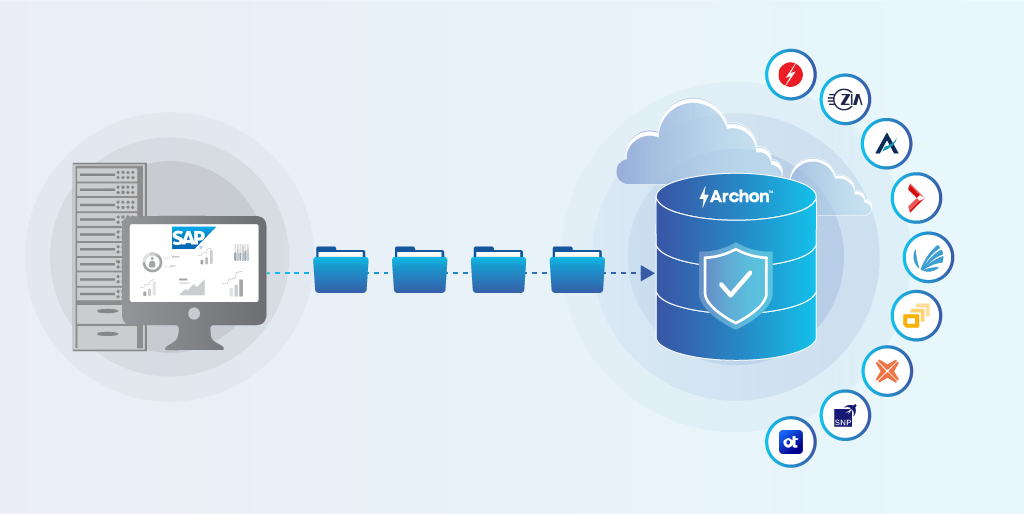
- A structured workflow – extract, map, store, index, and access ensures usable and compliant archives.
- Common drivers include S/4HANA migration, HANA optimization, system decommissioning, and compliance needs.
- Modern archiving must support governance, cross-system data access, and long-term retention.
Ever felt your SAP system slow down under growing data weight? Volumes surge, everyday tasks take longer, costs rise, and upgrades lose momentum. You are at a crossroads – ignore the data bloat or move historical data to an external archive?
SAP archiving allows organizations to move infrequently accessed cold data out of the SAP database into a dedicated archive repository. The operational system remains lean and efficient, while historical records remain preserved dedicatedly for audits, regulatory compliance, and business reference.
If you’re evaluating SAP data archiving solutions, know this: the right choice turns historical data from a burden into a governed, usable asset.
This guide will help you choose the right solution that impacts cost, compliance, and helps safely retire legacy systems.
What is SAP Data Archiving Workflow?
A typical SAP archiving workflow involves several steps.
Extracting SAP Data and Business Objects: Data is extracted from SAP tables while preserving business object relationships.
For example:
Sales Order → Delivery → Invoice
Purchase Order → Goods Receipt → Invoice
Mapping Data Relationships: SAP data rarely exists in isolation. A single business transaction may span dozens of tables. Archiving platforms must preserve these relationships to ensure historical data remains meaningful.
Storing Data in an External Repository: The extracted data is stored in a dedicated archive repository optimized for long-term retention. This repository typically uses compressed storage formats and scalable storage systems.
Creating Indexed Metadata: To ensure fast retrieval, archived data is indexed using metadata like Document numbers, Customer IDs, etc.
Providing Access Through Portals or APIs: Users, auditors, and analysts must still access archived records.
Applying Compliance and Retention Controls: Retention policies determine how long data must be preserved and when it can be securely deleted.
Common SAP Archiving Scenarios
Organizations archive SAP data for a variety of operational and strategic reasons.
Preparation for SAP S/4HANA Migration
One of the most common drivers for archiving at this moment is preparation for SAP S/4HANA modernization. Before migrating to S/4HANA, companies often archive historical data to reduce the size of the system being migrated.
Read more: SAP S/4HANA migration strategies explained (Greenfield, Brownfield, Bluefield)
HANA Memory Optimization
SAP HANA stores data in memory, which makes storage efficiency critical. Archiving reduces the memory footprint and ensures that only active transactional data remains in the HANA environment.
SAP System Decommissioning
After a migration or system replacement, organizations often retire legacy SAP systems. Archiving ensures historical data remains accessible even after the original system is shut down.
End-of-Year Financial Processing
Archiving historical financial records helps maintain system performance during year-end processing cycles.
Data Privacy Regulations
Regulations such as GDPR & DPDPA require organizations to control how personal data is stored and retained. Data archiving solutions help enforce retention policies and secure sensitive records.
Managing Large Technical Tables
Certain SAP technical tables grow rapidly and can impact performance. Archiving helps reduce their size while preserving historical information.
Typical SAP Archival Strategy
During SAP modernization or legacy system retirement, companies usually follow a structured archiving strategy. First, inactive transactional data is archived from the legacy system. Then, active operational data is migrated to the new environment.
Historical records are stored in long-term repositories such as:
- SAP ILM archives
- Enterprise archiving platforms
- Data lakes for analytics
- Cloud object storage environments
This approach significantly reduces migration complexity.
Instead of transferring decades of historical data into the new system, organizations move only the data that is still operationally relevant.
Features to Consider While Choosing SAP Archiving Solution
SAP environments are evolving rapidly. Organizations are moving to cloud platforms, modern analytics environments, and new enterprise applications.
Modern SAP archiving platforms must enable enterprise data governance, long-term data retention, accessibility, cross-system data consolidation, and safe retirement of legacy systems.
Also, make sure the archiving platform has the following features that meet modern demands:
- SAP Business Object Integrity
- Data discovery and pre-archive analysis
- Independent archive repository
- Cross-platform data archiving
- Data access and search capabilities
- Compliance and retention management
- SAP system decommissioning support
- Scalable Storage Architecture

With various SAP archiving solutions on the market, you need to carefully evaluate options to choose one that fits your business needs.
8 Best SAP Archiving Solutions
Looking for the right SAP archiving solution to support your data growth and system modernization? Here’s a curated list of the top SAP archiving solutions, evaluated on expert insights and real-world use cases.
1. Archon Data Store
Archon is a modern enterprise archiving and application retirement platform designed specifically to support large-scale system decommissioning and long-term data preservation.
Archon Data Store is an independent archive repository capable of storing data from SAP and other enterprise systems.
ADS is a core product of Archon, combining Archon ETL and Archon Analyzer to enable streamlined data extraction, transformation, and analysis.
Archon’s key capabilities:
- Supports mergers, acquisitions, and divestitures involving SAP systems.
- Retires legacy SAP systems by extracting and preserving all historical business data in a secure archive.
- Uses a custom program to archive the complex ADK files.
- Understands SAP business objects and preserves relationships across multiple tables during the archiving process.
- Stores archived data in a dedicated repository (ADS) built for long-term retention and regulatory compliance.
- Provides built-in controls for data retention policies – secure access controls, audit trails, and regulatory compliance.
- Supports archiving data from multiple enterprise applications, allowing organizations to create a unified historical data repository.
- Offers defensible data deletion with RBAC, supporting legal holds and future compliance needs.
These capabilities make it particularly effective for organizations looking to retire legacy SAP environments while preserving business-critical historical records.
Strengths
- Archon acts as an independent repository without SAP system dependency.
- Archon preserves SAP business object relationships, ensuring that historical transactions remain meaningful and accessible.
- Organizations can archive data from SAP, databases, and other enterprise applications into a single repository.
- Enables full SAP system retirement and helps eliminate the need to maintain expensive legacy infrastructure.
2. Auritas
Auritas is a consulting firm specializing in SAP data volume management and archiving strategy development. The company primarily provides advisory services, helping organizations plan and implement SAP archiving initiatives.
Features
- SAP data volume management consulting
- SAP archiving strategy advisory services
- SAP data lifecycle planning and governance
- SAP system cleanup before upgrades or migrations
- Implementation services for SAP archiving initiatives
Strengths
- Expertise in SAP data volume management
- Consulting-led approach for SAP archiving strategy
- Experience supporting SAP landscape optimization projects
- Effective for organizations needing guidance on SAP archiving planning
Limitations
- Primarily a services-led consulting model rather than a software platform
- No independent enterprise archive repository
- Limited capabilities for cross-application data archiving
- Does not provide a unified archive platform for long-term system retirement
While Auritas brings SAP consulting expertise, its offerings are largely service-driven rather than a standalone enterprise archive platform.
3. Archiving by Zia
Rocket Archiving combines Rocket Software archiving technology with SAP implementation and managed services delivered by Zia Consulting. The solution focuses on SAP data and document archiving, helping organizations manage database growth and improve system performance.
- SAP data and document archiving capabilities
- Integration with SAP ArchiveLink and SAP Information Lifecycle Management (ILM)
- Content capture and document management integration
- Managed SAP archiving services delivered by Zia Consulting
- External repository for archived SAP documents
Strengths
- Combines Rocket Software archiving technology with SAP implementation expertise from Zia
- SAP document and content archiving
- Managed services and cloud deployment options
Limitations
- Focuses primarily on document and content archiving rather than full SAP application retirement
- Relies heavily on SAP archiving frameworks
- Limited capabilities for enterprise-wide data consolidation across applications
- Less suited for large-scale legacy system decommissioning initiatives
4. TJC Group
TJC Group specializes in compliance-driven data retention, helping organizations align archiving practices with regulations like GDPR and tax laws. Their solutions extend beyond archiving to include legacy system decommissioning and secure data access, ensuring long-term usability of archived SAP data. Their SAP data archiving initiatives include:
- SAP data archiving solutions
- SAP Information Lifecycle Management (ILM) implementation
- SAP data volume management tools
- SAP housekeeping and system optimization services
Strengths
- Specialization in SAP environments
- Expertise in SAP ILM and archiving frameworks
- Effective for SAP performance optimization initiatives
Limitations
- Focuses primarily on SAP system optimization rather than enterprise archiving
- Limited independent archive repository capabilities
- Less support for archiving data from multiple enterprise applications
- Limited focus on long-term legacy system retirement
5. OpenText Core Archive for SAP
OpenText Core Archive for SAP is typically deployed in a cloud environment, allowing organizations to store archived data without maintaining additional on-premises infrastructure.
Its key features include:
- SAP document archiving capabilities
- Integration with SAP ArchiveLink and SAP ILM
- Enterprise content management and governance
- Secure document storage and retrieval
Strengths
- Integration with SAP ecosystems
- Enterprise content management capabilities
- Supports compliance and document retention policies
Limitations
- Primarily focused on document and content archiving rather than structured SAP data archiving
- Often requires broader OpenText ECM stack deployment
- Complex implementation and higher cost for large environments
- Limited support for enterprise-wide application retirement
- Implementation complexity for large enterprise environments
- Often requires professional services for deployment and customization
6. DataNovata
DataNovata is a multi-platform data archiving and legacy application access platform designed to help organizations preserve and access historical data after legacy systems are retired.
Key capabilities of DataNovata include:
- Web-based interface for accessing archived data
- Schema-aware representation of database relationships
- Federated search across multiple archived databases
- Role-based access and security controls
- Configurable data retention and compliance policies
- Support for multiple relational database systems via standard connectors
Strengths
- Focused on legacy system retirement use cases
- Enables access to historical data after system shutdown
- Provides reporting and query capabilities on archived datasets
Limitations
- Smaller ecosystem and market presence
- Limited enterprise-scale archive architecture compared to larger platforms
- Less specialization in SAP-specific data extraction and business object preservation
7. SNP Group
At the core of SNP’s offering is its transformation platform (such as Kyano and earlier platforms like CrystalBridge), which integrates capabilities for data analysis, migration, restructuring, and lifecycle management across SAP systems.
Organizations typically use SNP solutions for scenarios such as:
- SAP S/4HANA migrations and conversions
- SAP landscape transformations and consolidations
- Mergers, acquisitions, and divestitures involving SAP systems
- Data restructuring and selective migration strategies
- Optimization of SAP environments before modernization
Strengths
- Expertise in SAP transformation and migration initiatives
- Advanced tools for SAP landscape restructuring
- Widely used during large SAP modernization projects
Limitations
- Primary focus is SAP migration rather than long-term archiving
- Limited dedicated archive repository
- Not designed as a long-term enterprise archive platform
8. PBS Software
PBS Software is a specialized provider of SAP add-on solutions focused on data archiving, data extraction, nearline storage, and legacy system decommissioning.
Key features include:
- SAP archive access tools
- Nearline storage integration
- SAP ILM integration
- Reporting and analytics on archived SAP data
Strengths
- Enables reporting on archived SAP datasets
- Integration with SAP archiving frameworks
Limitations
- Archive remains tightly coupled with SAP systems
- Limited support for cross-platform archiving
- Does not provide a fully independent enterprise archive repository
The comparison below is based on commonly observed capabilities across enterprise implementations:
| Feature / Capability | Archon | Auritas | Rocket (Zia) | TJC Group | OpenText | DataNovata | SNP Group | PBS Software |
|---|---|---|---|---|---|---|---|---|
| SAP Application Decommissioning | ✅ | ❌ | ❌ | ❌ | ❌ | ✅ | ❌ | ❌ |
| Unified Archive Repository | ✅ | ❌ | ✅ | ❌ | ✅ | ❌ | ❌ | ❌ |
| SAP Business Object Relationship Preservation | ✅ | ✅ | ❌ | ✅ | ✅ | ✅ | ✅ | ✅ |
| Structured + Unstructured Data Support | ✅ | ❌ | ✅ | ❌ | ✅ | ❌ | ❌ | ❌ |
| Pre-built Data Access UI | ✅ | ❌ | ✅ | ❌ | ❌ | ✅ | ❌ | ❌ |
| Data Discovery & Analysis Before Archiving | ✅ | ❌ | ❌ | ❌ | ❌ | ❌ | ❌ | ❌ |
| Legacy System Retirement | ✅ | ❌ | ❌ | ❌ | ❌ | ✅ | ❌ | ❌ |
| Cloud / Hybrid Deployment | ✅ | ❌ | ❌ | ❌ | ✅ | ❌ | ❌ | ❌ |
| Compliance-Ready Retention | ✅ | ✅ | ✅ | ✅ | ✅ | ✅ | ✅ | ✅ |
| Test Data Management & Subsetting | ❌ | ❌ | ❌ | ✅ | ❌ | ❌ | ❌ | ❌ |
| Data Masking & Anonymization | ❌ | ❌ | ❌ | ❌ / Partial | ❌ | ❌ | ❌ | ❌ |
How to Choose the Best SAP Archiving Solution
Choosing the right SAP archiving solution starts with understanding your specific use case. Once the cases are identified, you need to ask the right questions to align the solution with your current priorities and long-term data strategy.
- Require SAP performance improvement alone?
→ Basic SAP archiving tools focused on data volume reduction may be enough - Planning S/4HANA migration?
→ Look for pre-archiving and data reduction capabilities to optimize your HANA footprint - Planning SAP system decommissioning?
→ Choose an independent archive to retain access to historical data beyond SAP
By now, you should have a clear sense of what fits your business needs. If your SAP strategy involves modernization, cost optimization, or system retirement, it’s worth evaluating how Archon aligns with these goals.
Why is Archon the Best Over the Rest?
If your enterprise is looking to reduce the size of its SAP systems, optimize infrastructure costs, and safely retire legacy environments, Archon could be your first choice.
Archon’s different archiving solutions address different aspects of the SAP data lifecycle:
Decommissioning SAP systems? Archon enables archive-led retirement while preserving historical records.
Planning SAP migration or HANA optimization? Archon provides a future-ready SAP archiving platform.
Facing challenges with ADK file conversion and migration? Archon converts and moves ADK data into a fully readable archive.
Preserving SAP business relationships? Archon maintains a full SAP business-object context.
Access after system shutdown? Archon provides an independent, searchable archive.
Need scalable long-term retention? Archon supports secure, compliance-ready storage.
Ensuring defensible data deletion? Archon enforces policy-driven retention and deletion, helping you confidently remove data when it’s no longer required.
Archon Data Store provides a complete enterprise archiving platform designed for SAP data preservation, legacy system retirement, and cross-application data consolidation.
If you’re planning an SAP migration, optimizing HANA memory, or preparing to retire legacy SAP systems, see how Archon Data Store can power your SAP data archiving strategy. Tell us your challenges


