

Key Points
- Modern data archiving must handle both structured and unstructured data across multiple sources.
- Scalability and storage optimization (deduplication, tiering, compression) in data archiving software directly impact cost efficiency.
- By 2026, organizations prioritize intelligent, scalable archiving systems with automated compliance and fast search due to rising data volumes, stricter regulations, and the need for instant, audit-ready access.
- Compliance, legal holds, security, retention control, scalability, and advanced search are non-negotiable features for good archiving software.
- Flexible deployment across cloud, on-prem, and hybrid environments is essential for an archiving tool to meet diverse business and compliance requirements.
- Archon Data Store stands out by unifying all data into a metadata-driven platform that simplifies compliance and reduces costs.
Ever thought of this? At the end of the quarter, you are required to access financial emails and reports from five years for an audit request. You log in to the system only to realize that some critical files are buried in old drives and scattered across cloud systems. Some needs deletion while some needs archiving under a secured platform.
Your compliance team panics until they realize reliable data archiving solution could have made it better and will get them out of penalties.
The GDPR specifies that violations of its fundamental principles, including data retention and deletion regulations, may lead to penalties of up to €20 million or 4% of a company’s total global revenue, whichever amount is greater.
Surprisingly, research shows that only one-third of enterprise data is ever utilized, leaving about 68% of business data unused.
As an organization, paying high penalties may ruin a company’s reputation and may cost as high as the pay of several workers. As we approach 2026, storing data from the past and complying with data regulations are crucial. Piled up records, multimedia files, documents, sensitive information – how are we going to archive them to make it future-ready?
Without the right tools to store, organize, and retrieve this data, essential information can get buried, hard to access, or even vulnerable to security threats. Think of retrieving your data from the server like content loading in an old browser. This is where data archiving software can make a significant impact.
If you are a CIO looking to archive your valuable customer information or sensitive data, what features would you expect from an archiving platform? Data archiving solutions are evolving in the market. AI and cloud solutions keep transforming the industry.
In 2026, organizations are prioritizing intelligent data archiving solutions that not only securely store vast amounts of information but also offer quick and precise search capabilities. Organizations are focusing on scalable systems that can grow with their data needs, along with automated compliance checks that ensure adherence to regulatory requirements effortlessly.
What is Data Archiving Software?
As digital data grows, the management of large quantities of data has become a crucial responsibility for businesses, organizations, and individuals alike.
The demand for effective systems for data storage and retrieval is more vital where terabytes of data is handled.
Data archiving software is a secure storage system, created for long-term data retention, organization, and management of data.
Data archiving software goes beyond being merely a data storage option. Data archival software offers a structured approach for archiving data that is organized, secure, and easily accessible.
If you are looking to protect your confidential information, adhere to regulations, or wish to streamline their digital environments, data archival is the only sustainable solution. Effective archiving software delivers efficient workflows, enhanced data accessibility, and strong security measures.
What to look for in a Data Archiving Software in 2026
Choosing the right data archiving software isn’t just a “nice to have” anymore. It’s critical for compliance, security, and keeping costs under control. While considering Data Archiving Software for a business, there are certain key features and capabilities that need to be looked for. Let’s explore what are the features to consider and why it matters:
Compliance and Legal Hold
The foremost criteria are data regulations such as GDPR, HIPAA, DPDPA, and local privacy laws that demand data retention and audit readiness. Legal holds prohibit the premature deletion of essential data.
Security and Integrity
Archived data must be secured with encryption even during transit. The data stored must be tamper-resistant with thorough integrity checks.
Data Retention and Deletion Policies
Not all data is equally treated as critical. It is essential to have full control over the retention period of each data category across the organization. Defensible disposition of eligible data is required to support audit trails.
Scalability and Cost Efficiency
Data keeps growing. Archiving systems must scale both storage & performance, optimize storage such as deduplication, compression, tiering, and avoid hidden costs.
Search and Retrieval
Data Archiving is not just storing data. All the structural implementation is for timely retrieval of data. That involves metadata indexing and advanced search capabilities to quickly locate archived data using criteria like dates, names, and content, making it accessible for compliance, legal, and operational needs.
Handle Structured and Unstructured Data
A data archiving software should be capable of supporting both structured and unstructured data. The system should handle all forms of data – emails, chats, databases, system logs, and multimedia files.
Cloud / Hybrid / On-Prem Options
The best archiving solutions must provide storage options based on business cases – cloud, on-premises or hybrid. On-premises storage archives data within organization’s data centers and hybrid storage which combines both the worlds (cloud and on-prem). The hybrid mode is vital where businesses require different storage mediums for varied data purposes.
Integration & Connectivity
Must provide integration capabilities with email platforms, collaborative tools, messaging systems, file servers, cloud storage, and more. Additionally, APIs must be made available for data ingestion, exporting, auditing, and other functions
Metadata & Classification / Machine Learning
Good archiving software facilitates search capabilities, retention, and regulatory compliance. Automatic identification of sensitive information (such as PII and regulated materials) and meta-tagging reduce the need for manual intervention.
Durability & Redundancy
After archival that data must survive despite hardware failures, disasters, and other issues. Techniques such as geo-replication, versioning, and immutable storage (WORM) are utilized.
Usability & Manageability
Effective data management involves defining admin and user roles, creating dashboards, and maintaining auditing logs. Ease of setup, migration from legacy archives, are major factors as poor usability is often a hidden cost.

10 Data Archiving Solutions & Software
Are you looking for the best archiving software to help scale your business? Here is a curation of the 10 best archiving software based on expert reviews and customer feedback to choose the perfect software that matches your business requirements.
| Software | Key Features | Best For | Deployment |
|---|---|---|---|
| Archon Data Store (ADS) | Metadata-driven data management, regulatory compliance (GDPR, PDPA), intelligent storage tiering, secure cross-repository querying, hybrid data governance | Large enterprises managing structured, unstructured & semi-structured data | Cloud / On-prem / Hybrid |
| Google Vault | Retains and searches Gmail, Drive, Chat, and Meet data; custom retention rules; legal holds; audit logs | Businesses using Google Workspace or Microsoft 365 | Cloud |
| Veritas Enterprise Vault | Email, file, and SharePoint archiving; advanced eDiscovery; automated retention; ML-based classification | Enterprises requiring strong compliance & legal hold | Cloud / On-prem / Hybrid |
| Mimecast Cloud Archive | Centralized cloud storage for emails & files; eDiscovery; litigation support; 100% SLA availability | Email-heavy organizations seeking reliable, searchable archives | Cloud |
| Barracuda Message Archiver | eDiscovery, encryption, retention automation; full-text search; Microsoft 365 backup | Mid-sized companies prioritizing compliance and email retention | Cloud / On-prem |
| Jatheon Archiving Suite | Multi-source data capture (email, social, mobile, chat); on-site hardware; encryption; legal hold | Enterprises preferring on-prem compliance with full control | Cloud / On-prem |
| Archive360 | Cloud-native Azure archiving; data migration; built-in compliance & legal hold; metadata classification | Enterprises migrating legacy archives securely to Azure | Cloud |
| Dell Data Protection Suite | Archives emails/files/SharePoint; deduplication; indexing; legal hold; eDiscovery | Enterprises managing inactive data & reclaiming storage | On-prem / Hybrid |
| Proofpoint Enterprise Archive | Cloud-based email/social archiving; policy-based retention; eDiscovery; customer-controlled keys | Large enterprises with complex compliance requirements | Cloud |
| MessageSolution | AI-powered compliance; unified archiving (email, Teams, Slack, Zoom); sentiment search; legal hold | Organizations managing large-scale, multi-channel communication data | Cloud / On-prem / Hybrid |
1. Archon Data Store
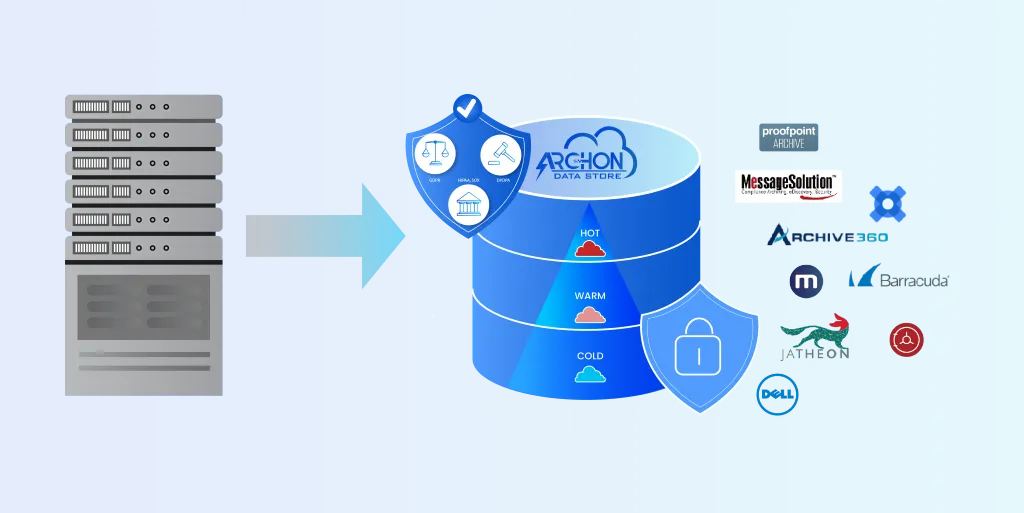
Archon Data Store (ADS) is a smart archiving solution specifically designed for the archiving and management of various data types within a single integrated platform. This robust, compliance-focused platform allows organizations to adhere to international regulatory standards while ensuring quick, cost-effective, and secure access to data. It has proven expertise in decommissioning and retiring applications and offers adaptable deployment options (cloud, on-premises, and hybrid) based on business needs.
Features of Archon Data Store
- Metadata-powered data management system
- Compliant with data protection regulations like PDPA and GDPR
- Archives all types of data – structured, unstructured, and semi-structured
- Secured storage with cross-repository querying across different data types
- Deploys data governance through metadata for managing access, data retention, holds, and privacy
- Establishes data marts within the Data Lakehouse for analytics
- Implements tokenization to protect archived data in the secure data bunker
- Intelligent Storage Tiering by moving data across storage tiers based on usage or age
- Optimizes storage costs and performance with quick deployment options and SAAS offering for quick setup
- Offers On-premises deployment and hybrid deployment models
- Facilitates robust data discovery and helps access data through SQL queries
- Features intuitive search interfaces with APIs for external data retrieval and asynchronous access to data
- 200+ pre-built source connectors to pull data from legacy systems
Benefits:
- Combines the strengths of data warehouses and data lakes to a single platform eliminating siloes, streamlines data engineering and machine learning workflows
- Uses metadata centralization for easy eDiscovery
- Readily scalable with optimized Cloud computing storage and distributed computing
- Efficient data governance and security for systematic operations and faster innovation
- One consolidated platform to analyze and archive data, strengthening operational efficiency and cost reduction
- Tiered storage to manage multiple data types and large volumes for a cost-effective solution for storing and retrieving
2. Google Vault
Google Vault is an eDiscovery and information governance tool for Google Workspace, designed for retaining, searching, and exporting data for compliance and legal purposes. Google Vault is a perfect solution for enterprises that use Google Workspace or Microsoft, for these are easily compatible with Google Vault.
Features
- Archives Gmail, Google Drive files, Google Meet recordings, Google Chat messages, and other Workspace data
- Advanced search across emails, chats, and files using keywords, date ranges, and other filters
- Preserves data even after users delete their account content
- Define custom retention rules for emails and files
- Automatically retains or deletes data according to organizational policies or compliance requirements
Benefits
- Retains and searches large volumes of data for legal investigations and compliance
- Track actions taken in Vault, including searches, exports, and policy changes
- Place accounts or specific data on hold to prevent deletion during litigation or investigations
- Built-in audit logs help track user activity within Vault, providing a record of actions taken
- Support for Google Workspace Data preserving data from key services like Gmail, Google Chat and Google Drive
3. Veritas Enterprise Vault
Veritas Enterprise Vault is an Enterprise-grade archiving solution for emails, files, SharePoint, and collaboration tools. It offers compliance, eDiscovery, and retention management post-archiving. Conveniently supports on-premises, cloud, and hybrid deployments for data archiving.
Features
- Mainly for email, file, and SharePoint archiving
- Automated data retention and deletion policies
- Advanced eDiscovery and legal hold capabilities
- Compliance and regulatory support
- Scalable storage management
Benefits
- Rich in data-source support
- Modern classification and ML policies
- Flexible deployment
- Strong retention, legal hold, and compliance features
4. Mimecast Cloud Archive
Mimecast transitions data to the cloud with a centralized, secure repository for emails, files, and other types of content. Mimecast Cloud Archive has set the benchmark for archiving enterprise information, ensuring business information is safe, accessible, preserved, and safeguarded while simplifying data management.
Features
- Eliminates email storage complexity
- Simplifies data retention
- Redundancy via geographically dispersed data centers
Benefits
- Protect intellectual property with a secure, trusted cloud platform
- Ensure reliability with 100% availability SLA and regional storage
- Enhance user experience with fast search and retrieval on any device
- Stay compliant with built-in eDiscovery and litigation support.
5. Barracuda Message Archiver
A simple archiving platform designed for compliance and storage optimization. Barracuda offers eDiscovery, encryption, and retention policies and can be deployed on-premises or in the cloud.
Features
- Cloud-to-cloud backup & recovery for Microsoft 365 (Exchange, Teams, OneDrive, SharePoint)
- Cloud archiving: indexed, immutable store with granular retention, legal hold, export, and full search & eDiscovery
- Scans OneDrive and SharePoint for sensitive or malicious content, supports custom classifiers, and reporting
- Centralized cloud-based management via the Barracuda Cloud Control portal
Benefits
- Cloud storage for secure, long-term and email storage reducing on-premises infrastructure needs and associated costs
- Enhanced user productivity offering mobile and desktop access to archived emails
- Advanced Search Capabilities including Boolean queries, to facilitate quick and accurate retrieval of archived emails
- Compliance and eDiscovery Support
- Easily integrable with all email platforms
Streamline your data, cut costs, and stay compliant
6. Jatheon Archiving Suite
Jatheon Archiving Suite is a customizable, on-site data archiving software featuring enterprise-level hardware. It preserves email, social media, mobile, and chat communications. Provides comprehensive data compliance and e-discovery solution available within your premises.
Features
- Multi-source data capture that archives diverse forms of data
- Flexible deployment options (cloud and on-premises)
- Data security and encryption
- Facilitates legal processes with features like legal hold and audit trails
Benefits
- User-Friendly Interface to minimize the learning curve for administrators and users
- Straightforward setup and smooth onboarding
- Comprehensive archiving supporting a variety of data types like email, social media, and mobile communications
7. Archive360
Archive360 is a cloud-native archiving and data management platform focused on secure data migration, compliance, and governance. Archive360 enables enterprises to store, retrieve, and analyze large volumes of structured and unstructured data, especially in Azure environments.
Features
- Migrates legacy archives and on-prem data to the cloud with full chain-of-custody
- Cloud-native, Azure-optimized platform with tiered storage and no vendor lock-in
- Built-in compliance, retention, legal hold, and governance tools
- Advanced search, indexing, and eDiscovery across multiple data sources
- Automated data classification with metadata, audit trails, and reporting
- Strong security with encryption, role-based access, region choice, and immutable storage
Benefits
- Scalable and Flexible to handle large volumes of data
- Migrates legacy archives with minimal disruption
- Archives data in native format, supports customer-managed keys & tenant control
- Reduces on-prem infrastructure and allows cloud storage handle cold data
Read More: Archive360 competitors and alternative archiving solutions
8. Dell Data Protection Suite
Dell Data Protection Suite for Archive is a purpose-built archiving & eDiscovery solution designed to help organizations reclaim primary storage space, ensure regulatory compliance, and simplify managing inactive data from multiple sources like email, files, and SharePoint.
Features
- Archives emails, files, SharePoint, databases, and other structured/unstructured data
- Uses SourceOne tools for capture, indexing, and storage management
- eDiscovery and legal hold with Discovery Manager and Email Supervisor
- Cloud/hybrid storage with deduplication and tiered cost savings
- Search, retrieval, and management across on-prem, virtual, and cloud environments
Benefits
- Frees up expensive primary storage and improves system performance
- Strong compliance and legal hold capabilities
- Flexible deployment options – on-prem, hybrid, and integrates with cloud storage tiers
- Tools for indexing, search, and retention automation
9. Proofpoint Enterprise Archive
Proofpoint Enterprise Archive is a cloud-based solution intended to simplify legal discovery, maintain regulatory compliance, and enable end-user access to information without the complexities of operating an in-house archiving system.
Features
- Data capture and archival of email, social media, collaboration platforms, and SMS for compliance
- High-performance, centralized search capabilities across diverse data sources
- Self-service e-discovery tools, including legal hold and export functionalities
- Policy-based retention and supervision to meet regulatory requirements
- Data security with encryption and customer-controlled keys
Benefits
- Cloud-native architecture reduces the need for on-premises infrastructure
- Scalable to accommodate growing data volumes in large enterprises
- Intuitive user interface improves usability for legal and compliance teams
- Quick search and retrieval capabilities accelerate e-discovery workflows
- Robust compliance support available across multiple industries
10. MessageSolution
MessageSolution offers a comprehensive archiving and eDiscovery platform designed to streamline compliance, reduce storage costs, and enhance data retrieval across various communication channels.
Features
- AI-powered compliance archiving with intelligent content analysis and sentiment-based search
- Unified archiving for Microsoft Teams, email, SharePoint, file systems, Zoom, Slack, OneDrive, and Google Docs
- High-speed search and retrieval capabilities
- Policy-based retention and legal hold support
Benefits
- Scalable solution suitable for high volumes of data
- Comprehensive compliance support across various industries
- User-friendly interface with web access to archives
- Flexible deployment models – on-premises, cloud, and hybrid
- Advanced eDiscovery tools facilitate legal holds and data export
How to choose a data archiving solution for your business
Choosing the right archiving tool is about efficiency, compliance, security and scalability beyond just storing data. The ideal archival solution for your business must unify all data types, removing the data siloes that slow down system performance.
Consider the archiving solution that best solves your data storage problems and your business priorities.
- Does high data volume slow down your system’s performance?
- Does siloed and unorganized data interrupt your business operations?
- Are you stuck with high storage costs due to redundant data?
By archiving your organization’s data, you are not just optimizing them, you are making your data compliant-ready, audit-ready and future-proof to meet the modernization demands.
Still reasoning out the best archiving software?
Why Archon Data Store Over Others for Your Data Archive?
As data volumes continue to grow every few years and regulations become more stringent across different regions, organizations can no longer depend on outdated archiving methods. The need to adopt a modernized data archiving approach is no longer an option.
Different needs call for different archiving approaches:
- Need airtight compliance and retention? Go for Archon Data Store or Veritas.
- Rely on cloud-first operations? Microsoft 365 and Archon Data Store have you covered.
- Trapped in unstructured data? Archon Data Store and Veritas make retrieval effortless.
- Watching your budget? Message Solution and Archon Data Store bring value without compromise.
By now, it’s clear that Archon Data Store consistently checks every box, offering a full-stack, intelligent archiving experience built for performance, compliance, and scalability.
Your next steps? Get in touch with our growth partner to turn your inactive data into a strategic asset with effortless archiving.


