


TL;DR
Data ingestion is the process of collecting data from legacy systems and loading it into an archive while preserving its accuracy, context, relationships, and auditability.
In legacy system archiving, ingestion becomes the hardest and most critical step because older systems contain decades of schema drift, inconsistent metadata, mixed formats, and undocumented business rules; this means the archive is only as trustworthy as the ingestion layer that reconstructs this history.
Traditional ETL tools fail here because they were designed for analytics (where approximations are acceptable), not for compliance, retention, chain-of-custody, or the semantic reconstruction required in decommissioning.
Archon Analyzer, Archon ETL, and Archon Data Store solve this end-to-end ingestion and archiving process by providing prebuilt legacy connectors, governed ingestion pipelines, metadata-driven validation, encryption during ingestion, chain-of-custody enforcement, and an immutable, searchable archive designed specifically for long-term compliance and audit-ready access.
The team thought their SAP archival was on track. In the beginning, it looked clean with connectors running, sample datasets validating, and storage pipelines tested. Everyone assumed the difficult part would be retention rules or S/4HANA alignment.
Then something happened. Ingestion started breaking. Not because the storage failed, not because the archive was misconfigured, but because the data arriving from ECC didn’t match any schema created in the last twenty years.
Forgotten tables. Inconsistent relationships. Payroll records tied to objects that no longer existed. Files that weren’t even files anymore.
Suddenly, the ‘simple archival project’ turned into a scramble: rebuild mappings, reconcile orphaned data, figure out what was trustworthy, and explain to leadership why timelines were delayed.
Here’s the uncomfortable truth: archiving projects rarely fail at the storage layer; they fail at ingestion.
Legacy systems don’t hand over clean, well-behaved data. They hand over decades of formats, customizations, patches, migrations, broken metadata, undocumented relationships, and version drift.
If ingestion is weak, your archive is weak. Period.
And yet… ingestion remains the least planned, least resourced, and most underestimated part of archiving.
This blog will help you understand how ingestion actually works in enterprise archiving, why it breaks, and how modern ingestion engines handle legacy complexity.
What is Data Ingestion?
Data ingestion is the act of pulling data from a source system and loading it into another environment, usually a data store, archive, or analytics platform. That source could be a decades-old legacy system or even a live source system like database, ERP, CRM, mainframe, file share.
Types of Data Ingestion
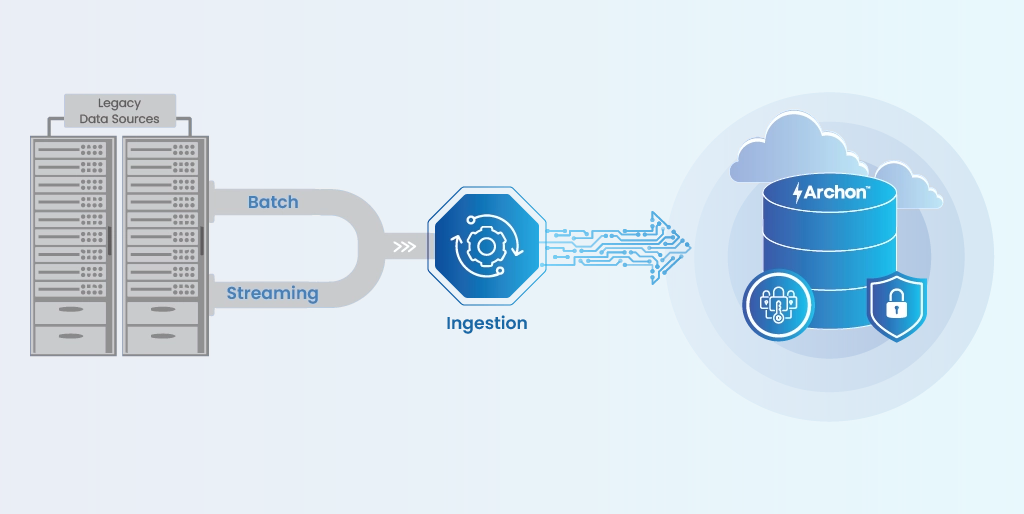
There are three major types of data ingestion: Batch, Streaming, and Hybrid

1. Batch ingestion
Large volumes of data are processed at scheduled intervals.
⭐ Perfect for archiving because legacy systems rarely support real-time extraction.
Examples:
- Pulling 15 years of SAP FI-CO data once a week
- Exporting AS/400 files in nightly chunks
- Migrating JD Edwards tables in batches
2. Streaming ingestion
Data flows continuously, in real time.
⭐ Useful when you need to capture new transactions as they happen.
Examples:
- CDC (Change Data Capture) from Oracle
- Capturing updates from PeopleSoft payroll
- Logs, events, IoT streams
3. Hybrid ingestion
Most enterprises end up here. Historical data comes in batches, while new data streams in parallel.
⭐ Hybrid delivers the best of both: large-scale movement + real-time freshness.
Examples:
- Archive 20 years of SAP data in bulk
- Simultaneously stream new S/4HANA transactions to keep the archive up to date
See how Archon handles Legacy Ingestion!
Where Does Ingestion Pull Data From? (Real Enterprise Sources)
If your environment is more than a few years old, data ingestion almost never comes from one clean database. It comes from a mix of structured, semi-structured, and unstructured sources spread across multiple platforms scattered across multiple systems, formats, and repositories. You’re pulling from:
Structured sources
- Oracle, SQL Server, DB2, Postgres
- SAP tables
- JD Edwards / PeopleSoft / Epicor / Infor
- AS/400 files
- Mainframe VSAM datasets
Semi-structured sources
- JSON, XML, Avro
- API exports
- logs and audit trails
Unstructured sources
- PDFs
- file shares
- scanned documents
- SharePoint content
- images, binary objects
- old mainframe report formats (AFP, EBCDIC, flat files, etc.)
Is Data Ingestion the Same as ETL?
Data ingestion and ETL are related, but they serve different purposes in the lifecycle of enterprise data.
Data ingestion is the act of collecting and moving raw data from source systems into a target environment. It focuses on connectivity, extraction, metadata capture, and preserving the original meaning of the data.
ETL (Extract, Transform, Load) is a complete data processing pipeline. It includes extracting data, applying business logic through transformation, and loading it into a structured system such as a warehouse or archive.
In data archiving, ingestion is the foundation. ETL may be used to support validation or compliance rules, but the goal is not to reshape the data. It is to preserve it.
| Category | Data Ingestion | ETL (Extract Transform Load) |
|---|---|---|
| Primary purpose | Move raw data from source to a destination | Reshape data according to business rules before loading |
| Focus | Connectivity, extraction, metadata capture, validation, landing the data | Cleansing, standardization, joining, enrichment |
| Transformations | Minimal; only what is required for integrity and compliance | Extensive; applies business and analytical logic |
| Typical use | Archiving, backups, system retirement, data lake loading | Analytics, reporting, BI, warehousing |
| Risk sensitivity | Very high because it impacts chain of custody, compliance, and historical accuracy | Moderate; focused on data quality and usability |
| Output expectation | Historically accurate, context-preserved records | Optimized datasets for analytics |
| Role in archiving | Foundation step; core requirement | Used selectively to support ingestion rules |
Why Data Ingestion Matters for Legacy System Archiving
Let’s break down why ingestion is the make-or-break layer for every legacy archiving project.
Have a legacy ingestion challenge? Our team has handled everything from AS400 to SAP to Mainframe workloads.
1. Compliance Depends on Preserving Context (Not Just Rows of Data)
Regulations don’t just require data to be stored; they require context, relationships, timestamps, lineage, and metadata to remain intact.
That means ingestion must preserve:
- Referential integrity
- Audit fields (created_by, updated_by, timestamps)
- Retention-relevant metadata
- Object relationships and hierarchies
If any of these drops during ingestion, the archive becomes non-compliant even if the raw data is still ‘present.’
Ingestion = Preserving meaning, not just copying tables
2. eDiscovery Relies on Accurate, Searchable Metadata
Legal teams never search by table name. They look for:
- employees
- contracts
- events
- transactions
- time periods
- cases
If ingestion doesn’t extract and rebuild metadata correctly:
- Legal teams cannot find responsive data
- Search becomes slow or inaccurate
- eDiscovery timelines blow up
- Litigation risk skyrockets
💡 A weak ingestion pipeline → A weak archive → A lost case
3. Auditors Need a Defensible Chain of Custody
In regulated industries, auditability isn’t optional. Auditors expect:
- Proof of completeness
- Proof of accuracy
- Proof of tamper-proof storage
- Lineage of how data moved from system → archive
If ingestion logs are missing or inconsistent, the entire archive loses credibility.
Ingestion must generate:
✅ Extraction logs
✅ Validation checkpoints
✅ Checksum comparisons
✅ Reconciliation reports
✅ Version histories
4. Legal Teams Need Defensible Deletion, not just Data Purging
Retention and legal-hold rules only work when ingestion:
- Classifies data correctly
- Tags records with the right retention periods
- Attaches legal holds without losing context
One misclassified field and retention logic collapses. Bad ingestion leads to poor governance and, eventually, non-compliance with regulations.
5. User Adoption Depends on Clean, Searchable Data
Business users care about one thing: “Can I find the exact record I need, instantly?”
If ingestion fails even slightly, search collapses in painfully visible ways:
- Key fields don’t get indexed correctly
- Lookup values break
- Relationships (employee → records, customer → transactions) get lost
- Metadata arrives incomplete or misaligned
- Dates and identifiers don’t match the source system
- Objects that belong together show up separately
- Search queries return partial or empty results
And when search breaks, retrieval breaks:
- Results take too long
- Filters return irrelevant data
- Business users lose trust immediately
6. Business Outcomes Depend on Ingestion Quality
When ingestion is clean and complete:
- Legacy systems can be decommissioned
- Licenses can be terminated
- Servers can be decommissioned
- Compliance risk drops
- Audits become routine
- Cloud migrations accelerate
Ingestion is the direct lever for cost reduction, compliance, and modernization.
Why Legacy Ingestion is So Much Harder
Most people assume ingestion is “extract the data and load it somewhere else.” That’s true for analytics. But legacy archiving isn’t analytics.
When you ingest from legacy environments, you’re dealing with:
- Schema Evolution Across Time: Enterprise systems undergo multiple upgrades, module extensions, and vendor-driven changes. As a result, schema versions coexist, producing heterogeneous structures within the same application boundary.
- Semantic Drift in Data Fields: Field definitions evolve as business processes change. A single attribute may represent different semantic meanings at different points in the system’s timeline. This temporal semantic drift must be reconstructed during ingestion to preserve historical accuracy.
- Overloaded Data Elements: Legacy architectures often allow fields to serve multiple purposes because early system designs lacked extensibility. This leads to field overloading, where a single column stores unrelated or context-dependent values.
- Custom Extensions Without Formal Documentation: Enterprises commonly introduce custom fields, tables, and logic to meet evolving operational requirements. Over time, documentation becomes incomplete or obsolete. This produces structural opacity, where ingestion must infer relationships that were never formally recorded.
- Divergence Between Logical and Physical Models: Operational constraints, performance tuning, and partial refactors create divergence between declared models and actual storage layouts. Ingestion must reconcile these discrepancies to maintain referential integrity.
- Heterogeneous Encoding and Format Inheritance: Long-lived systems preserve historical encoding standards (EBCDIC, ASCII variations, Unicode migrations). Multi-decade data inherits a layered encoding history, not a unified modern representation.
- Fragmented Object–Document Associations: Document repositories and transactional systems often evolve separately. As a result, attachments and related documents exhibit incomplete linkage metadata, requiring reconstruction during ingestion.
This is why a purpose-built ingestion engine, not a generic ETL tool, is required.
Where Does Data Go? The Archival Ingestion Lifecycle
Archiving legacy systems isn’t about moving tables from Point A to Point B. It’s a controlled lifecycle where every stage protects the original meaning, structure, lineage, and regulatory value of the data.
Skip a step, and you end up with:
- Missing relationships
- Inconsistent metadata
- Unusable historical records
- Search results that never match
- Compliance gaps you can’t defend
- Or even worse — a migration that looks ‘successful’ but cannot pass an audit
Let’s walk through the lifecycle the way it actually works inside an enterprise archive.

Step 1: Source Extraction
Everything begins at the source layer, which is often the most complex.
Legacy systems do not behave consistently. They differ in formats, encodings, metadata quality, and documentation availability. Common extraction sources include:
- Relational databases: Oracle, SQL Server, DB2, Postgres
- ERPs and enterprise suites: SAP, JD Edwards, PeopleSoft
- Mainframes: COBOL, VSAM, DB2
- IBM CMOD, Mobius, AFP reports
- AS/400 and midrange systems
- SharePoint & File Shares: unstructured documents with inconsistent metadata
- Lotus Notes and custom form applications
Extraction captures data and its context: metadata, relationships, timestamps, audit fields, unstructured attachments, and anything required to reconstruct meaning later.
This is the foundation layer and keeps your archive defensible and complete. If relationships or metadata are lost here, they cannot be recovered downstream.
Step 2: Raw Zone
Once extracted, everything lands in the Raw Zone, the most important layer in any archival ingestion architecture.
This zone stores data exactly as it arrived from the source system. It’s intentionally unpolished, a byte-for-byte representation of what existed in the legacy system.
What lands here
- Batch extracts (RDBMS, mainframes, SAP)
- Streaming data (IoT, live transactions, incremental SAP feeds)
- CDC (Change Data Capture) for active system archival
Formats commonly used
- Avro (schema evolution)
- JSON (flexible structure)
- Parquet (column-optimized)
- CSV (legacy systems)
Why keep this messy version? Because if an auditor ever asks, “Prove this wasn’t altered,” this is the layer you fall back on. It acts as the evidence record, the byte-for-byte representation that proves data integrity to auditors, regulators, and legal teams.
Step 3: Clean Zone
Raw data is rarely archive-ready. It often includes inconsistent types, duplicate structures, missing metadata, or system-specific quirks. The Clean Zone fixes that.
Here’s what happens in this layer:
- Data type unification: Dates stored as strings, numbers stored as text, and corrupted encodings are all corrected
- Masking of sensitive data: PII and PHI must be protected before they enter long-term retention
- Column removal: Drop fields that have no compliance or business value
- Metadata alignment: Map business keys, join relationships, and normalize IDs
- Quality checks: Record counts, PK/FK validation, duplicate checks, null scans
- Cleaning is not cosmetic: It’s what makes your archived data compliant, searchable, and legally defensible
This zone transforms raw extracts into consistent, trustworthy, and regulated datasets without altering meaning.
Step 4: Curated Zone (Archive-Ready Structures)
Once cleaned, this is where data becomes optimized for long-term retention, retrieval, and storage efficiency.
Key activities
- Conversion into Parquet for a minimal footprint
- Compression using LZ4, Snappy, Zstd, or GZIP
- Structuring by business domains (Finance, HR, Supply Chain…)
- Optimized file sizes for faster read performance
- Tiering to low-cost storage
At this stage, the dataset becomes significantly lighter, more efficient, and easier to search at scale.
Step 5: Conformed Zone (Searchable, Discoverable, and Retention-Enforced)
- The Raw Zone preserves evidence
- The Clean Zone fixes inconsistencies
- The Curated Zone optimizes for storage
…the Conformed Zone is where the archive becomes usable for real-world queries.
This final stage prepares data for retrieval, eDiscovery, compliance, and analytics. The Conformed Zone is where the archive becomes truly usable.
This layer applies
- Uniform schemas and normalized structures
- Indexing for fast search
- Retention policy enforcement
- Legal hold application
- Chain-of-custody and audit tracking
- Role-based access control
- Versioning and time-based history
This structure ensures that historical data can be queried across systems, even if those systems never shared a schema while they were alive.
In practice, this is what allows organizations to answer audit questions quickly: “Show me all customer records from 2012–2018 across three retired platforms.”
The Conformed Zone makes that possible without reactivating any legacy application.
How Metadata Governs the Entire Ingestion Process
Most teams underestimate metadata. They treat it like a label and something optional; something added later, something that sits quietly in the background. In archival ingestion, metadata isn’t background but the control plane.
Without metadata, ingestion has no rules, no boundaries, no guarantees, and no defensible lineage. With metadata, the entire archival pipeline behaves like an engineered system: predictable, traceable, auditable, and compliant.
Here’s how metadata actually governs the ingestion process end-to-end.
1. Metadata Defines What ‘Valid Data’ Actually Means
Every legacy system comes with its own version of truth: primary keys that don’t align, inconsistent types, corrupted timestamps, orphaned rows, and half-filled attributes.
Metadata is the contract that tells the ingestion engine what should exist, what can be accepted, and what must be rejected.
It enforces:
- Primary key rules: Ensures every record has a unique, valid key before it moves downstream
- Data type validation: Prevents date fields stored as text, integers stored as strings, or corrupted encodings from sneaking into the archive
- Row and count validation: Confirms that what was extracted matches what was loaded, which is essential for audit defensibility.
This is the first line of protection against silent data loss.
2. Metadata Dictates How Sensitive Information Must Be Treated
In compliance-heavy environments, you cannot rely on developers or ETL logic to remember which fields contain PII/PHI.
Metadata makes it explicit. It drives:
- Which fields must be encrypted
- Which values must be masked
- Which attributes require redaction
- How encrypted values can be searched (e.g., equality-only queries)
- Which groups are allowed to view decrypted results
This is how sensitive data remains protected throughout ingestion; not as an afterthought, but as a rule.
3. Metadata Preserves Business Meaning by Capturing Relationships
Legacy systems rarely store relationships cleanly. ERPs use surrogate keys; mainframes rely on positional fields; HR systems use natural keys; and finance systems use composite ones.
Metadata restores order by defining:
- Parent-child relationships
- Cross-table dependencies
- Composite key rules
- Referential integrity expectations
When these rules are applied upstream, your archive retains the same business meaning the original application once held; even years after the system is gone.
4. Metadata Governs Retention, Legal Hold, and Compliance Behavior
In archival environments, ingestion isn’t only about loading data; it’s about shaping how that data will behave for the next 7, 10, or 30+ years.
Metadata maps:
- Retention periods
- Hold statuses
- Archival categories
- Disposition rules
- Exception cases
- Jurisdiction-specific requirements
This ensures that once data enters the archive, it’s already aligned to regulatory expectations without manual intervention.
5. Metadata Controls Chain of Custody and Lineage Tracking
Every ingestion workflow must answer three questions:
- Where did this data come from?
- Has it been altered?
- Can you prove it?
Metadata makes chain of custody possible by defining and generating:
- Hash generation
- Transformation logs
- Timestamping
- User/activity tracking
- Reconciliation reports
This is what turns ingestion from a pipeline into a defensible process.
6. Metadata Manages Unstructured Content the Same Way It Governs Structured Data
Unstructured content, such as PDFs, scanned documents, emails, and reports, is unpredictable. Metadata makes it manageable.
It defines:
- Extraction rules
- Classification logic
- Content type identifiers
- Mapping to business entities
- Required enrichments (e.g., OCR tags, file hashes, MIME types)
This ensures text documents, attachments, line data, and binary artifacts are treated with the same rigor as tabular records.
7. Metadata Enables Consistency Across All Ingestion Zones
Every zone in the ingestion lifecycle (Raw, Clean, Curated, Conformed) behaves according to metadata:

- Raw Zone: schema registration, source mappings, raw-to-clean mapping
- Clean Zone: validation rules, quality thresholds, relationship definitions
- Curated Zone: domain models, compression rules, file partitioning
- Conformed Zone: indexing, search models, retention logic
Metadata is the thread that keeps these layers aligned.
How Archon Analyzer Prepares Legacy Systems for Ingestion
Ingestion doesn’t start with extraction; it starts with understanding what you’re about to ingest. If you begin ingestion without a discovery phase, you’re essentially flying blind. Archon Analyzer establishes the visibility and structure needed to prevent blind ingestion.
Before any data enters a pipeline, Analyzer builds a complete, accurate picture of the legacy ecosystem, like what exists, what matters, what should be archived, and what rules must be applied during ingestion.
Archon Analyzer performs an exhaustive pre-ingestion assessment:
- Automatic Application & Schema Discovery: It identifies all source systems, modules, tables, objects, and relationships across the environment
- Deep Data Profiling: Analyzer inspects row counts, data types, null patterns, duplicates, and anomalies, exposing risks before they corrupt the archive
- Relationship Mapping: It reconstructs referential chains: primary keys, foreign keys, parent–child structures, cross-module dependencies, and broken links
- PII / PHI Detection: Sensitive fields are flagged early, so encryption, masking, and search rules can be applied correctly during ingestion
- Retention Category Recommendations: Analyzer identifies record types that require regulatory retention vs those safe for disposition
- Risk & Complexity Assessment: It surfaces inconsistencies, misaligned schemas, orphaned data, and areas requiring cleansing
- Ingestion Blueprint Creation: Analyzer generates ingestion-ready metadata: entity definitions, business rules, PK/FK expectations, and extract specifications handed directly to ETL
Ready to modernize your data ingestion and unlock compliant archiving? See how Archon works.
How Archon ETL (Data Ingestion Tool) Handles Data Ingestion for Legacy System Archiving
Most ETL tools were built for analytics or cloud pipelines. Legacy archiving is a different game.
Archon ETL is engineered specifically for this challenge. It doesn’t just ‘extract and load ’; it analyzes, reconciles, validates, encrypts, compresses, and prepares data for long-term retention inside a governed archival platform.
Here’s how it works.

1. Smart Extraction with Prebuilt Connectors
In Archon ETL, the ingestion process begins long before any transformation happens. It starts with connecting directly to the systems that created the data, even if those systems are 20+ years old.
Archon ETL includes dozens of prebuilt connectors designed specifically for legacy and enterprise environments:
| Category | Typical Systems | What Makes Them Hard |
|---|---|---|
| Relational Databases (RDBMS) | Oracle, SQL Server, DB2, PostgreSQL, MySQL | Large schemas, legacy data types, broken PK/FK relationships |
| Enterprise ERPs & Business Apps | SAP, JDE, PeopleSoft, T24, Salesforce, Documentum | Complex business logic, custom tables, multi-module dependencies |
| Mainframes & Midrange | IBM Mainframe, VSAM, AS/400 | Cobol copybooks, positional files, EBCDIC encoding |
| Legacy ECM & Report Archives | IBM CMOD, Mobius, FileNet | Mixed formats, AFP/line-data, huge volumes of unstructured reports |
| Collaboration & File-Based Systems | SharePoint, file shares, Lotus Notes | Inconsistent metadata, attachments, and semi-structured objects |
These connectors pull not just data, but relationships, metadata, attachments, and audit trails, all critical for a compliant archive.
2. Automated Workflows for Consistent, Repeatable Ingestion
Archon calls this its Smart ETL™ layer, a workflow engine built for archive-grade ingestion.
It automates:
- Creation of ingestion jobs and entities
- Scheduling and orchestration
- Parallel task execution
- Monitoring and status tracking
- Change data capture (CDC)
- Both real-time and batch ingestion
This turns ingestion into a predictable, traceable, and fully governed process instead of a hand-built pipeline.
3. Parallel Ingestion at Scale
Legacy archives often involve terabytes or petabytes of historical data. Archon ETL uses a distributed compute architecture to handle that load.
Key capabilities:
- Spark-based ingestion
- Horizontal scaling across clusters
- Livy + Yarn job submission
- Distributed worker nodes
- Microservice-driven ingestion components
- Resource-aware parallel pipelines
This design ensures that even the heaviest ingestion jobs run consistently at scale.
4. Chain of Custody and Data Integrity Enforcement
Compliance isn’t optional in archiving, and Archon treats integrity as a first-class requirement. During ingestion, Archon ETL generates:
- Cryptographic hashes
- Detailed logs
- Checksums
- Validated record counts
- PK/FK reconciliation
- Transformation lineage
Every step is auditable.
Every transformation is traceable.
Every dataset can be defended.
5. Encryption During Ingestion
Sensitive data must be encrypted before it enters long-term storage. Archon ETL enforces encryption policies during ingestion, not after.
Supported encryption and security controls:
- AES-256
- Java Cryptography Extension (JCE)
- Key rotation
- Vault / external key management
- Field-level encryption
- Equality-based search on encrypted fields
- Group-based access to decrypted values
This ensures that archived records remain secure while still being searchable.
6. Advanced Compression for Cost-Efficient Storage
Archival datasets are massive. Optimizing footprint without losing fidelity is critical. Archon ETL applies columnar storage formats and modern compression algorithms:
- LZ4 (fastest)
- Snappy (balanced)
- Zstandard (Zstd) (high compression ratio)
- GZIP (traditional)
Combined with Parquet and ORC formats, organizations routinely achieve 60–80% compression on legacy datasets.
How Archon Data Store Converts Ingested Data into a Searchable, Compliant, Immutable Archive
Archon Data Store is the environment that turns ingested data into something that can survive audits, legal scrutiny, and long retention periods while still being fast to search and simple to retrieve.
Here is what ADS actually does with the data that ETL delivers.
1. Immutable Storage
Data is written in a way that prevents alteration. This protects historical accuracy, stops accidental modification, and satisfies audit and regulatory expectations for non-tamperable records. Immutable storage is the foundation that makes archived data defensible.
2. Tenant Separation
Data from different applications, business units, or projects remains fully isolated. This prevents bleed-over, accidental cross-access, and permission conflicts. Tenant separation keeps the archive organized and makes governance simple at scale.
3. Data Access (RBAC) Services
Archon Data Store exposes a structured set of access services that allow business users, auditors, investigators, and compliance teams to retrieve exactly what they need. This avoids direct storage access and ensures every data request follows rules, logs, and permissions.
4. Encryption and Decryption Controls
Sensitive data gets encrypted during ingestion and stays encrypted throughout its lifecycle. Sensitive information remains protected but still searchable for those who have the right to see it.
5. Search Services
Search is where most archives fail. ADS fixes this by indexing the data, aligning metadata, preserving relationships, and keeping file structures intact. Search feels instant, even at scale. Users can find a specific transaction, document, or employee record in seconds without knowing anything about the original system.
6. Compliance Services
Retention, audit, legal hold, and defensible deletion all rely on a consistent set of rules. ADS enforces these rules automatically. This makes the archive compliance-ready from the moment ingestion completes.
Your Archive is Only as Strong as Your Ingestion Layer
A lot of teams treat archiving as a storage problem. It isn’t. Archiving is an ingestion problem because the moment data leaves a legacy system, everything that follows depends on how well that moment was handled.
If the ingestion layer misses relationships, drops metadata, breaks keys, misclassifies PII, or applies the wrong retention rules, no amount of storage, indexing, or analytics can fix it later.
That’s why a strong archive doesn’t start with storage. It starts with a strong ingestion engine.
Archon ETL was built specifically for the challenges legacy systems create, like multi-decade schemas, undocumented relationships, mixed formats, and regulatory expectations that don’t accept shortcuts. Paired with Archon Data Store, it forms an end-to-end archival system designed for one purpose: taking historical enterprise data and preserving it as a searchable, compliant, immutable asset.
Whether you’re decommissioning a single legacy app or modernizing an entire estate, the smartest next step is simple: understand the category, understand the process, and see exactly how ingestion shapes the outcome.
📞 If you want guidance on your legacy ingestion strategy or want to see what flawless ingestion looks like in practice, our team can walk you through it. Talk to an expert!
Frequently Asked Questions
Data ingestion is the process of collecting data from source systems and moving it into a target environment like an archive, warehouse, or data lake. In archiving, the goal is accuracy, context preservation, and metadata integrity.
The three common ingestion approaches are:
- Batch — scheduled bulk loads, ideal for historical data
- Streaming — continuous real-time feeds for live updates
- Hybrid — a mix of both, typically used in legacy system archiving
No. Data ingestion focuses on collecting and loading data while preserving historical accuracy. ETL includes extraction, transformation, and loading for analytics, reporting, and business rules.
In archiving, ingestion includes only minimal transformation. The goal is to preserve meaning, not reshape data. ETL in an archival context usually supports ingestion rather than replacing it.
Common ingestion tools include Apache NiFi, Talend, Informatica, AWS Glue, and Azure Data Factory. These tools work well for analytics and cloud pipelines but are not designed for legacy archiving, regulatory retention, or multi-decade systems.
For archival ingestion, specialized tools are required. Archon ETL is one such tool. It is designed specifically for legacy system retirement and archival ingestion. It handles schema drift, metadata reconstruction, complex relationships, audit logging, encryption, compression, and compliance-aligned ingestion.


