


Key Takeaways
- Application decommissioning shuts down legacy systems while keeping historical data accessible for audits, eDiscovery, and compliance requests.
- Legacy applications consume up to 80% of IT budgets and create the most expensive technical debt in your modernization roadmap.
- Native retention, backups, and cold storage are not archives. They fail audit, evidentiary, and chain-of-custody tests.
- The decommissioning process spans 9 stages, and skipped post-shutdown governance is where most projects fail their next audit.
- SAP ECC, Oracle end-of-life platforms, and mainframe systems dominate enterprise decommissioning queues through 2027.
- Archon Data Store retires applications across 200+ source systems and keeps the data searchable, immutable, and audit-ready.
Legacy systems don’t just sit quietly in the background. They drain IT budgets, expose hidden compliance risks, and slow down every modernization effort your organization makes. The numbers are not unknown to the CIOs and IT leaders: up to 70% of IT budgets are consumed by maintaining legacy applications that no longer support growth.
The risks go deeper than just the cost. These unsupported applications leave compliance gaps, make security incidents harder to contain, and force organizations to keep paying for systems they’d rather move past.
In regulated sectors like healthcare, finance, and manufacturing, the challenge is even sharper: auditors still want access to historical data, even if the application that created it is long past its prime. So, they keep paying millions just to “keep the lights on” in old applications.

This is where application decommissioning and application retirement comes in. It frees organizations from legacy systems while preserving access to historical data for audits, analytics, and governance.
In this guide, we’ll explore the difference between retirement and decommissioning, the step-by-step process, benefits, and real-world examples, so, you can retire outdated systems without losing the data your business still relies on.
Don’t let Legacy Systems become a liability. Decommission them.
What is Application Decommissioning
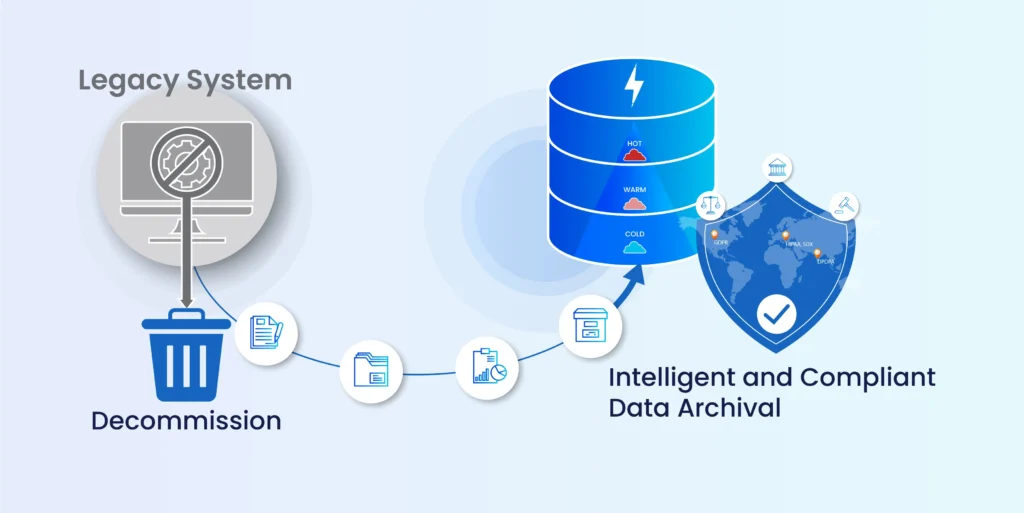
Application decommissioning is the process of shutting down an application while preserving its historical data in a secure, governed archive. This ensures that audits, eDiscovery, and business users can still access what they need, even after the system itself is no longer active.
Examples:
- A hospital decommissions its outdated scheduling system but keeps all appointment history in an archive to meet healthcare regulations.
- A manufacturer retires JD Edwards and archives historical financial data to keep audit trails intact.
- A law firm decommissions Lotus Notes while keeping emails archived for eDiscovery.
- A bank decommissions a legacy loan platform while ensuring auditors can still retrieve 10 years of transaction data.
Application Decommissioning vs Application Retirement vs Sunsetting
Enterprise organizations often use these terms interchangeably, but they represent distinct phases in the application lifecycle with important strategic implications.
Software Sunsetting
It is a planned phase-out or discontinuation of a software product, typically announced with advance notice to users and stakeholders.
Purpose: Strategic business decision to stop selling, developing, or marketing a product while providing transition time
Key Characteristics:
- Advance notification period (typically 6-12 months)
- Migration paths offered to users
- Limited ongoing support during transition
- Often precedes retirement or decommissioning
Application Retirement

The process of ceasing active use of an application while preserving data access for compliance, audit, or business needs.
Purpose: End operational use while maintaining historical data accessibility.
Key Characteristics:
- Read-only access maintained for compliance
- The system moves from productive to non-productive status
- Focus on data preservation and regulatory adherence
Application Decommissioning
The systematic and complete removal of outdated applications from the IT environment while ensuring compliant data archiving.
Purpose: Permanent elimination of system infrastructure with secure data transition.
Key Characteristics:
- All system components removed
- Focus on cost elimination and security enhancement
Comprehensive comparison matrix: Application Retirement vs Decommissioning vs Software Sunsetting
| Phase | What Happens | System Status | Cost Impact |
|---|---|---|---|
| Software Sunsetting | Vendor or IT announces end of life; migration path defined. | Live, supported (limited) | No change yet |
| Application Retirement | Active use stops; read-only access is preserved solely for compliance. | Live, holding pattern | Some reduction; full cost base remains |
| Application Decommissioning | Infrastructure is fully removed, and data is extracted to an independent archive. | Off; data in governed archive | Major reduction; archive cost only |
A practical sequence: a vendor sunsets a platform, the IT team retires it from active use, and the application is then fully decommissioned once historical data is safely archived.
How to Define a Legacy System
Not every old application qualifies as “legacy.” A system becomes legacy when it no longer aligns with the business’s needs, instead creates more risks, and drains resources.
Characteristics of legacy systems:
- Over 10 years old or built on outdated technology stacks
- Developed in obsolete languages like COBOL or Fortran
- Costly and difficult to maintain or evolve
- Missing or unreliable documentation
- Dependent on specialized skill sets that are hard to replace
- Unable to support modern business requirements (e.g., mobile access, cloud integration)
The Drivers Forcing Application Decommissioning Now
For years, “we will decommission it next quarter” was a perfectly acceptable answer. That window has closed. Here are the five forces that make application decommissioning a board-level priority instead of a backlog item.

1. Vendor end-of-life pressure is concentrated and unforgiving
Three of the largest enterprise vendors are forcing simultaneous deadlines:
- SAP ECC mainstream maintenance ends 31 December 2027 for Enhancement Packs 6 to 8. EHP 0 to 5 already ended in December 2025. Extended maintenance is available until 2030 at premium cost, but only for complex customers under specific RISE agreements.
- Oracle’s 2024 to 2026 end-of-life cycle has rolled multiple databases, engineered systems, and acquired applications off Premier and Extended Support, including Database 19c (April 2024), Exadata X7 (June 2024), Essbase 11.12 (December 2024), and dozens of OFS and Utilities releases.
- Mainframe specialist talent is retiring faster than it is being replaced, with COBOL and RPG developers concentrated in cohorts approaching retirement before 2030.
2. M&A consolidation is creating zombie portfolios
Mergers and acquisitions inherit duplicate ERPs, HCM systems, CRMs, and content stores. After integration, many of these become inactive but remain in the IT cost base.
Consolidating overlapping applications post-deal is a fast lever for application portfolio rationalization, but only if the historical data is preserved defensibly.
3. Cloud migration economics do not support lift-and-shift archives
Moving 30 years of transactional data into a cloud-native ERP or data platform inflates migration scope, lengthens timelines, and balloons consumption costs.
Smart cloud strategies decouple historical data from live systems before migration, archiving the inactive 70% so the live workload can move efficiently.
4. Compliance and retention pressure is mounting
GDPR, SOX, HIPAA, DPDPA, eIDAS, and DORA all demand defensible data retention with auditable chain of custody. A live legacy system is a poor evidentiary source: no immutability, weak access controls, and integration debt that makes retrieval slow and unreliable.
5. Security exposure compounds with every quarter the system stays alive
Unsupported software cannot be patched. Legacy systems lack MFA, modern encryption, and compatibility with current detection tools, creating extended exposure windows when breaches occur.
The conclusion is not subtle. Every driver above shares one constraint: your historical data still has to live somewhere defensible.

A strategic guide to retire aging systems without risk. Learn how to reduce technical debt, control costs, and maintain compliance while keeping historical data accessible.
The Business Case for Application Decommissioning
Most decommissioning business cases lose because they are framed as cost optimization. They are not. They are risk-adjusted modernization investments. The numbers only work when you account for what keeping the application alive actually costs over time.
A useful framework: TACO (Total Archive Cost of Ownership). Four cost layers, each easy to underestimate.
Direct costs (the line items everyone sees)
- License fees and vendor maintenance contracts
- Infrastructure: servers, storage, data centre footprint, power, cooling
- DBA and admin hours per month, often masked inside broader IT staff costs
- Backup and DR overhead for systems that no longer create new transactions
Indirect costs (the line items the CFO often misses)
- Audit retrieval time: hours legal and IT spend extracting records for every regulatory request
- Production system performance drag from databases bloated with historical data
- Integration debt: every legacy app exposes APIs that must be maintained for upstream and downstream systems
- Skill scarcity premiums for COBOL, AS/400, older SAP, and similar platforms
Risk-adjusted costs (the line items the auditor cares about)
- Probability-weighted breach exposure on unsupported systems
- Compliance fine exposure for retention failures (GDPR up to 4% of global turnover, HIPAA up to $1.5M per violation per year)
- Litigation cost when chain of custody cannot be demonstrated
- Technical debt drag on M&A integration timelines
Opportunity cost (the line item that decides the strategy)
What is the return on the IT bandwidth currently locked into legacy maintenance?
Industry research consistently shows that legacy maintenance consumes 60 to 80% of IT budgets. Every percentage point reclaimed is direct fuel for AI, cloud, and product modernization initiatives.

Run the numbers before the next audit lands.
The Legacy Application Decommissioning Playbook walks you through the TACO model, retention obligations, and a board-ready business case framework.
The Application Decommissioning Process
Decommissioning is a structured process that ensures data is preserved, compliance is met, and operations continue smoothly.
1. Planning & Assessment
- Inventory candidate applications across the portfolio.
- Conduct business and technical analysis (architecture, dependencies, integrations)
- Map stakeholders (IT, business, compliance, legal) and define responsibilities
- Identify regulatory retention requirements (GDPR, HIPAA, SOX)
- Document cost, security, and operational impacts
2. Dependency Mapping
- Identify databases, downstream systems, reports, and workflows relying on the legacy app
- Plan for continuity to prevent disruption during shutdown
3. Data Classification & Retention
- Categorize data by sensitivity, compliance risk, and business value
- Define what must be retained, archived, or safely purged
- Choose the right archival strategy (active, cold, hybrid)
4. Data Extraction & Archiving
- Implement ETL (Extract, Transform, Load) to migrate data
- Preserve business context with semantic data containers
- Apply security controls: encryption, access management, audit trails
- Configure archival platforms to support long-term compliance and easy retrieval
5. Testing & Validation
- User Acceptance Testing (UAT) with representative data sets
- Verify integrity and accessibility of migrated data
- Test performance of archival queries and reporting
- Confirm compliance with retention rules and audit needs
- Run disaster recovery scenarios
6. User Communication & Change Management
- Notify business users about upcoming changes and archival access
- Provide training on how to retrieve data from the new archive
7. System Shutdown
- Execute a controlled, phased shutdown of the application
- Terminate user access with full audit trail capture
- Remove network connections, decommission associated databases and storage
- Securely dispose of hardware containing sensitive data
8. Documentation & Governance
- Document the process, validation steps, and retention policies applied
- Ensure compliance evidence is available for audits
- Establish ongoing retention schedules and access controls
9. Ongoing Retention & Access Management
- Monitor archival system performance and access requests
- Maintain audit logs, legal holds, and policy updates
- Regularly review archival strategies to align with evolving regulations and business needs
Application Decommissioning Checklist
Print this. Tape it to your project room wall. Five phases. The things you will forget if you do not write them down.
Phase 1: Pre-decommissioning discovery
- Application inventory complete with version, platform, data volume, and active user count
- Dependency map of every upstream and downstream system, integration, and report
- Data classification by sensitivity, retention obligation, and business value
- Regulatory mapping (SOX, GDPR, HIPAA, DPDPA, eIDAS, DORA, sector-specific)
- Cost baseline: license, infrastructure, support hours, audit retrieval cost
Phase 2: Stakeholder and governance setup
- RACI defined across IT, legal, compliance, business, and the application owner
- Executive sponsor confirmed and budget locked
- Retention owner appointed with named authority
- Legal-hold owner appointed with documented escalation path
- Risk register opened and signed by the steering committee
Phase 3: Archival design and validation
- Archive architecture chosen (Lakehouse-based or otherwise) and approved
- Immutability mechanism in place (WORM, append-only logs, hash chaining)
- Search and retrieval interface tested by business users
- Access controls aligned with enterprise IAM
- Retention-rule engine tested for every regulatory obligation in scope
- Disaster recovery and backup tested under load
Phase 4: Cutover and shutdown
- UAT signed off by business, legal, and compliance
- Final extraction reconciled to source (row count, hash, sample queries)
- User access terminated with audit trail
- Infrastructure deprovisioned in defined sequence
- Licenses cancelled after dormancy window
- Communications sent to all retrieval-eligible users with new instructions
Phase 5: Post-decommission governance
- Retention monitoring dashboard live with alerts
- Audit log review scheduled (monthly recommended)
- Quarterly retrieval drills run with the legal team
- Annual retention-rule review against current regulations
- Three-year archive integrity audit calendared
What Most Decommissioning Projects Get Wrong
Five truth bombs that have killed more decommissioning programmes than any technology choice. Read these before you scope your project, not after.

“Native retention is enough”
Native retention controls in D365, Workday, Salesforce, Purview, and similar SaaS platforms manage retention while the application is alive. They do not deliver immutability at ingestion, independent retrieval after the application is retired, cross-application search, or evidentiary chain of custody.
Native retention is a feature inside a live system. An enterprise archive is an independent system that survives the retirement of the original.
“Backups are an archive”
Backups are point-in-time copies designed for restore. Archives are governed, immutable repositories designed for retrieval and evidentiary use.
Backups expire. Archives must demonstrably preserve. Do not confuse the two in front of an auditor.
“Cold storage counts”
S3 Glacier, tape, or “we kept the VM in cold standby” are not defensible archives. Cold storage lacks metadata-driven search, retention orchestration, and access control granularity.
Under SOX, HIPAA, GDPR, or eIDAS scrutiny, cold storage rarely passes.
“An S3 bucket is cheaper than an archive”
S3, Azure Blob, or Google Cloud Storage can store data cheaply. Building a defensible archive on top of them cannot.
A bucket stores files. An archive manages retention policies, enforces legal holds, tracks chain of custody, applies immutability at ingestion, maintains metadata catalogs, orchestrates deletion schedules, and proves to auditors that you can retrieve what you need when you need it.
If you push decommissioned application data into an S3 bucket without retention orchestration, access control, and audit logging, you have created a liability, not an archive. Worse, maintaining that infrastructure requires a dedicated in-house technical team to handle policy enforcement, retrieval workflows, and compliance reporting, which quickly erases any cost advantage the storage layer appeared to offer.
The storage is the cheapest part of archiving. The governance is where the cost lives.
“Database archiving equals application decommissioning”
Database archiving moves rows from a live database to a secondary store. Application decommissioning retires the entire application and preserves data with full business context.If you archive only the database, you still pay for the application stack. The license bill, the integration debt, and the security exposure all remain.
“We will decommission later, after migration”
Migration cost balloons because of carry-over data. Archiving first reduces what migrates by 60 to 80%, shrinks the migration window, and removes the historical-data complexity from cutover.
“Later” is the most expensive word in any modernization roadmap.
Best Application Decommissioning Software (Comparison)
Choosing the right tool is critical to ensure smooth shutdown of legacy applications while maintaining compliant access to historical data.
Here are five of the most recognized solutions in the market:
1. Archon Data Store™ (ADS)
Archon Data Store™ (ADS) is designed specifically for application decommissioning and intelligent data archiving. ADS combines cloud-native scalability, compliance-first design, and multi-platform integration to ensure enterprises can retire legacy systems without losing access to critical business data.
It provides a single, governed archive that works across ERP, CRM, HR, and custom applications, making historical data secure, searchable, and ready for audits or analytics.

Key Benefits:
- Cloud-native architecture for scalable, cost-effective data management
- End-to-end compliance support (GDPR, HIPAA, SOX, regional mandates)
- Multi-platform coverage: SAP, JD Edwards, Lotus Notes, Epicor, PeopleSoft, and more
- AI-powered metadata for fast search and retrieval
- 200+ pre-built connectors for seamless connection with legacy applications
Ready to step up your Decommissioning? See Archon in Action.
2. Proceed Group
Proceed is focused on SAP and ILM environments. It includes pre-defined report sets to support business, audit, and legal requirements, and it provides access to legacy data after system shutdown. Organizations using the tool often adopt it to reduce costs associated with keeping redundant SAP systems online, while supporting broader Information Lifecycle Management objectives around retention, governance, and accessibility.
3. SNP Group – Kyano Datafridge
SNP’s Kyano Datafridge is designed for SAP transformation projects, especially in the context of S/4HANA migrations. It is used in scenarios such as mergers, acquisitions, and system consolidations. The tool provides access to legacy data with audit trails while enabling system retirement.
4. AvenDATA
AvenDATA is used for archiving data from legacy ERP, CRM, and mainframe systems. It includes a retrieval interface that allows users to search across archived data. The company also provides services for handling complex decommissioning projects at scale.
| Vendor | Architecture | Best Fit | Native Immutability | Cross-App Search | Cloud-Native |
|---|---|---|---|---|---|
| Archon Data Store (ADS) | Lakehouse | Multi-platform decom + analytics on archived data | Yes (at ingestion) | Yes | Yes |
| OpenText InfoArchive | Database / content hybrid | Large enterprises with existing OpenText estate | Yes | Limited | Available |
| Solix EDMS | Database-centric | Database archiving + ECC retirement | Yes | Limited | Available |
| Archive360 | Cloud-native (Azure-led) | Microsoft-centric estates, M365 archiving | Yes | Yes (M365) | Yes |
| Informatica ILM | Database-centric | Long-running ILM customers | Yes | Limited | On-prem leaning |
| Rocket Software | Mainframe-focused | IBM i and Mainframe decommissioning | Varies | Limited | Limited |
| SAP ILM | SAP-native | SAP-only environments | Yes (within SAP) | No | Available |
| AvenDATA | Service-led + archive | ERP / CRM / mainframe legacy archiving at scale | Yes | Limited | Available |
Best Practices for Decommissioning Legacy Systems
Adopt Intelligent Archiving; Not Passive Storage
Decommissioning projects fail when they treat archiving as a simple “lift and dump” exercise. A best-practice approach is to archive all data initially, avoiding long upfront analysis delays and delivering faster cost savings.
Archiving should be metadata-driven so that records remain searchable, reportable, and audit ready. Preserving business context is equally important — relationships, workflows, and logic must be retained so archived data is actually usable rather than locked away.
Build Cross-Functional Teams
Decommissioning succeeds when it is managed as a cross-functional program rather than an IT-only initiative.
Executive sponsors are needed to align budgets and strategy, IT teams handle infrastructure, security, and integrations, and business stakeholders ensure reporting and access requirements are met. Legal and compliance officers define regulatory obligations.
This blend of perspectives helps avoid gaps and ensures that both technical and business needs are addressed.
Implement Phased, Well-Governed Execution
Instead of switching everything off at once, use phased rollouts to minimize disruption and validate progress at each stage. Pilot projects on non-critical systems provide a safe way to test processes before scaling.
Comprehensive documentation of every decision, policy, and technical step creates a defensible audit trail. Security protocols like encryption, access controls, audit logs, and WORM storage should be applied throughout the process to protect data integrity.
Plan for Risk and Resilience
Every decommissioning plan should include contingency measures. Backup and rollback options protect against migration errors, while continuous validation ensures data integrity and access are maintained in the archive.
Disaster recovery testing is another essential safeguard, confirming that archived data can still be retrieved under stress scenarios.
Choose the Right Technology Platform
Not every archiving platform is built for decommissioning. The right technology must be able to scale with future data growth, support compliance obligations across GDPR, HIPAA, SOX, or industry-specific regulations.
It should also integrate with enterprise security frameworks such as Active Directory or IAM. Vendor viability and long-term roadmap should also be considered to ensure ongoing support and stability.
Align with Modernization Strategy
Finally, application decommissioning should be aligned with the broader modernization agenda. In some cases, systems are replaced entirely with modern cloud-native platforms. In others, applications are retired permanently because they no longer provide business value.
A third path is to archive: deactivating systems but retaining data in governed archives. Most enterprises use a combination of these approaches, depending on system criticality and compliance requirements.
Legacy Systems Commonly Decommissioned
The systems below appear most often in enterprise decommissioning queues. The list is not exhaustive, but it covers roughly 80% of the volume.
| Category | Systems Commonly Decommissioned | Primary Retention Driver |
|---|---|---|
| ERP | SAP ECC, JD Edwards, Oracle EBS, Epicor, JBA | Finance audit, SOX, tax retention |
| HCM / Payroll | PeopleSoft, ADP EV5, Taleo, SAP HCM, NHS ESR | Multi-decade HR retention, payroll audit |
| CRM | Siebel, legacy Salesforce orgs | Customer record retention, GDPR |
| Mainframe | COBOL, DB2, VSAM, AS/400, IBM Mobius | Data sovereignty, talent scarcity |
| Healthcare / EHR | Cerner, Meditech, legacy Epic environments | HIPAA, clinical audit, patient continuity |
| Content / Mail | Lotus Notes, IBM FileNet, legacy SharePoint | eDiscovery, GDPR, contract retention |
| Archiving | Informatica ILM, OpenText, older retention platforms | Replatform to lower-TCO archive |
A few that warrant extra attention
- SAP ECC: The 2027 mainstream maintenance deadline is forcing the largest single wave of enterprise decommissioning since the Y2K cycle. Archiving ECC historical data before S/4HANA migration reduces HANA footprint, shrinks migration scope, and protects audit access for the 7 to 10 year retention windows that finance and HR records require.
- Oracle EOL platforms: Database 19c, Exadata X7, Essbase 11.12, OFS suites, and Utilities CC&B are all rolling off Premier or Extended Support across 2024 to 2026, pushing many organizations to evaluate modern ERP platforms like NetSuite as part of their long-term modernization and decommissioning strategy.
- Mainframe (COBOL, DB2, VSAM): Talent scarcity is the forcing function. The platform itself can run for another decade; the people who maintain it cannot.
- Lotus Notes: Decades of mail, custom workflows, and unstructured content. eDiscovery is the dominant retention driver. Solving it cleanly is one of the harder unstructured archiving challenges in enterprise IT.
- Cerner / Meditech / Legacy EHR: PHI, HIPAA, and decades of clinical history. Archive design must support fast audit retrieval and patient-record continuity simultaneously.
- PeopleSoft / Taleo: PeopleSoft HR and payroll history with multi-decade retention obligations. When the live system moves to Workday, Oracle Cloud, or SuccessFactors, the historical data needs an independent home.
- SAP HCM to SuccessFactors: When migrating from SAP HCM to SuccessFactors, historical payroll and HR records carrying multi-decade retention obligations need a defensible archive that operates independently of both platforms.
- AS/400 (IBM i): AS/400 systems run reliably, but the talent pool is shrinking. For historical transaction data with no active business logic dependency, archiving AS/400 data enables clean decommissioning.
- JBA ERP: When moving from JBA to modern ERP, historical financials, inventory movements, and procurement records must be archived with full audit trail and referential integrity intact.
- Workday migrations (from legacy HRIS): Workday consolidates data from PeopleSoft, Oracle HCM, or legacy ADP. The challenge is preserving decades of payroll history, benefits elections, and performance records for audit and employee self-service while workday data migration.
- ADP legacy platforms (ADP EV5, Enterprise HR): ADP legacy platforms hold payroll records with 7 to 10 year retention mandates. When migrating to ADP Workforce Now, Workday, or another platform, those ADP records need an independent archive for audits, verification requests, and legal holds.
Application decommissioning spans multiple platforms, each with unique challenges.
Which systems in your portfolio are candidates?
Run a free assessment of your SAP, Oracle, mainframe, or HR estate. We’ll map your decommissioning queue, estimate the TACO impact, and flag the highest-priority retirements.
What are the Benefits of Application Decommissioning
1. Cost Reduction and ROI
- Cut software licensing and maintenance fees, hardware costs, data center space, and admin overhead
- Studies show legacy systems consume 60–80% of IT budgets, with individual applications costing $40K–$120K annually
- Systematic decommissioning can deliver:
- 80% reduction in IT costs for retired systems
- 90% reduction in legacy system costs through archiving
- 40% less server management effort
2. Stronger Security Posture
- Legacy apps often lack modern security patches, MFA, and encryption
- Decommissioning reduces attack surfaces and exposure to vulnerabilities
- Eliminates reliance on unsupported software that creates compliance gaps
3. Compliance and Audit Readiness
- Aligns with retention rules under GDPR, HIPAA, SOX, and industry regulations
- Provides defensible audit trails, legal holds, and tamper-proof archival
- Simplifies governance across fragmented systems
4. Operational Efficiency
- Streamlines IT portfolios, reducing maintenance overhead
- Frees up resources for innovation and cloud-first initiatives
- Delivers measurable results:
- 30% improvement in operational efficiency
- 86% faster restore times
- Improves disaster recovery readiness by consolidating data into governed archives.
5. Strategic Agility
- Enables faster M&A consolidation by eliminating redundant apps
- Unlocks modernization by removing “legacy drag” on cloud adoption
- Improves usability — when data lands in a governed, searchable archive instead of a cold store, teams can answer queries without reviving old systems
Why Archon for Application Decommissioning
Archon Data Store™ (ADS) is built specifically to help enterprises retire legacy system without losing control of their data. Unlike simple storage or passive archiving, ADS provides a secure, scalable, and compliant platform for decommissioning across diverse applications including SAP, Mobius, JD Edwards, Sage, Lotus Notes, Epicor, Informatica ILM, PeopleSoft, and more.
With its cloud-native architecture, ADS ensures organizations can reduce costs while maintaining long-term access to critical records for audits, legal requests, and business continuity. It integrates automated retention policies, metadata-driven search, and a secure data bunker architecture to protect PII and PHI, making archived data both safe and usable.
Key Benefits of ADS
- Compliance-first: Meets global regulations like GDPR, HIPAA, PDPA, SOX, DPDPA, APPI, PDPL, SAMA, MiFID II and DIFC
- Cost savings: Achieves up to 90% reductions in infrastructure and support costs while eliminating licensing fees for legacy systems
- Security: Protects sensitive data with encryption, masking, RBAC, tokenization, and logical air-gapped segregation
- Accessibility: Enables sub-second eDiscovery, ad-hoc queries, and metadata-driven retrieval for both structured and unstructured content
- Performance & agility: Makes production systems lighter, freeing IT resources for modernization and digital transformation
SAP Decommissioning
SAP is one of the most frequent and urgent decommissioning scenarios because of SAP’s roadmap: mainstream maintenance for SAP ECC is ending, making migration to SAP S/4HANA mandatory. This shift forces enterprises to address decades of data growth across HR, finance, sales, and distribution. Much of it is no longer needed for day-to-day operations, but still critical for audits, compliance, or historical reference.
The challenges are clear:
- Escalating infrastructure and storage costs
- Licensing overheads for data you no longer use
- Slower production system performance as databases bloat
- More complex, expensive S/4HANA migrations weighed down by historical data
- Compliance and legal discovery risks if data is mishandled
Archon Data Store (ADS) addresses these issues directly:
- Unified archival & retention: Retire SAP ECC systems securely while keeping historical records accessible for business, audit, and compliance needs
- S/4HANA optimization: Offload inactive or auxiliary data to improve migration performance and reduce storage cost
- Flexible strategies: Archive both existing S/4HANA data and live transactional data for continuous efficiency
- Auxiliary system management: Offload high-volume SAP BW, CRM, and SRM data into low-cost, regulation-ready archives
- Compliance-first design: Built to handle GDPR, SOX, HIPAA, and industry retention mandates with intelligent metadata tagging and SAP-native integration
Case Study: Medtronic
When Medtronic grew through acquisitions, it inherited hundreds of redundant applications. Many of which are inactive, costly to maintain, and creating unnecessary technology debt. These “zombie systems” consumed millions in licensing, infrastructure, and support, while posing compliance risks if data was lost or mismanaged.
With Archon Suite, Medtronic established an internal application decommissioning team. Together, they built a structured decommissioning program evaluating retention requirements, maintaining data custody, and retiring inactive systems without disrupting compliance.
The result: millions of dollars saved annually, a leaner IT environment, and streamlined operations.
Archon Suite has been trusted by global enterprises facing similar challenges. Whether driven by mergers and acquisitions, cloud migration, or cost optimization, ADS empowers organizations to retire legacy systems while keeping historical data compliant, secure, and accessible for years to come.
👉 Would you like a customized consultation for your application decommissioning strategy? Contact us
Frequently Asked Questions
Start by asking:
- Is the data still needed?
- Is the system still supported?
- Does a newer app replace its functions?
If any answer raises a red flag, decommissioning is likely the right move.
Most processes begin with inventory and planning, followed by:
- Data classification
- ETL to archive systems
- Testing
- Validation
- System shutdown
Post-decommissioning governance and monitoring keep things running smoothly.


