


Key Points
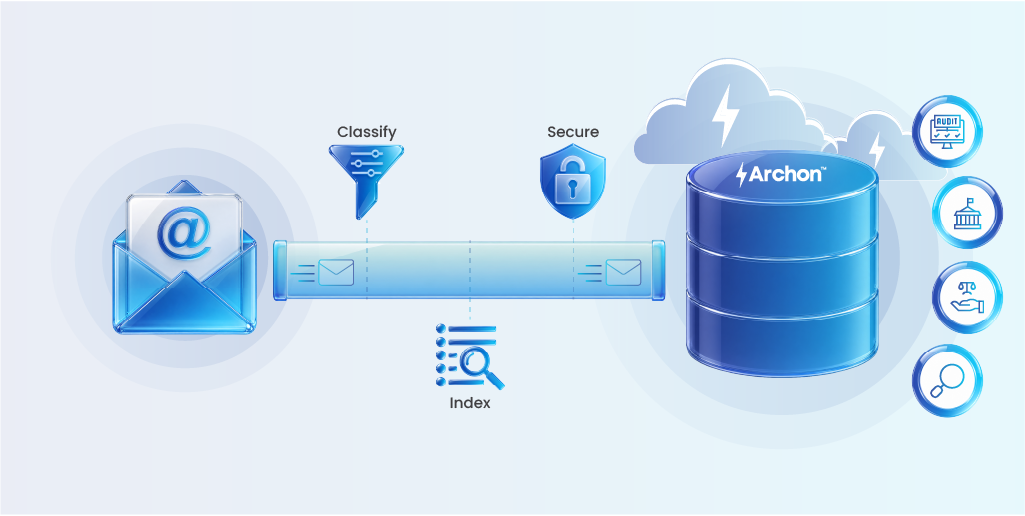
- Email archiving captures, indexes, and preserves emails for compliance and retrieval.
- Poor email governance leads to real risk, with scattered PST files, deleted emails, and inconsistent retention often arising during audits or litigation.
- Regulatory requirements demand that emails be retained, protected, and produced on demand with full auditability, legal holds, and evidentiary integrity.
- Archiving reduces storage costs and improves system performance by separating historical data from live mail systems and moving it to cost-efficient infrastructure.
- Fast, indexed search enables quick retrieval for investigations, dispute resolution, and decision-making.
- Archived data must be secured, governed, and immutable.
- Native platform tools and siloed archives lack the scalability, advanced search, and cross-source visibility required for enterprise use.
- Archon unifies email in a single platform, enabling eDiscovery, centralized legal hold, governance-driven retention, and AI-driven data handling.
Subject: The Missing Emails Cost Nearly $850,000
In a recent case, the court found that key electronic evidence, including thousands of WhatsApp messages and other digital records, was deleted despite multiple court orders to preserve them. The judge imposed nearly $850,000 in sanctions tied to investigative costs and legal fees
What makes this scenario dangerous is that the penalty wasn’t tied to losing the original business dispute. It came from failing to preserve the evidence.
Email carries critical business decisions, yet it’s often poorly governed. Email archiving is about preserving decisions, commitments, and evidence, with integrity intact, policy enforced, and retrieval measured in seconds, not weeks.
This guide is for the organizations that have stopped praying and started planning. We’ll cover what enterprise email archiving is, why it matters, what the architectural choices look like, and how to implement it properly, where legacy email archiving approaches fall short.
What is Email Archiving?
Email archiving is the process of capturing, indexing, and storing email communications in a secure, tamper-proof, and searchable repository, separate from your live mail environment, so that records can be retrieved quickly and reliably when needed.
Email Archiving vs Email Backup
Enterprise Email archiving is not the same as email backup. A backup is a snapshot of your mail environment at a point in time, designed for disaster recovery. It is neither indexed for search nor built to withstand legal scrutiny. Restoring a backup to find one email thread is like demolishing a building to find a specific brick.
| Capability | Email Backup | Email Archive |
|---|---|---|
| Purpose | Disaster recovery | Compliance & retrieval |
| Indexing | None | Full-text, metadata |
| Search | Not designed for it | Granular, rapid |
| Tamper-proof | No | WORM / immutable |
| Legal hold | No | Yes, with audit trail |
| Retention policy | Point-in-time only | Granular, rule-based |
| Chain of custody | No | Yes |
An email archive captures every message in real time, including the full body, subject line, headers, attachments, and all metadata at the point of sending or receiving. And everything can be retrieved, with context and provenance intact, when it is needed.
Why Archiving Emails Matters: The Strategic Value
Secure archiving beyond storage is a preservation approach for compliance, cost optimization, and retrievability. The following benefits highlight how email archiving delivers measurable strategic value.
Cost and Scalability
Enterprise mailbox sizes continue to grow, typically 8–10 GB per user and rising.
Archiving separates live mail from historical data, reducing load on production systems and shifting storage to lower-cost infrastructure. Systems run faster, storage costs drop, and IT avoids continuously expanding premium storage just to retain old communications.
Scalable archiving grows with the organization, without requiring repeated architectural changes.
Accessibility
A well-maintained archive makes historical email usable.
Indexed content, metadata, and attachments can be retrieved in seconds. When a compliance officer needs emails tied to a contract or timeframe, results are immediate.
More importantly, email archives preserve business context. Decisions, commitments, and negotiations remain accessible, even when employees leave.
Governance and Retention Policies
The regulatory requirements around email retention aren’t getting simpler.
- FINRA requires certain broker-dealer communications to be kept for six years in non-rewriteable, non-erasable formats.
- HIPAA covers healthcare-adjacent communications for up to six years from creation or last use.
- MiFID II mandates five years for communications related to client orders.
- GDPR layers on data minimization requirements that create obligations to delete data that’s no longer necessary, while simultaneously requiring availability for regulatory or legal purposes.
- SOX data retention requires public companies to retain records relevant to financial reporting for seven years. Email is frequently within scope.
Managing this manually through user compliance, PST discipline, and default platform retention settings is a liability.
Policy-driven archiving handles this automatically. Emails are retained for exactly as long as they need to be. Legal holds override normal deletion when litigation is anticipated. Deletion is documented and defensible. And when a regulator asks to see your retention policy in action, you can show them a system.
Searchability
Search is what turns an archive into an operational asset.
Email indexing and metadata filtering allow users to locate specific communications quickly, without relying on IT. Whether resolving disputes, supporting investigations, or recovering institutional knowledge, effective search makes the archive usable in real scenarios.
Data Security and Integrity
An email archive contains years of sensitive business communication and must be secured accordingly through email data protection and compliance.
Encryption, role-based access control, and audit logging are essential. Immutability ensures that archived emails cannot be altered outside of defined policy controls, preserving their integrity as evidence.

Risks and Challenges in Email Archiving
Email archiving introduces several risks and operational challenges that impact compliance, governance, and the reliability of retained data.
- Silos and fragmented data: Email archives often operate in isolation from the broader data estate. This limits cross-system governance and reduces the value of archives for analytics, AI, legal holds, and eDiscovery.
- Limitations of native platform tools: Built-in solutions such as Microsoft Exchange archiving lack advanced search, filtering, redaction, tagging, and scalable performance. They can also introduce litigation risks due to user notifications when holds are applied.
- Operational and compliance gaps: Inconsistent journaling, PST file proliferation, mailbox size constraints, and weak indexing lead to incomplete or unreliable capture of email data. These gaps often surface during audits, litigation, regulatory reviews, or M&A due diligence, when remediation is most costly.
- Governance and evidentiary risk: Poorly governed archives may retain data inconsistently or beyond required retention periods, increasing regulatory exposure and privacy risks. Without demonstrable tamper-evidence, completeness, and policy enforcement, the archive’s legal credibility is weakened.
Types of Email Archiving Architecture
There are three broad architectural approaches, and the right choice depends on your regulatory environment, existing infrastructure, data sovereignty requirements, and budget.
On-Premises Archiving
On-premises archiving means the archive infrastructure – servers, storage, indexing that lives in your data center. You have full control over the data, which matters for certain regulatory regimes and data sovereignty requirements. You also have full responsibility for maintenance, scalability, and resilience.
The costs of owning equipment are typically less favorable for mid-market organizations when compared to cloud solutions. Hardware refresh cycles, storage capacity planning, and the operational burden of maintaining archive infrastructure at enterprise scale are all real costs.
On-premises archiving makes sense for highly regulated industries, organizations with strict data residency requirements, or those heavily invested in existing infrastructure, especially where cloud use is restricted.
Cloud Email Archiving
Cloud-based email archiving shifts the infrastructure burden to a vendor. Storage scales elastically, there’s no hardware to manage, and modern cloud archive platforms offer search and retrieval capability that outperforms legacy on-premises solutions considerably.
For most organizations, cloud archiving is the right default. The question is which cloud platform, and what happens when you want to change providers.
Hybrid Archiving
Hybrid architectures, some data on-premises, some in the cloud, typically emerge when an organization evolves. A company that acquired another with on-premises archiving or one that has specific data classes requiring local retention might legitimately operate a hybrid model.
The risk of hybrid archiving is visibility. If different data sets are archived in different systems, unified search and legal hold become more complex. The governance challenge increases.
Email Archiving Best Practices
Most organizations have email archiving in place. Far fewer have it working the way it needs to when an auditor, a court, or a regulator actually asks for something. These practices close that gap.
1. Define retention policy by data type, not by mailbox
Apply retention policies by data type instead of one rule for all; this reduces costs and lowers risk. For example, seven years for financial correspondence, six for administrative, and three for everything else. Where multiple regulations apply, set a high-water mark and apply the longest period across the board. Just watch the GDPR flip side: retaining personal data longer than necessary creates its own exposure.
2. Automate capture at the server level
Any architecture that relies on users to manually archive, forward, or export emails will have gaps. Capture needs to happen automatically at the server level, on every message, with no exceptions. Gaps found during an audit are not a technical problem. They are a governance finding.
3. Enforce role-based access with clean separation
Enforce multi-tiered, permission-based access controls. Archived emails should be encrypted both in storage and in transit using standards-based encryption. Administrators should not have default access to archived email content. That separation protects the organization and preserves the archive as credible evidence.
4. Audit your archive regularly
Scheduling periodic reviews for ongoing compliance checks and identification of gaps, including any new communication channels added since the last review. Policies set at implementation drift over time. Review annually at minimum, or whenever a regulatory or organizational change occurs.
5. Plan deletion as carefully as you plan capture
Most organizations obsess over what they retain. Few think equally hard about what they delete. Over-retention of personal data creates GDPR exposure just as real as under-retention. An automated deletion system should remove archived emails when they reach the expiry date stipulated by policy, with every deletion logged and auditable.
6. Treat archive migration as a governance task
Shutting down an archive with data still in it does not absolve an organization from regulatory or legal orders to recover that data. The legally defensible approach is to migrate everything out, analyze it for legal and regulatory requirements, document that analysis, then defensibly dispose of what remains.
7. Do not treat platform-native tools as a complete solution
SaaS archiving solutions use multi-tenant cloud environments, which means the vendor controls the encryption key for all customer data. Because keys can be reused among many customers, the risks of data breaches and associated regulatory exposure are greater. Dedicated third-party archiving solutions almost always offer more capability at lower cost than upgrading a native platform plan.
Email Archiving with AI
This is where things get interesting, and where the gap between legacy archiving and modern platforms is widest.
- AI in email archiving is rapidly advancing, with current use cases including:
- Intelligent classification of email content for retention policy assignment,
- Automated detection of sensitive data (PII, financial data, privileged communications) for appropriate handling
- Anomaly detection to flag unusual data access patterns
- AI-assisted eDiscovery that can identify responsive documents within large archives without exhaustive manual review
AI-powered email analysis can surface patterns across large volumes of historical communication, identifying risk signals, compliance anomalies, or business intelligence that would be invisible in manual review.
The prerequisite for all of this is a well-structured, properly indexed, tamper-evident archive.
How to Implement Email Archiving: Gmail, Outlook, and Beyond
Getting email archiving in place starts with understanding what your existing platform actually covers and where it runs out of road.
Google Vault
Google Vault provides basic archiving and eDiscovery capabilities. Vault supports retention rules, legal holds, and exports for eDiscovery. It captures Gmail, Google Chat, Drive, and Meet data.
The limitations become apparent quickly for enterprise use cases: Vault’s search is functional but not sophisticated, the retention policy engine is relatively inflexible, and the data remains within Google’s infrastructure with limited export options. For organizations with complex multi-jurisdiction retention requirements, Vault alone typically isn’t sufficient.
Outlook / Microsoft 365
Microsoft 365 includes In-Place Archiving and compliance features via Microsoft Purview (formerly Compliance Center). The native tooling covers basic retention policies, legal hold, and eDiscovery with Microsoft 365 E3/E5 licenses, unlocking progressively more capabilities.
The limitations parallel Google’s: native tooling works well if you’re an all-Microsoft shop with relatively straightforward requirements, but multi-source archiving (capturing email alongside data from other platforms), granular retention policy management, and truly immutable WORM storage at enterprise scale require more than the native stack provides.
Third-Party Archiving: Where the Real Capability Lives
Both Google Vault and Microsoft Purview are adequate for organizations with simple, homogeneous environments and standard compliance requirements. They are not adequate for:
- Multi-source environments: Organizations that run a mix of communication platforms, or that have acquired companies on different email systems, need a unified archive that captures everything in one place with consistent governance.
- Complex retention requirements: Multiple retention schedules by data type, jurisdiction, entity, or user class require a policy engine more sophisticated than either native platform provides.
- True WORM immutability: Demonstrating to a regulator that archived data cannot have been modified requires an immutability guarantee that goes beyond what cloud email platforms offer natively.
- Legal hold at scale: Managing large-scale legal hold across multiple custodians, with a documented chain of custody, is operationally difficult in native tools.
- Cross-platform eDiscovery: When a case requires searching email alongside other enterprise data, SharePoint, file shares, SAP records, HR systems, native email archiving tools don’t help.
Meanwhile, a purpose-built archiving platform brings everything into one place. It gives you a consistent way to manage data, apply policies, and retrieve what you need without jumping between systems or second-guessing completeness. So, when the pressure is on, whether it’s an audit, investigation, or regulatory request, you’re not scrambling. You already have control.
Managing and Optimizing Email Archives
Once the archive is running, four things need ongoing attention:
Retention policies – regulations change, and your policies need to be kept up. Review them annually at a minimum.
Storage efficiency – deduplication, compression, and tiered storage keep costs under control as volumes grow. Left unmanaged, storage costs compound quietly.
Access auditing – monitor who is querying the archive, when, and why. Continuous visibility here is both a security and a governance requirement.
Legal hold lifecycle – holds need to be created, documented, and released systematically. An undocumented hold is as much of a liability as a missing one.
On the performance side, archives that start fast get sluggish without proactive maintenance. As volumes scale, index health, query performance, and retrieval speed all need active attention.
Teams usually overlook search relevance. If users have to search through hundreds of results to find what they need, the archive is technically functional but operationally useless. Tuning search so it surfaces the right records quickly is worth the investment.
How to Choose an Email Archiving Solution
The evaluation criteria depend specifically on the environment, but these are the questions worth asking of any vendor:
Does it capture everything?
A good email archiving solution should reliably capture all email traffic in real time, including the full message body, subject line, headers, attachments, encrypted messages, and all metadata.
Are your archived emails truly immutable?
Immutability and tamper-proof storage are non-negotiable for an email archiving solution. The solution should provide a complete reporting trail and an unalterable audit trail that demonstrates retention; chain-of-custody, and legal-hold requirements have been met.
Are your archived emails governed? Who holds the encryption keys?
Any data leaving the live environment should always be encrypted in transit and at rest. Critically, the encryption key should belong to the organization alone, not shared with the cloud archive provider, so you retain full control over who can access archival data.
Does it have audit access controls?
An email archive must be accessible for auditing at all times, with the ability to grant auditors extended read rights to stored emails for a limited time. The solution should keep a complete log of all access to the email archive, including when settings such as retention periods are changed. That log must be uneditable.
To prevent misuse, administrators should not have access to archived user emails, a clean separation between admin and content access.
Can it handle complex retention policies?
Email compliant solution should offer legal hold capabilities, role-based access controls, audit trails, configurable retention policies, eDiscovery readiness, and open format storage to avoid vendor lock-in.
What are the operational considerations for an email archiving solution?
- Platform integration: Check native connectors for your email platform (M365, Google Workspace, etc.) – coverage of all communication channels matters.
- Scalability: Cloud-based solutions eliminate the need for on-premises hardware and offer flexible storage that grows with your organization.
- Retention policy flexibility: Standards-based encryption such as AES 256-bit, TLS for transfer, robust authentication options, and email retention policies that are long-term and adjustable are the baseline for any serious enterprise deployment.
Choosing the right email archiving solution ultimately comes down to balancing compliance, security, scalability, and long-term accessibility.

Inside Archon’s Email Archiving System
Archon’s email archiving capability is a Lakehouse-native platform designed for enterprise-scale data archiving and retention across heterogeneous source systems.
The distinction between Archon’s approach and conventional email archiving vendors is architectural. Most email archiving solutions are email-specific; they capture email well, but the archive is a silo.
When your compliance team needs to investigate a matter that spans email, SharePoint documents, SAP records, and HR system data, they’re working across four different systems with four different interfaces and four different governance models.
Archon archives email alongside all other enterprise data in a unified platform. That means:
Unified legal hold: A legal hold in Archon applies across every data source, email, files, structured application data, simultaneously, with a single custodian record and documented chain of custody.
Cross-source eDiscovery: A search query returns results from email and every other archived data source in a single interface. The compliance officer investigating a complex matter doesn’t need to know which system the relevant record came from.
Immutability at ingestion: Email captured by Archon is written to WORM storage with cryptographic hashing at the point of ingestion. The hash is timestamped and logged.
200+ connectors: Archon connects to over 200 enterprise source systems. Email from Microsoft 365, Google Workspace, or legacy on-premises mail platforms can be captured alongside data from SAP, Salesforce, Workday, Oracle, and whatever else your environment runs.
Governance-first retention: Retention policy management in Archon is designed for enterprise complexity, multiple schedules, legal hold overrides, GDPR deletion workflows, and full audit logging of every policy action.
AI-readiness: Archon Analyzer combines AI-driven intelligence with structured outputs to simplify data understanding and archiving decisions.
It generates and enriches metadata, classifies and summarizes documents, extracts PII, maps data flows, and recommends governance rules and archival strategies. It also suggests optimized search queries to improve data retrieval.
For organizations that have outgrown native platform archiving, or that are tired of managing multiple point solutions that don’t talk to each other, Archon offers something the conventional archiving platform that treats email as one data source among many, governed by a single policy engine, retrievable through a single search interface.
The Decisive Point
If your current approach relies on native platform retention, PST files, or an archiving solution that was bought to solve a point-in-time compliance problem and hasn’t been revisited since, it’s worth taking a hard look at what you actually have, versus what a regulator or opposing counsel would find if they looked.
Archon can help you find out. Whether you’re starting from scratch, migrating from a legacy archive, or trying to get your arms around a complex multi-source environment, we’ll tell you honestly what you have, what you need, and what it would take to get there.


