


Key Takeaways
- SAP environments accumulate decades of inactive data that degrades system performance, inflates storage costs, and creates audit risk without structured archiving.
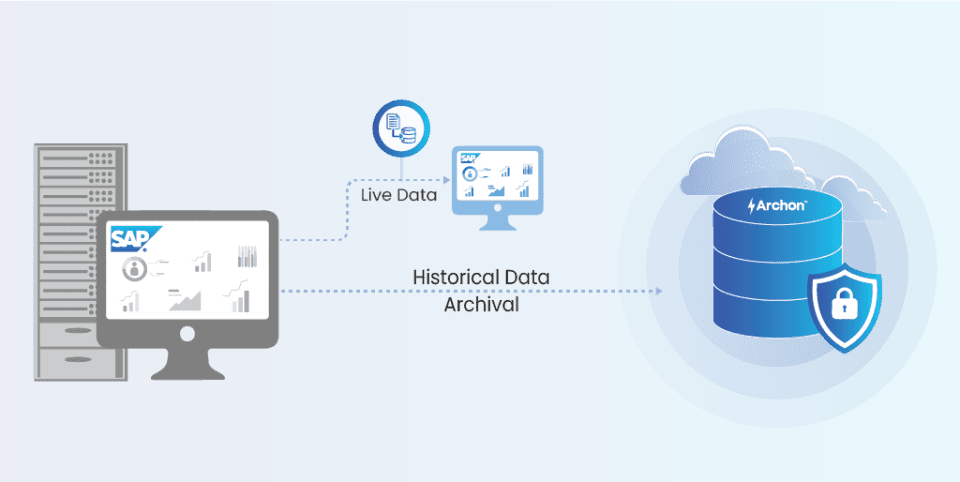
- SAP archiving is a governed data lifecycle process that moves inactive records out of the live database while keeping them retrievable.
- Pre-migration SAP data archiving reduces HANA footprint, shortens testing cycles, and prevents historical data debt from following you into S/4HANA.
- Compliance frameworks including GDPR, SOX, HIPAA, and Section 128 require long-term retention with audit-ready retrieval; native SAP tools alone don’t guarantee this.
- Intelligent archiving automates retention decisions, applies business rules continuously, and eliminates the manual Basis overhead that slows most SAP archiving programmes.
- Archon Data Store extends SAP archiving across non-SAP systems, providing immutable storage, cross-application governance, and a single compliance repository SAP ILM cannot deliver.
A global manufacturer running operations across fourteen plants had a problem they couldn’t hardware their way out of. One SAP system. Twelve years of data. And a database that had been quietly filling up ever since.
The symptoms showed up at the edges first, the way they always do. Field supervisors at one plant flagged that certain SKUs weren’t pulling up during goods receipt. Procurement raised that purchase order confirmations were taking longer to process. Batch jobs that used to complete overnight started bleeding into the morning shift. The helpdesk queue grew. The Basis team ran diagnostics. The database was not broken. It was full.
This is what unchecked SAP data accumulation looks like from the inside. Inventory movements, production orders, goods issues, quality inspection records, vendor invoices — twelve years of it, all live in the same database as that morning’s transactions. Every record the business had ever generated was consuming the same memory, adding to the same backup overhead, and slowing down the same queries that fourteen plants were depending on to run operations.
The problem was that historical data with no operational relevance in the live system was crowding out the records that actually mattered today. And this is the trap that most SAP environments walk into gradually: early in a deployment, the focus is on capturing data and making it available across the organization. That is the right instinct.
Over time, however, that same data becomes the source of a different problem. Storage costs rise. System performance degrades. Audit readiness becomes harder to guarantee. And the issue is retaining everything in the live system, regardless of whether it is still needed for day-to-day operations.
For this manufacturer, the business case for inaction had expired. Every week of delay was a week of degraded operations across all fourteen sites.
The resolution was not a hardware investment. It was SAP archiving. By identifying and moving inactive historical records out of the live database into a structured, retrievable enterprise archive, the organization reclaimed memory, restored system performance, and returned batch windows to overnight completion without losing a single record. Archived data remained fully accessible. The live system finally had room to operate.
That is what SAP archiving does at its most fundamental level. The rest of this guide covers how to do it right.
Why Enterprises Have Endless SAP Data Growth
Every business process running through SAP generates data: employee records, invoices, purchase orders, goods movements, payroll runs, and compliance logs. None of it disappears once a transaction closes. It accumulates, year over year, across every module the organization operates.
Multiply that volume by years of operations and you end up with a database where a small fraction of data is actually driving daily work, while the rest sits idle, still online, still consuming resources, still adding to your backup overhead just like active records do.
SAP data growth falls across five distinct categories:
- Master Data: core business entities such as customers, vendors, materials, and employees
- Transactional Data: records generated by day-to-day business operations and processes
- Configuration Data: system setup rules, parameters, and workflows
- Organizational Data: business structure and hierarchy records
- Metadata: data elements that support interpretation and integration across systems

What SAP Data Growth Demands from Enterprises
When you look closely at most SAP landscapes, the patterns are familiar: a large chunk of the database has not been touched in years, queries and reports are slower than they used to be, and infrastructure costs keep rising to support data that has no real operational purpose in the live system.
Storage bills go up. Batch windows stretch. Backup cycles take longer. And when an audit request lands, compliance teams find themselves digging for records that should have been easy to retrieve.
Is Every Data Important?
Enterprise leaders running SAP environments eventually ask a practical question: how much of this data actually needs to stay live? The answer is almost always the same: far less than is currently online.
The challenge is balancing accessibility with compliance requirements while keeping the SAP system running well. Retention regulations require that certain data be preserved for defined periods, but they do not require it to remain in the live production database. That distinction is where intelligent archiving becomes the operative answer.
What is SAP Archiving: Understanding the SAP Data Lifecycle
Archiving is not about moving files into a storage bucket and forgetting about them. It is a deliberate process with a clear purpose: separating rarely accessed historical data from the operational data that the business runs on a day-to-day basis.
SAP data archiving moves inactive records out of the live system and into structured, secure storage, keeping the active database lean while making sure archived data stays accessible for reporting, compliance, and audit queries.
The result is an active SAP system that runs faster, costs less to maintain, and is easier to govern, without losing access to any historical records.
Right SAP Archiving Strategies
There is no one-size-fits-all archiving strategy. The right approach depends on the SAP environment, the compliance requirements in play, and how much the organization wants to automate. Most mature archiving programmes end up blending all three core approaches.

1. Proactive Archiving
Archiving runs on scheduled cycles, monthly, quarterly, or aligned to fiscal periods. The goal is prevention: keeping the live database from accumulating backlogs before they become a performance or cost problem. Systems stay predictable, infrastructure costs remain manageable, and report performance stays consistent.
2. Event-Driven Archiving
Archiving is triggered by significant business or technical events such as S/4HANA migrations, database upgrades, compliance audits, or major system transitions. These inflection points create a natural mandate to address historical data volumes before entering a new environment.
Moving to S/4HANA without archiving first is like carrying two decades of legacy baggage into a system built for lean, fast processing. Event-driven archiving makes sure migrations start on a clean slate.
3. Business Rule-Driven Archiving
Here, archiving decisions are driven by defined business rules and retention policies, not manual reminders. Data is classified and assessed automatically based on usage patterns, compliance requirements, and lifecycle criteria.
Inactive historical data moves into the archive on its own. Active data stays live. Over time, this becomes a self-sustaining process that keeps the organization audit-ready, performance-optimized, and cost-efficient without needing someone to kick it off each cycle.
In practice, the strongest archiving programmes combine all three. Intelligent automation runs quietly in the background, with governance and periodic reviews layered over it. That combination scales with the business and adjusts as compliance requirements evolve.
What Are the Best Practices for SAP Archiving?
Choosing a strategy is just the starting point. To execute SAP archiving well, it needs to be treated as a repeatable, governed process that balances cost, performance, and compliance across the data lifecycle. These practices consistently separate well-run archiving programmes from the ones that end up as one-off firefighting exercises.

Defining Governance Earlier
Governance is the foundation that holds everything together. Without it, archiving becomes unstructured and very difficult to defend under audit. Establishing clear ownership early covers who controls the process, who defines retention rules, and who is accountable when regulators request data. This sets the accountability framework that everything else depends on.
Aligning Retention Policies with Compliance Regulations
Archiving policies must be directly mapped to the regulatory frameworks governing the organization, including GDPR, HIPAA, SOX, Section 128, and any applicable regional requirements. This alignment is not optional. It is the mechanism by which archived data stays legally defensible. Misaligned policies create compliance gaps that tend to show up exactly the wrong moment, like during an audit or legal proceeding.
Bridging Business and IT Teams Collaboration
Archiving decisions cannot be made by IT alone. Business teams including Finance, Audit, HR, and Supply Chain hold the knowledge of which records are operationally critical, how long specific data types must be retained, and what access requirements apply after archiving. When IT and business teams work together, the resulting strategy tends to be both technically solid and operationally workable.
Testing Data Retrieval Before Archiving
An archive you cannot reliably retrieve from is a compliance liability, not an asset. Before any archiving programme goes live, retrieval needs to be tested properly. Run retrieval simulations. Confirm that archived records are accessible in the format and timeframe that audit and legal requirements demand. Successful testing builds confidence internally and shows regulators that data governance is in good shape.
Automating the Process Wherever Possible
Manual archiving works up to a point, then starts introducing risk. It is slower, more prone to error, and entirely dependent on people doing things consistently. Automation handles retention policies, scheduling, and execution with consistency that manual processes rarely achieve, turning archiving from a periodic project into an ongoing, governed operation.
What Are the Best SAP Archiving Tools & Solutions For Modern Enterprises?
Modern enterprises have two categories of tools available for SAP archiving:
- SAP’s native tools (ADK, SARA, SARE, ILM, SAP CMS, DART) provide the technical foundation for archiving within the SAP environment.
- Third-party enterprise archiving platforms, including Archon Data Store (ADS), OpenText, IBM, Hitachi, and SNP, extend native capabilities to deliver advanced compliance, multi-system coverage, and intelligent automation at enterprise scale.
Inbuilt SAP Archiving Tools
1. ADK (Archive Development Kit)
- The technical foundation of SAP archiving.
- Provides the framework for creating and managing archive files.
- Defines how data objects such as purchase orders or HR records are compressed, stored, and retrieved.
- Every archiving object in SAP is built on ADK, making it the engine that ensures integrity and consistency.
2. SARA (SAP Archive Administration)
- The administrative interface for the full archiving cycle, covering creation of archive files, writing them, storing them, and managing subsequent retrieval.
- Handles scheduling of background jobs, monitoring, and exception handling.
- The primary transaction through which SAP Basis teams manage archiving operations.
3. SARE (SAP Archive Information System)
- The retrieval and reporting layer for archived data.
- Enables compliance and audit teams to access archived records without returning data to the live database.
- Supports fast, structured access to historical records.
4. ArchiveLink
- Works with SAP Content Management Service (CMS) and external ECM systems.
- Integrates external storage with SAP to link and store documents, images, and archived data objects.
- Enables direct access to stored documents from within SAP transactions.
- Establishes the connection between SAP business objects and archived content, helping manage document growth and reduce SAP SOFFCONT1 table size.
5. SAP CMS (Content Management Service)
- SAP’s core repository service for storing archived content and documents.
- Handles repository management, including retrieval and lifecycle management for archived documents.
- Supports both structured data and unstructured document archiving.
- Provides access control, security, and versioning of stored content.
- Scalable for high-volume archiving across SAP modules.
6. DART (Data Retention Tool)
- Designed specifically for compliance and tax audit purposes.
- Particularly relevant for organizations operating in jurisdictions that mandate detailed audit trails.
- Works alongside data archiving but serves a distinct function: producing audit-ready data extracts.
- Important for Section 128 compliance and similar financial data retention requirements.
7. ILM (Information Lifecycle Management)
- SAP’s advanced solution for full data lifecycle governance, going beyond archiving into retention policy management, legal holds, and data destruction.
- Relevant for regulations such as GDPR and HIPAA, where organizations must demonstrate not only that data is retained but that it is deleted at the appropriate time.
- Integrates with both SAP and non-SAP storage systems.
Together, ADK, SARA, SARE, DART, ArchiveLink, SAP CMS, and ILM form the native SAP archiving ecosystem, covering data identification, archiving execution, retrieval, and lifecycle governance.
Non-SAP Tools & Solutions
SAP’s native tools provide a solid technical foundation. For enterprises that require advanced automation, intelligent retention decisions, or legacy system decommissioning at scale, third-party platforms extend those capabilities significantly.
The decision to adopt a third-party SAP archiving solution is not about replacing SAP’s native toolset. It is about extending it to meet the compliance, cost, and operational demands of a complex enterprise landscape.
1. Archon Data Store (ADS)
- Purpose-built for intelligent archiving across SAP and non-SAP environments.
- Automated retention and compliance processes, policy-driven rather than manual.
- Tamper-proof, immutable storage with fast retrieval for audit and legal hold scenarios.
- Particularly effective for enterprises managing both SAP and non-SAP legacy data in a single governance framework.
- Extends SAP archiving beyond isolated archive files through ready-to-use enterprise connectors, enabling organizations to centralize historical SAP and non-SAP data within a unified, searchable governance framework.
2. OpenText Data Archiving for SAP Solutions
- SAP-certified and deeply integrated with the SAP stack.
- Scalable document and data archiving with cloud or on-premise storage options.
- Extends SAP ArchiveLink capabilities for enterprise content management.
3. IBM InfoSphere Optim
- Focused on performance optimization and infrastructure cost reduction.
- Handles both SAP and non-SAP structured and unstructured data.
- Suited to large SAP environments where database footprint reduction is the primary objective.
4. Hitachi Content Platform (HCP)
- Secure, scalable storage integrated with SAP archiving workflows.
- Strong compliance focus, used widely in financial services and healthcare.
5. SNP (Schneider-Neureither & Partner)
- Specializes in SAP system decommissioning, migration, and transformation.
- Includes archiving solutions for both SAP and non-SAP legacy systems.
6. Cloud-Integrated Solutions (AWS, Azure, Google Cloud)
- Many enterprises connect native SAP archiving to cloud storage via standard connectors.
- Low-cost, globally accessible long-term retention is especially valuable for organizations preparing for larger SAP cloud migration programs while maintaining compliance access to historical records.
SAP Archiving For S/4HANA Modernization & Modern ERP
S/4HANA is built for speed. In-memory computing delivers real-time analytics, faster transaction processing, and a genuinely different ERP experience. That architecture assumes a lean database, though. When you bring in a decade or more of ECC historical data without archiving first, the consequences are predictable: performance drops, memory costs climb, and the business case for the migration starts to erode. Similar considerations apply during an Oracle to SAP HANA migration, where reducing unnecessary historical data can significantly improve migration outcomes.
Archiving does not matter less in an S/4HANA context. It matters more.
Why Archiving Matters Even More in S/4HANA Migration
S/4HANA performs best with a lean database. Cold data sitting in memory has direct cost and performance consequences:
- Higher infrastructure and HANA hosting costs, as memory is priced differently from disk
- Slower query and analytics performance as the in-memory footprint grows
- Extended migration timelines and more complex testing cycles
- Unnecessary pressure on the HANA database during and after cutover
The answer is intelligent archiving, keeping high-value, frequently accessed data in memory while moving inactive or aging data to secure, retrievable storage under automated retention policies.
Intelligent Archiving in the S/4HANA Era
Intelligent archiving in an S/4HANA environment ensures that:
- Frequently accessed, high-value data stays in-memory where performance demands it
- Inactive or aging data moves automatically to secure, retrievable storage
- Retention policies are applied without manual intervention
- Data remains fully accessible for audits, compliance queries, and business reference
Modern ERP Means Automated, Continuous Archiving
S/4HANA benefits most when archiving operates as a continuous background process rather than a one-time migration activity. Automated archiving aligns with business activity cycles, applies data tiering strategies that minimize cold data in-memory, maintains compliance without requiring manual oversight, and eliminates the risk profile that comes with periodic manual clean-ups.
S/4HANA Data Aging Vs. Data Archiving
Data aging and data archiving often get treated as the same thing. They are not:
- Data aging keeps data inside the HANA database but marks it as less frequently accessed; the data remains in the HANA footprint
- Data archiving moves data completely out of the database into structured, secure, external repositories, so it no longer occupies HANA memory
This distinction matters a lot for long-term cost planning and compliance strategy. Data aging reduces memory pressure. Archiving eliminates it.
Role Of Archiving In S/4HANA Migration
Migration projects have a way of revealing just how much historical data has been built up. A database that has grown over 10 to 15 years of ECC operation will make an S/4HANA migration slower, more expensive, and more complicated than it needs to be. This is one reason many organizations begin archiving initiatives well before SAP ECC end of maintenance deadlines approach.
Archiving before migration removes that unnecessary load, speeding up testing cycles, reducing downtime windows, and cutting out volume that has no real business justification in the new system. Post-migration archiving keeps S/4HANA lean over time, so the same data accumulation problem does not quietly rebuild itself within a few years.
Read more: SAP ECC vs SAP S/4HANA: architecture, performance, and migration considerations.
Archiving Shapes the Future-Ready ERP
A modern ERP environment works best when data is in the right place at the right time. Intelligent archiving enforces that by creating clear data boundaries, reducing system weight, and keeping the organization continuously compliance-ready. In S/4HANA, archiving is not a technical afterthought. It is a strategic part of keeping the system optimized for the long term.
Industry-Specific SAP Archiving
The archiving imperative applies across industries, though the specific drivers vary by sector. High transaction volumes, long regulatory retention mandates, and the operational cost of maintaining large SAP databases are consistent themes. The table below summarizes the key data challenges and archiving outcomes by industry.
| Industry | Data Challenges | Why Archiving Matters |
|---|---|---|
| Retail | High-volume customer transactions, POS data, sales logs, and inventory updates accumulate rapidly in SAP, degrading system performance over time. | Reduces active database size, improves query performance, accelerates reporting, and lowers maintenance overhead. |
| Healthcare | Sensitive EHR, billing, and patient records require long-term, regulation-driven retention under frameworks such as HIPAA. | Provides secure, tamper-proof storage that supports audits, legal compliance, and efficient system performance. |
| Manufacturing | Order histories, production logs, and supply chain data accumulate in volume, slowing reporting and system performance. | Reduces database load, accelerates MRP planning, ensures reliable analytics, and keeps production systems scalable. |
| Financial Services | Regulations including SEC 17a-4, FINRA 4511, SOX, and GDPR require secure, long-term retention of transactional, accounting, and client data. | Ensures regulatory compliance, improves reporting speed, reduces storage costs, and supports secure long-term data retention. |
Compliance-Driven Archiving Across Industries
Regulatory requirements drive archiving decisions across all sectors. The obligation is not simply to retain data. It must be retained securely, in an auditable format, and remain retrievable on demand. Intelligent archiving addresses each of these requirements through automated retention policies, tamper-proof storage, and structured retrieval workflows.
- GDPR, HIPAA, SOX, and Section 128. Automated retention policies enforce compliant storage timelines consistently
- Audit readiness: archived records are immediately retrievable without manual search or system restoration
- Tamper-proof repositories prevent accidental deletion, modification, or loss of data under legal hold
What Are the Hidden Obstacles for SAP Archiving
SAP archiving looks straightforward from the outside: move older data out, reduce database size, lower costs. Inside a real SAP landscape, it is considerably more complicated than that. Years of customization tightly coupled integrations, and overlapping regulatory requirements make archiving one of the more technically and organizationally demanding modernization activities an enterprise takes on.
Rising HANA storage costs, longer batch windows, and pending S/4HANA migrations make tackling these obstacles a business priority, not just an IT one.

1. Complex Decommissioning Challenges
Legacy SAP systems almost never operate in isolation. Over years of operation, they accumulate tightly coupled custom interfaces, point-to-point integrations, downstream reporting dependencies, and hardcoded logic embedded in Z-programs. During decommissioning, these connections create fragile extraction scenarios where:
- Fields have been repurposed over time, changing their original semantic meaning
- Definitions differ across modules or system versions
- Undocumented customizations exist that have no visible owner
- Active dependencies on external systems including CRM, HR, Payroll, EDI, and finance tools remain live
Getting data out cleanly while maintaining schema consistency and preserving business meaning under these conditions takes thorough discovery work, careful dependency mapping, and a disciplined extraction and validation process.
2. Data Integrity Risks
The core question in any archiving programme is simple: will the data retrieved five or ten years from now match exactly what was archived? Integrity risks arise from multiple sources:
- Inconsistent retention rules applied across modules
- Incorrect object selection that produces partial or incomplete extracts
- Parent-child relationship breaks during extraction, leaving header records without their corresponding line items
- Metadata not preserved alongside transactional data
- Archived datasets that fail compliance checks during audit, finance, or legal review
Weak validation governance turns an archive from a compliance asset into a compliance liability. This is particularly important for financial records, where maintaining complete line-item relationships in structures such as the ACDOCA table in SAP is critical for audit and reporting accuracy.
3. Process & Cultural Resistance
Archiving projects run into a type of resistance that most IT initiatives do not. Teams that rely on historical SAP data, including Finance, Audit, Supply Chain, and HR, are concerned about losing visibility or ease of access. The resistance is typically rooted in a lack of trust in the retrieval experience, uncertainty about whether archived data will satisfy statutory requirements, and the perception that archiving is an IT-driven exercise rather than a business-aligned one.
These concerns are solvable, but they require clear communication, honest demonstrations of how retrieval works, and role-based access that gives business users real confidence in the archived environment.
4. Compliance & Retention Complexity
SAP data typically sits across multiple overlapping regulatory frameworks, including GST, VAT, SOX, FDA 21 CFR Part 11, country-specific payroll laws, and sector-specific financial regulations. The complexity compounds when:
- Retention rules differ by geography for the same data type
- Legal holds block planned archiving timelines
- Multi-year accessible datasets are required by audit teams
- Data must remain immutable, traceable, and exportable over extended periods
Any inconsistency in how retention policies are applied can lead to compliance failures, audit escalations, or penalties.
5. Tooling Limitations in Standard SAP
SAP’s native tools including Content Server, ArchiveLink, CMS, and DART were built for compliance within the SAP boundary. They were not designed for modern-scale storage, federated search, cross-application analytics, or large-scale decommissioning work. Common limitations include:
- Dated retrieval interfaces with limited search capability
- Version dependencies that constrain deployment flexibility
- No self-service access model for non-SAP system users
- Limited support for structured decommissioning across multi-system estates
- No cross-application governance: SAP ILM manages retention within SAP, it cannot govern the wider application landscape
6. Lack of Project Ownership
Successful SAP archiving requires coordinated ownership across IT, Finance, Audit, Legal, and business process owners. Projects fail when no single group champions the initiative. Without clear ownership, decisions stall, requirements remain ambiguous, and validation cycles stretch from weeks into months.
7. Underestimating Volume & Complexity
Organizations frequently underestimate the actual scope of an archiving project: how many years of data exist across which tables, how many custom reports or interfaces depend on historical records, and what it costs to keep legacy systems running until data has been fully migrated. Scope misalignment at the outset is the most common reason archiving timelines slip significantly.
These challenges are solvable, but only with the right architecture. See how Archon eliminates manual archiving overhead, cross-system governance gaps, and compliance blind spots.
How to Overcome These Challenges
- Archiving programmes that work well tend to share a few common traits:
- Clear communication between business, IT, and compliance teams, established early and maintained throughout
- Automated extraction, transformation, and validation to eliminate manual gaps and ensure data integrity at every stage
- A trusted archival solution that preserves business context, referential relationships, and long-term usability
- Strong change management that builds organizational confidence in the archived environment
- Defined governance covering retention rules, legal hold, audit-readiness, and lifecycle management
When done well, archiving is not a clean-up exercise. It is a strategic enabler for modernization, compliance confidence, and sustained cost reduction.
How to Implement the SAP Archiving Process
Organizations that treat SAP archiving as a strategic initiative rather than a technical clean-up task consistently get better results. The following phases provide a structured path that balances compliance requirements, operational continuity, and long-term system efficiency.
1. Assess data volume and growth trends
Every archiving programme begins with a clear-eyed assessment of the current data landscape. Identify which modules are contributing the most to database growth, what proportion of the database is inactive or cold, and what the cost trajectory looks like if the current accumulation rate continues. This baseline shapes all subsequent decisions.
2. Define clear objectives
Archiving succeeds when its purpose is unambiguous. Whether the primary driver is system performance improvement, infrastructure cost reduction, S/4HANA migration preparation, or audit readiness, clearly defined objectives govern the choice of archiving objects, retention policy design, and tool selection. They also give business stakeholders a concrete rationale for the initiative.
3. Identify the right archiving objects
SAP contains hundreds of data objects, but not all are ready for archiving at the same time. Common candidates include financial documents, material movement records, sales and distribution documents, HR and payroll records, and logistics data. Selection requires input from business users, IT teams, and compliance officers to ensure the right data is addressed at the right time without disrupting live operations.
4. Design your processes and procedures
This phase establishes the governance framework: retention timelines for each object, classification rules, archiving cycles, retrieval procedures, access controls, and audit readiness criteria. This is also where organizations determine whether native SAP tools are sufficient or whether an intelligent, automated archiving solution is required to meet the scale and compliance demands of the environment.
5. Conduct a pilot in a controlled environment
No production archiving programme should launch without a controlled pilot. The pilot validates that archiving rules are correctly configured, that archived data remains accessible and intact, that business users can retrieve records in the format required, and that no compliance or reporting gaps exist. A successful pilot builds the organizational confidence needed for a full rollout.
6. Roll out the archiving organization-wide
Following a validated pilot, the archiving strategy scales across modules, business units, and geographies. This phase introduces automated scheduling for recurring archiving jobs, performance monitoring, and continuous optimization based on operational feedback. Most organizations at this stage introduce more capable tooling to strengthen automation, cross-system governance, and retrieval performance at enterprise scale.
SAP Archiving with Archon
SAP’s native archiving tools do what they were designed to do: move inactive objects out of the live application, reclaim database space, and keep production systems running. For many organizations, that is enough to get started.
Large enterprises rarely operate a clean, single-instance SAP landscape, though. The typical environment involves multiple ECC and S/4HANA instances, hybrid landscapes spanning HR, payroll, CRM, SCM, and legacy ERPs, regional deployments governed by different retention laws, and terabytes of structured and unstructured data. When audits arrive, they often need context that spans more than one system. These same complexities frequently arise during a SAP carve-out strategy, where data, systems, and business processes must be separated while maintaining compliance and operational continuity.
This is where native SAP archiving reaches its limits, and where Archon Data Store (ADS) is built to operate.
What Archon Data Store (ADS) Adds to SAP Archiving
Automated Processes for Retention, Cleansing, and Storage
SAP archiving jobs typically require ongoing Basis team oversight and manual scheduling coordination. ADS removes that dependency.
- Identifies inactive or retention-expired SAP data without manual analysis
- Cleanses duplicates and removes junk records before archiving, reducing the volume entering the archive
- Applies regulatory and business retention policies automatically and consistently across the environment
- Eliminates repetitive Basis tasks and reduces the error exposure that comes with manual process management
- Maintains continuous optimization of the SAP landscape rather than relying on periodic clean-up cycles
Intelligent Archiving That Adapts to Business Rules
Standard SAP archiving works at the object level. ADS works at the level of business meaning.
- Preserves full business context, not just tables, but the relationships and classifications that make data interpretable years later
- Classifies HR, finance, payroll, procurement, and other records according to actual business logic
- Maintains regulatory context for each archived object so compliance is preserved through the data lifecycle
- Adapts retention and classification rules when business operations or regulatory requirements change
- Ensures archived SAP data remains contextually relevant and legally defensible over time
A Compliant, Tamper-Proof Repository for SAP and Beyond
SAP ILM manages retention within the SAP boundary. It cannot provide a centralized, immutable archive that spans the wider application estate. ADS fills that gap:
- Encrypted, tamper-proof, immutable storage for all archived SAP data
- Full audit trails, legal hold workflow, and defensible deletion capability
- Compliance coverage across GDPR, HIPAA, SOX, DPDPA, and regional retention mandates
- Centralized governance that gives compliance teams a single, verifiable view of retention decisions
- Security is built into the architecture, not applied as a post-implementation add-on
The result is one place where compliance teams can manage retention decisions and demonstrate governance across the entire enterprise, something SAP alone does not offer.
Multi-System Support
SAP’s native archiving stays within the SAP environment. ADS works across the full application estate:
- Supports SAP and non-SAP systems, including ERP, CRM, HRMS, payroll platforms, and legacy databases
- Consolidates historical data from multiple systems into a single, searchable, audit-ready repository
- Enables safe retirement of legacy systems without loss of access to their historical data
- Reduces infrastructure cost across the entire application portfolio and simplifies application rationalization decisions
- Gives compliance teams unified retention management regardless of the originating system
Future-Ready Scalability and Modernization Support
Most archiving tools are built to solve the immediate problem of shrinking a database footprint. ADS is built for the longer-term challenge: lifecycle management, sustained compliance, and supporting modernization through system transitions.
- Scales to accommodate growing SAP workloads and multi-petabyte data histories
- Supports cloud, hybrid, or on-premise storage strategies
- Automates lifecycle policies so archived data ages and expires in accordance with retention rules
- Maintains historical access integrity during S/4HANA migrations and system modernization programmes
- Converts archiving from a point-in-time project into a long-term data governance capability
Organizations increasingly adopt cloud archiving as part of this strategy to improve scalability, reduce infrastructure overhead, and support long-term data growth.
Ready to take historical data out of your live SAP system? Archon Data Store handles archiving, retention, compliance, and decommissioning — across SAP and beyond.
Why Archon Matters in an SAP Archiving Strategy
Archiving usually sits quietly in the background of SAP operations, a Basis-managed function that keeps databases from growing out of control and auditors reasonably satisfied. Archon changes that. It turns archiving into a controlled, strategic capability that gives organizations genuine command over their historical data, rather than just moving it somewhere else.
- Reduces operational load on Basis and IT teams by eliminating manual oversight and repetitive archiving tasks
- Gives business users fast, searchable access to historical data on demand
- Provides compliance teams with clear, defensible visibility into retention policy, storage, access controls, and deletion records
- Lowers infrastructure cost by consolidating disparate archives into a single, governed repository
- Strengthens audit readiness through immutable storage, complete data lineage, and consistent policy enforcement
- Shifts SAP archiving from a reactive cost management necessity to a proactive source of operational and compliance agility
Archon turns SAP archiving from a technical obligation the organization works around into a genuine enabler of growth, compliance, confidence, and long-term modernization. To see how ADS handles SAP workloads at an enterprise scale, get in touch.


