

Key Points
- SAP ADK files are proprietary archive files that store historical SAP business data and typically require SAP runtime environments or custom extraction logic to access.
- Many enterprises continue running legacy SAP ECC systems after migration because archived ADK data remains dependent on the original SAP environment.
- SAP ADK archiving helps reduce database growth, lower SAP infrastructure and HANA storage costs, improve system performance, and support long-term compliance and audit retention requirements.
- During S/4HANA migration and SAP decommissioning, inaccessible ADK files can create compliance risks, operational delays, and unnecessary infrastructure costs.
- Native SAP archive retrieval through SARA, SARI, and AIS can be complex and difficult for business users, auditors, and compliance teams to navigate.
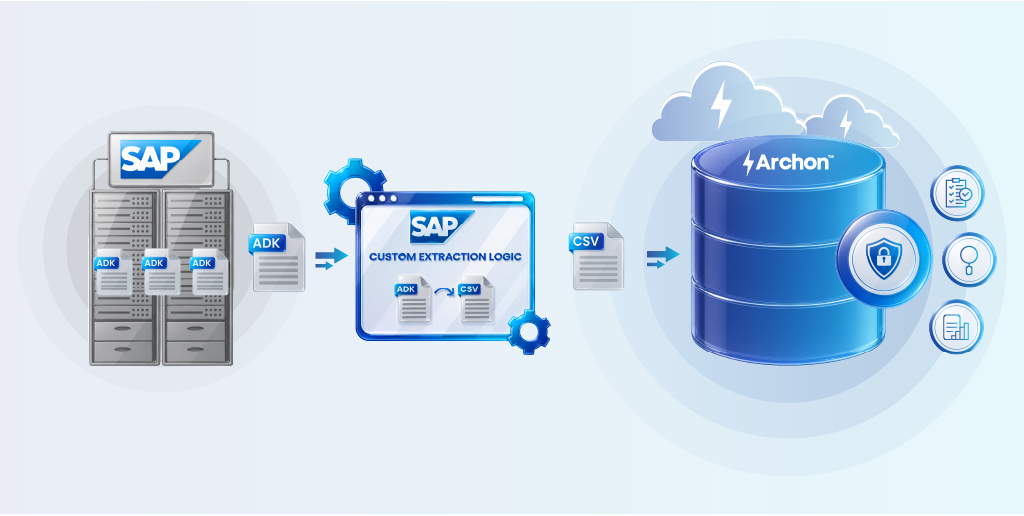
- Archon enables enterprises to extract SAP ADK data into CSV format, ingest it into Archon Data Store, and maintain searchable access to archived records without keeping legacy SAP systems alive.
The tax authority typically gives you a short notice to produce five years of financial records from your SAP systems.
Now imagine your SAP system was decommissioned six months ago, and every ADK file sitting in your archive can only be interpreted through SAP’s own custom-built programs and custom extraction logic running inside the system you just retired.
It is the exact reason thousands of enterprises refuse to decommission their age-old SAP systems.
At the end of 2024 , only 39% of the 35,000 SAP ECC customers had migrated to S/4HANA. That means more than 21,000 enterprises were still running legacy ECC environments because of unresolved data archiving obligations.
The real challenge is with the SAP Archive Development Kit (ADK) and the proprietary file format it produces. While ADK helps you store historical SAP data, accessing that data outside SAP becomes difficult once you migrate or retire from legacy systems. That directly affects your migration timelines, compliance readiness, infrastructure costs, and long-term data strategy.
This article explains how enterprises extract SAP ADK archive data and moves it into an independent archive platform for long-term access after decommissioning.
What Are SAP ADK Files?
The Archive Development Kit (ADK) is SAP’s standard framework for archiving application data from SAP systems. ADK is an intermediate layer sitting between your ABAP application programs and the underlying archive storage.
It provides all the functions required to write data to archive files, manage subsequent access, and handle structural or platform variations across SAP releases.
An ADK file is the output of this process: a proprietary binary archive file that contains serialized SAP business data, written sequentially according to predefined archiving objects.
These files are structured in a format that, by default, only SAP’s own runtime can natively interpret and read back.
How SAP ADK Files Are Created
ADK-based archiving follows a structured, multi-step workflow managed through transaction SARA (Archive Administration):
- Pre-processing / Write Phase: A write program reads eligible data from active SAP database tables (based on configurable residence periods) and writes it sequentially into newly created archive files. The ADK automatically handles all hardware-dependent adjustments like codepage, number format, and structural metadata.
- Delete Phase: A deletion program reads data back from the archive files and removes it from the live SAP database. This step only executes if data has been successfully written and stored, protecting data integrity.
- Storage Phase: Archive files are transferred to a content repository, either a file system path or an external content management system connected via SAP ArchiveLink. This architecture can help organizations reduce SAP SOFFCONT1 table size by moving document content out of the primary SAP database.
- Post-processing / Index Phase: An optional step builds an Archive Information System (AIS) index against the archive files, enabling structured search and retrieval without loading the full file.

Each archiving session produces one or more ADK files, all belonging to the same archiving object, for example, FI_DOCUMENT for Financial Accounting documents, SD_VBAK for sales records, or MM_EKKO for purchase documents.
What is Inside SAP ADK File
Each ADK file contains serialized data objects, the application-specific instances of an archiving object. A single data object encapsulates all the related database table content required to represent a complete, consistent business record. For a financial document, this means the document header, company-code-specific postings, change documents, and related texts pulled from multiple underlying tables and written as a single, coherent unit.
In addition to the business data itself, ADK files contain:
- Metadata about the archiving object and the SAP release under which the data was archived
- Structural descriptions allowing the ADK to handle schema changes across SAP releases, back to R/3 2.1
- Codepage and number format information for platform-independent retrieval
- Compression wrappers, ADK supports up to 5x compression of original data volume
- Sequential file markers enabling ADK to read data objects back in order
This self-describing structure is what makes ADK files technically sophisticated, and what makes them inaccessible outside a native SAP environment without specialized tooling.
Key Properties of SAP ADK Files
Understanding ADK file properties helps you evaluate both their long-term value and their operational risk.
- Proprietary binary format: ADK files are not human-readable or natively parseable by generic tools. Reading them requires either SAP’s ADK runtime or purpose-built extraction software.
- Platform-independent at creation: The ADK handles codepage (ASCII, EBCDIC, Unicode) and number format differences automatically, so files created on one hardware platform can be read on another, within SAP.
- Structurally versioned: The ADK stores metadata about the SAP release and object structure at the time of archiving, enabling retrieval even after data model changes. This backward compatibility extends to SAP R/3 Release 2.1.
- Sequentially organized: Data objects within a file are written sequentially. This means random-access retrieval of individual records without an index requires scanning the full file, a performance constraint that becomes significant at scale.
- Immutable after creation: Once written and the delete phase is complete, the original live data no longer exists in the SAP database. The archive file is the authoritative, sole copy.

Why SAP ADK Archiving Matters
SAP ADK files become more important as your SAP environment grows older, larger, and more regulated.
Compliance and Audit Readiness
Your legal and regulatory retention obligations are one of the primary reasons ADK files exist in the first place.
Depending on your industry and jurisdiction, financial transaction data, HR records, procurement documents, and tax-relevant data may need to be retained and retrievable for 7 to 10 years, or longer.
In SAP environments, a significant portion of that retained data lives in ADK archive files rather than in the live database. During a tax audit, a regulatory inspection, or a legal discovery process, your ability to retrieve specific archived records quickly is a legal obligation. An ADK file that cannot be accessed is, from a compliance standpoint, a file that does not exist.
Cost Reduction
Data archiving was designed to solve a direct infrastructure problem: SAP operational databases grow continuously, and HANA-based storage is expensive.
Modern decommissioning separates active and historical data, helping enterprises retire legacy systems while preserving compliant access and reducing TCO by up to 80%.
If your ADK files are locked to a legacy SAP system that still needs to stay running just to serve occasional archive access, you are paying full maintenance costs – licensing, infrastructure, support, personnel for a system that does essentially nothing productive.
System Performance
Database size directly affects the performance of every SAP system process. Reporting runtimes, period-end closing processes, and background job queues all slow down as unarchived data accumulates.
ADK archiving removes that data from the operational database, giving your active system back its performance headroom. Proper archiving, executed before or during migration, is a direct enabler of that outcome.
Long-Term Data Strategy
As your enterprise moves toward AI-assisted analytics, enterprise data lakes, and unified governance frameworks, the question of what to do with decades of SAP operational history becomes strategically significant. ADK files represent a historical record of your business: financial flows, supply chain transactions, HR events, that may have analytical value well beyond its compliance window.
The ability to extract, normalize, and make that data queryable in a modern environment is the difference between a data liability and a data asset.

SAP ECC Archiving Playbook
A Practical Guide for Archiving SAP ECC Data Before S/4HANA Migration Without Increasing Cost or Compliance Risk
Where ADK Files Become Critical
SAP ADK files become most important when you modernize, migrate, or retire legacy SAP systems but still need long-term access to historical business records.
S/4HANA Migration
If you are moving from SAP ECC to S/4HANA you are likely managing one of the largest infrastructure programs in your enterprises this decade.
One of the less-discussed complexities is what to do with existing ADK archives. You have three options, and all of them carry cost or risk:
- Migrate everything into S/4HANA – Technically possible but expensive. The HANA in-memory database is optimized for active transactional data, not decades of historical records. Storage costs scale sharply.
- Keep the legacy ECC system running – The most common default, and the expensive one. You are running an entire enterprise ERP system as a read-only archive server. It still requires licensing, patching, hardware, and skilled support.
- Archive properly and decommission – Extract data from ADK files into a purpose-built archive environment that provides compliant, searchable access without keeping the source system alive. This is the only option that delivers sustainable economics for organizations pursuing a selective data transition to S/4HANA.
The question in an S/4HANA migration is not what data goes into the new system; it is how to handle everything that shouldn’t move, but still needs to be accessible?
Read more: Choosing the right S/4HANA migration approach for legacy SAP environments.
Legacy SAP System Decommissioning
You will encounter the biggest ADK challenges during SAP system decommissioning. When you shut down a legacy SAP system, access to its ADK archives typically goes with it, unless you have proactively extracted and migrated that data to an accessible format in an independent archive.
Many enterprises discover this problem too late during migration: the ADK files exist on disk, but there is no SAP system left to read them. The data is technically present but practically inaccessible.
Business leaders see legacy systems as a major roadblock to digital transformation, yet few actively move forward with decommissioning those legacy systems. The primary reason is the fear of losing access to historical data trapped in proprietary archive formats.
Challenges with SAP ADK Files
SAP ADK files are highly effective for data archiving inside SAP environments, but they can become difficult to access, search, and manage outside the SAP ecosystem.
Limited Accessibility Outside SAP
One of the biggest challenges you face with ADK files is that they are stored in a proprietary binary format. Accessing and reading them requires the SAP ADK runtime, which depends on a live SAP NetWeaver or S/4HANA application server. Your business users, auditors, legal teams, and regulators cannot simply open an ADK file like they would access a PDF or spreadsheet.
Over time, this creates hidden operational costs across your enterprise. You deal with recurring IT tickets for archive access, slower audit responses, manual data extraction for legal and compliance requests, and in some cases, the need to temporarily reactivate decommissioned SAP systems just to retrieve historical information.
Dependency on Legacy Systems
After your S/4HANA migration, you may still find yourself keeping a legacy ECC system running solely to access historical ADK archives. Because ADK files require an SAP environment to be read, your retired system effectively becomes a “zombie” instance, active only to answer archive queries.
This creates one of the most expensive forms of technical debt in your SAP landscape. Even though the system no longer supports live business operations, you still pay for licensing, infrastructure, patching, and specialized support resources, often costing hundreds of thousands of pounds or dollars each year for a system processing no new transactions.
Search and Usability Constraints
Even within a live SAP environment, ADK archive access is not intuitive. The Archive Information System (AIS/SARI) provides field-level indexing for specific archiving objects, but search is constrained by which infostructures have been activated, which fields are indexed, and whether the index was built at the time of archiving.
For business users who need to locate a specific invoice, contract, or HR record from ten years ago, the experience of navigating transaction SARA and SARI, requiring knowledge of archiving object names, field catalogs, and session identifiers, is a significant usability barrier.
Compliance Risk if Not Retrievable
Compliance risk with ADK comes quick: if you cannot quickly retrieve a required record for an auditor, regulator, tax authority, or legal request, your enterprise is exposed to risk.
If your archived data still depends on an aging SAP system, shrinking support teams, or outdated infrastructure, your compliance risk increases over time. An ADK file that cannot be easily accessed is no longer a compliance asset, it becomes a business risk.
Read more: Why modern compliance archiving strategies matter for long-term audit readiness.
ADK Custom Archiving with Archon Data Store
Archon helps enterprises preserve long-term access to SAP archive data by ingesting CSV-based exports generated from SAP ADK files into Archon Data Store. This allows enterprises to retire legacy SAP environments after archive extraction while maintaining searchable access to historical business records.
Enabling Access to ADK Data Beyond SAP
SAP custom programs read and convert ADK archive content into structured CSV outputs. Archon ETL ingests these extracted datasets into Archon Data Store, where historical SAP records become searchable, reportable, and independently accessible outside the original SAP environment.
The exported datasets preserve the original business context, object relationships, and archived record structures during ingestion into Archon Data Store.
Eliminating Dependency on Legacy SAP Systems
Once the ADK archive data has been exported into CSV format and ingested into Archon Data Store, the legacy SAP system no longer needs to remain operational solely for archive access.
You can proceed with decommissioning on schedule, and without the compliance risk of destroying access to historical records.
Archon’s platform maintains continuous availability of archived data with enterprise-grade availability SLAs, replacing the fragile, expensive, and operationally risky model of keeping a zombie SAP instance alive.
Improve Search and Accessibility of Your Archived Data
If you rely on SAP’s native AIS, your teams need technical knowledge of archiving objects, field catalogs, and SARA transactions just to locate archived records. With Archon, you give your team a simpler way to search and retrieve archived SAP data across multiple archiving objects and even multiple source systems through a single search experience.
For your compliance and audit teams, this significantly reduces response times for information requests, turning processes that once took days or weeks into tasks completed within minutes. It also removes the constant dependency on IT teams for routine archive access.
Reduce Compliance Risk With Reliable Data Retrieval
When you archive data, you also take responsibility for proving that the information remains authentic and unchanged over time. Archon helps you meet that requirement by storing ingested archive files with cryptographic hashes, trusted timestamps, and append-only logging structures. This gives you a verifiable record of authenticity and integrity from the moment data enters the archive environment.
Your enterprise also benefits from alignment with electronic records preservation standards such as eIDAS and ETSI long-term preservation requirements, helping you maintain a defensible deletion and chain of custody for archived records used in audits, investigations, or legal proceedings.
WORM (Write Once, Read Many) storage enforcement further protects your archived data by preventing unauthorized modification or deletion outside approved lifecycle policies, reducing the compliance risks associated with uncontrolled archive environments.
Preserve the Familiar SAP User Experience
Your teams are already familiar with SAP transaction screens and workflows. Archon helps you preserve that experience by replicating SAP-style transaction interfaces for archived data access. Instead of forcing users to learn an entirely new interface, you allow them to work with screens that closely mirror the original SAP transaction layouts and field structures.
You also gain prebuilt views aligned to common SAP archiving objects across FI, SD, MM, HR, and other modules, combined with role-based access controls that determine which users can retrieve specific data sets.
For your SAP program leaders and enterprise architects, this means you can retire your legacy SAP landscape while preserving the operational familiarity your users depend on every day.
Access ADK Archive Beyond SAP
With more than 21,000 SAP ECC customers still to complete their S/4HANA migration and the 2027 mainstream support deadline approaching, if you resolve your ADK challenge early, you can decommission cleanly, migrate more efficiently, and reduce long-term operational costs.
Ready to resolve ADK challenges and cut off SAP dependency? Talk to Archon’s team about a legacy data readiness review.


