

Key Points
- Approximately 22,000 companies still run SAP ECC, most on Oracle databases. SAP’s mainstream maintenance deadline has been extended to 2027, narrowing the migration window for late movers.
- 77% of organizations report data management as a significant challenge during S/4HANA migration, according to SAPinsider’s 2025 Migration Research Report.
- SAP HANA’s in-memory, columnar architecture enables real-time analysis of large data volumes, a fundamental performance shift from Oracle’s disk-based, row-oriented model.
- SAP’s Database Migration Option (DMO) within Software Update Manager (SUM) combines Oracle database migration and SAP release upgrade in a single, downtime-optimized operation.
- Migration projects typically take 12 to 24 months. Demand for S/4HANA migration expertise is projected to exceed supply by 35% in 2026, raising cost and timeline risk for organizations without a plan.
- Custom code conversion from Oracle PL/SQL to ABAP or HANA SQL is consistently cited as the most time-consuming phase, requiring both functional and technical expertise.
- Pre-migration archiving of inactive Oracle records reduces data migration scope, compresses downtime windows, and ensures historical data remains accessible after the Oracle system is retired.
Approximately 22,000 companies worldwide still run SAP ECC, most on Oracle databases, and SAP’s mainstream maintenance for that platform ends in 2027. That deadline creates a resourcing problem as much as a technical one.
Demand for SAP HANA migration expertise is projected to exceed supply by 35% in 2026, and the organizations that reach the front of that queue will be the ones that started planning early.
The move from SAP ECC on Oracle to S/4HANA on SAP HANA is not a database swap and it is not a traditional upgrade. It restructures the database layer, the data model, the custom code estate, and the business processes built on top of all three. Teams that scope it like an ECC version upgrade almost always discover the true complexity during go-live week.
This guide covers the migration approaches and when each fits, the tools that handle the heavy lifting, the challenges most likely to derail a project, and a question IT teams frequently defer until after go-live: what happens to the custom programs reading SAP CRM tables when the database underneath them changes?
What Is Oracle to SAP HANA Migration?
Oracle to SAP HANA migration is the process of moving an SAP system’s underlying database from Oracle Database to SAP HANA, the in-memory platform that powers SAP S/4HANA and the broader Intelligent Enterprise suite.
Most organizations running SAP ECC have historically used Oracle as the database layer. Oracle stores and retrieves data from disk, which performs adequately for batch-oriented ERP workloads but creates hard performance ceilings for real-time analytics, large-volume reporting, and predictive processing.
SAP HANA changes the architecture at a fundamental level: rather than reading from disk, it stores data in working memory (RAM) and uses a columnar storage model, enabling analytical and transactional queries to run simultaneously at speeds that Oracle-backed systems cannot match.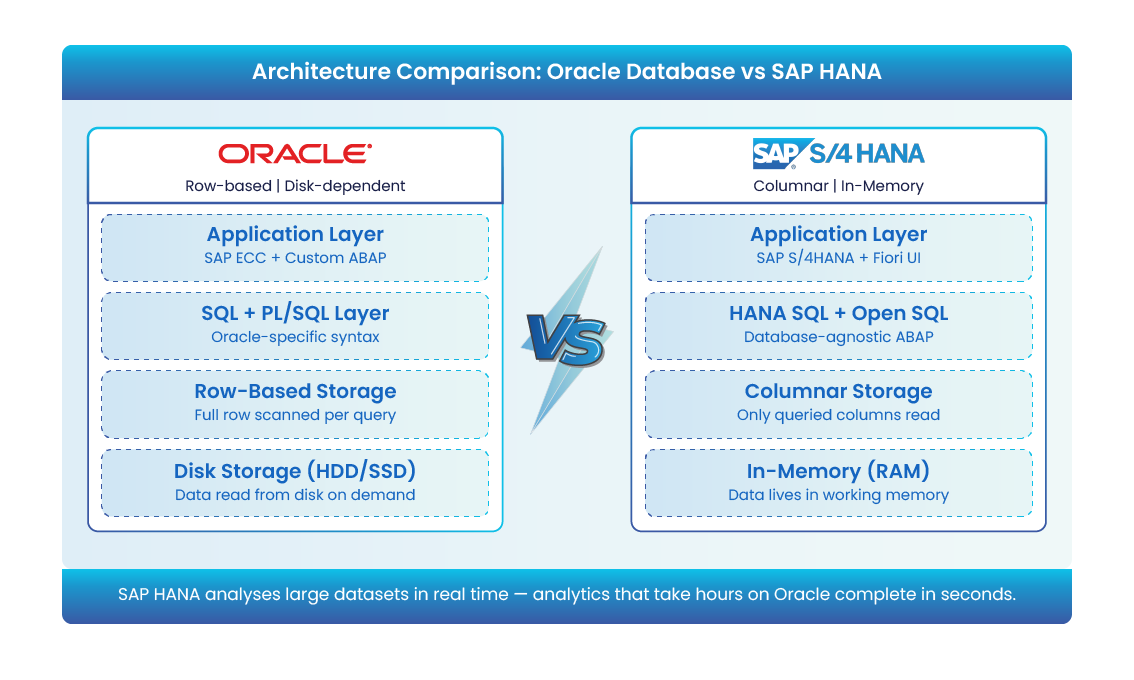
SAP built S/4HANA exclusively on HANA for this reason. Moving from SAP ECC to S/4HANA is not an upgrade in the traditional sense; it is a platform change that affects every layer of the system above the database: custom ABAP programs, database views, stored procedures, and integration interfaces.
Any code containing database-specific syntax (Oracle PL/SQL, Oracle-specific SQL functions, or database-level triggers) must be reviewed and, in many cases, rewritten before the system will run correctly on HANA.
Why Migrate from Oracle to SAP HANA? Key Business Benefits
In-Memory Processing and Real-Time Analytics
SAP HANA processes data directly in working memory, enabling real-time analysis of large data volumes that would take hours on a traditional Oracle-backed ECC system.
For finance teams, that translates to live profit-and-loss visibility without waiting for overnight batch processing. For supply chain, it means demand signals and inventory positions that reflect current reality.
The columnar storage model compounds this advantage. For analytical queries that aggregate across millions of rows, columnar storage allows the database to read only the columns relevant to a query, skipping all others.
Traditional row-based databases like Oracle read entire rows for every record scanned. The difference in query performance for reporting workloads is material, particularly as data volumes grow.
Simplified Data Architecture
SAP S/4HANA simplifies the underlying data model compared to SAP ECC. Many aggregate tables and redundant data structures that ECC maintained for performance reasons (because Oracle required them to avoid expensive joins) are eliminated in S/4HANA.
Fewer tables reduce storage requirements, simplify custom code, and accelerate data loads. However, this simplification also means that custom reports or programs built against the old ECC table structure will need revision after migration.
Support Lifecycle, RISE with SAP, and Cloud Readiness
SAP has positioned RISE with SAP as its primary commercial model for moving customers to S/4HANA in the cloud. It bundles S/4HANA Cloud Private Edition, SAP Business Technology Platform, infrastructure, and support into a single managed subscription, shifting the investment model from upfront capital expenditure on hardware and licenses to a predictable operating expense.
For organizations migrating from Oracle-backed ECC, RISE with SAP addresses two practical challenges. First, it removes the requirement to size and provision HANA hardware on-premise, which is one of the more demanding aspects of a migration project.
Second, it places SAP in the role of managing the infrastructure layer post-migration, reducing the internal Basis overhead required to run HANA at scale.
Staying on Oracle-backed ECC past the 2027 mainstream maintenance deadline means paying extended support contracts at premium rates while the gap between your platform and the current market standard widens. For most CIOs and enterprise architects, the question is no longer whether to migrate but which approach fits the business and when to commit resources.
Read more: Understanding the key challenges of SAP cloud migration.
Oracle to SAP HANA Migration Approaches: Greenfield, Brownfield, and Hybrid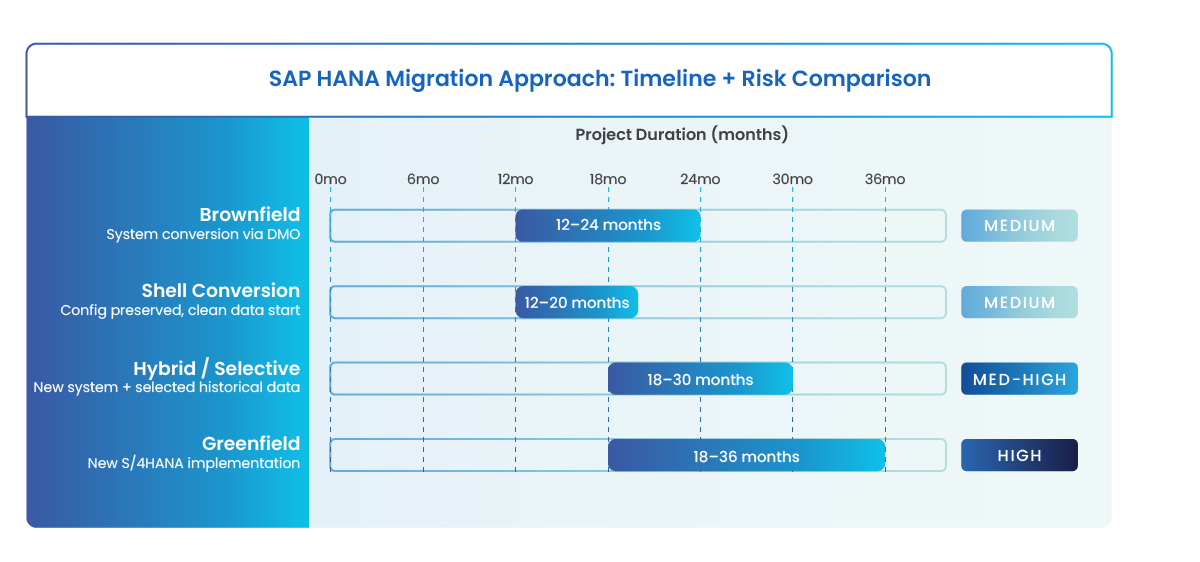
Choosing the right migration approach depends on your current SAP landscape, the scale of legacy customizations, business appetite for process redesign, and available migration timeline. The table below compares the five primary approaches:
| Approach | What It Means | Best For | Data Migration Method | Custom Code | Timeline | Risk Level |
|---|---|---|---|---|---|---|
| Greenfield | New S/4HANA build from scratch; nothing carried forward from legacy | Oracle EBS or non-SAP ERP moving to SAP for the first time; orgs wanting full process redesign | Selective migration of active master data and open transactions only | Rebuilt using SAP best practices; clean slate | 18-36 months | High (transformation scope), low technical debt |
| Brownfield | Convert existing SAP ECC system; config, data, and customizations carried forward | SAP ECC customers on Oracle who need speed and want to protect existing investments | Full data migration via DMO (Database Migration Option) in SUM | Compatibility-checked via ABAP Test Cockpit; targeted remediation required | 12-24 months | Medium |
| Hybrid (Selective Data Transition) | New S/4HANA system, selectively pulling historical data from the ECC source | Orgs with complex legacy data wanting a cleaner start without losing audit history | Selected objects, fiscal years, and open transactions migrated | Mix of standard adoption and targeted rewrite | 18-30 months | Medium-High |
| RISE with SAP | Cloud-managed S/4HANA subscription; SAP manages infrastructure | Orgs reducing IT overhead while migrating; prefers OPEX over CAPEX model | Brownfield or selective conversion; managed by SAP | Customer manages application layer; SAP manages infrastructure | Varies by size | Lower (ops risk managed by SAP) |
| Shell Conversion | Duplicate ECC config without transactional data; repopulate with clean data | Orgs wanting ECC config structure with a fresh transactional data start | Master data migrated; transactional history excluded or archived separately | Config preserved; code reviewed for HANA compatibility | 12-20 months | Medium |
Organizations migrating from non-SAP systems (such as Oracle E-Business Suite) to SAP S/4HANA typically follow a greenfield path, since there is no SAP ECC system to convert.
Those already running SAP ECC on Oracle and prioritizing speed and continuity tend toward a brownfield conversion using DMO. The hybrid or Selective Data Transition approach is increasingly common for organizations that want a clean system while preserving access to historical transactional data.
Read More: A Complete guide to SAP S/4HANA migration approaches: Greenfield, Brownfield, and Bluefield.
Migration Tools for Oracle to SAP HANA
Database Migration Option (DMO) via Software Update Manager (SUM)
The Database Migration Option (DMO) is SAP’s native tooling for migrating from Oracle to HANA. Operating inside the Software Update Manager (SUM), DMO combines the SAP release upgrade with the database migration from Oracle to HANA in a single operation.
In a standard DMO scenario, SUM creates a shadow copy of the HANA target database during the uptime phase, replicating data incrementally while the source Oracle system remains live.
When the system enters the defined downtime window, the database connection switches to HANA, the remaining delta data is migrated, and the system starts up on the new platform. Downtime-optimized DMO, available in SUM 2.0, further reduces the cutover window by front-loading as much data migration as possible into the uptime phase.
DMO also handles Oracle-specific structures, including index-organized tables (IOTs), splitting them by primary key automatically. It is the most widely used and SAP-recommended method for brownfield migrations.
SAP Landscape Transformation Replication Server (SAP SLT)
SAP SLT is a real-time data replication server that uses a trigger-based Change Data Capture (CDC) mechanism. It captures inserts, updates, and deletes at the source, including from non-SAP Oracle databases, and replicates them to SAP HANA with minimal impact on source system performance.
SLT connects to both SAP and non-SAP sources through built-in RFC and JDBC connectivity. In migration projects, it is used for high-availability scenarios where the team needs to keep a HANA target database current throughout the pre-cutover period, enabling near-zero-downtime cutovers. In published benchmarks, SAP SLT has demonstrated replication of 30 TB across five source systems with latency under two hours.
SAP Data Services (SAP BODS)
SAP Business Objects Data Services (BODS) is SAP’s ETL platform, used for transforming and loading data during migration projects. It is particularly valuable when data requires significant cleansing, transformation, or enrichment before loading into HANA. Unlike SLT, BODS is batch-oriented rather than real-time, making it better suited for initial data loads than ongoing replication.
Third-Party Tools: Ispirer and BryteFlow
Third-party tools provide additional options for organizations migrating from non-SAP Oracle systems or seeking no-code extraction and transformation capabilities.
Ispirer specializes in automated conversion of Oracle PL/SQL stored procedures and application code to HANA SQL or ABAP. Custom code conversion is one of the most resource-intensive phases of any Oracle-to-HANA project, and Ispirer’s automation toolkit can process large volumes of stored procedures, reducing manual rewriting effort significantly.
BryteFlow’s SAP Data Lake Builder positions as a no-code tool for extracting SAP data from Oracle-backed systems into a data lake or HANA target, with support for ODP (Operational Data Provisioning) and SAP OData Services extraction methods. It is typically used when the priority is extracting SAP transactional data for analytics workloads during or after migration.
Oracle to SAP HANA Migration Roadmap: A Step-by-Step Process
The following roadmap reflects a brownfield or hybrid migration using DMO as the primary tool. Greenfield implementations follow a similar logical sequence but use SAP Activate methodology for process design and data loading rather than DMO.
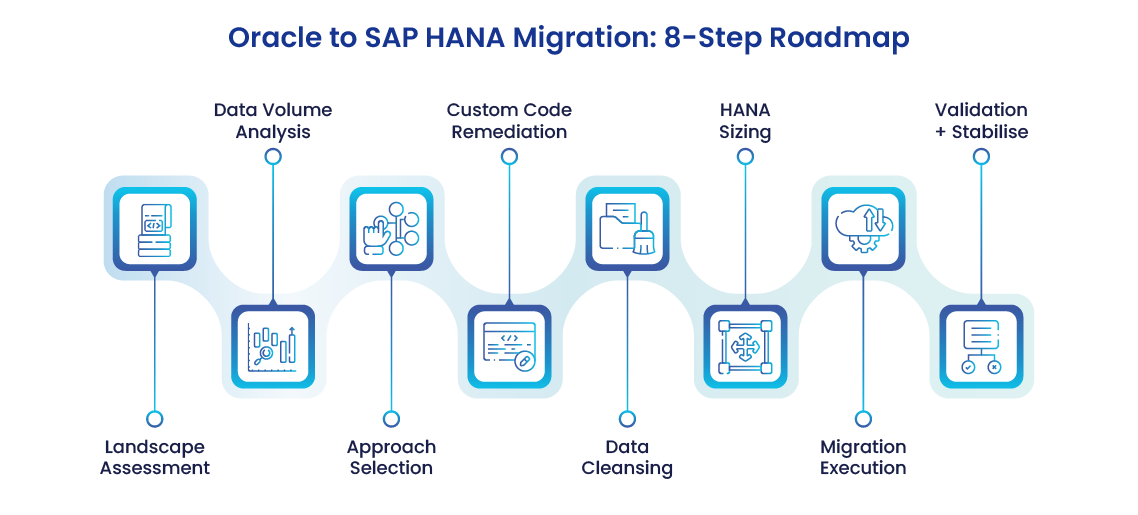
- Landscape Assessment: Map the current SAP system landscape: which SAP applications run on Oracle, what version and patch level, and which integrations connect to external systems. Run SAP’s Custom Code Migration app and ABAP Test Cockpit to flag custom programs containing Oracle-specific syntax. This assessment determines scope, approach, and the remediation work required before migration can begin.
- Data Volume Analysis and Pre-Migration Archiving: Analyze total data volume in the Oracle system, including the age and business relevance of historical records. Transactional data going back 10 or more years significantly extends migration runtimes and increases risk. Archiving inactive records before migration reduces the dataset that needs to move, compresses the downtime window, and lowers total project cost.
- Approach Selection and Infrastructure Design: Based on the assessment findings, select the migration approach (greenfield, brownfield, or hybrid) and the primary toolchain. Define the target HANA infrastructure: on-premise, cloud via RISE with SAP, or a hybrid topology. Confirm hardware or cloud sizing using SAP’s Quick Sizer tool.
- Custom Code Remediation: Run all flagged custom ABAP programs through the ABAP Test Cockpit and Custom Code Migration app. Programs using Oracle-specific database functions, PL/SQL, or deprecated SQL syntax require remediation before they will function on HANA. This phase runs in parallel with infrastructure preparation and can take several months for systems with extensive customizations.
- Data Cleansing and Master Data Quality: Clean master data (customers, vendors, materials, and chart of accounts) before migration. Duplicates, incomplete records, and orphaned entries create data quality problems that are significantly harder to address in the new system than in the source. BODS or equivalent ETL tooling can automate deduplication and validation rules during this phase.
- HANA Infrastructure Preparation and Sizing: Size the HANA hardware or cloud configuration based on the actual post-archiving data volume identified in Phase 2. SAP HANA is an in-memory database and requires RAM sized to hold the full working dataset. Undersized environments degrade under production load and require disruptive scaling after go-live.
- Migration Execution: Execute the migration using the selected toolchain. For brownfield DMO migrations, SUM builds the HANA shadow copy and migrates data during the uptime phase, with a defined cutover window for the final switch. For greenfield or selective migrations, load master data and open transactions using the Migration Cockpit or BODS, followed by validation runs before go-live.
- Post-Migration Validation and Stabilization: Validate data completeness, program behavior, and integration connections in the new HANA environment. Run reconciliation reports against the source Oracle system to confirm record counts and financial balances. Monitor system performance and custom program output for 4 to 8 weeks post-go-live before decommissioning the Oracle environment.
Common Oracle to SAP HANA Migration Challenges
Custom Code Conversion from Oracle PL/SQL
Custom code is the most time-consuming challenge in any Oracle-to-HANA migration. SAP ECC systems running on Oracle accumulate years of ABAP custom code that calls Oracle-specific database functions, uses PL/SQL stored procedures, or relies on SQL syntax that HANA does not support. Every piece of that code must be identified, assessed, and either remediated or retired.
The ABAP Test Cockpit automates the identification phase, flagging programs that use deprecated syntax or database-specific calls. Remediation requires ABAP developers with HANA SQL knowledge, a skill set in short supply as migration demand accelerates. Demand for S/4HANA migration expertise is projected to exceed supply by 35% in 2026, according to SAPinsider research, which means organizations starting late face both higher consulting rates and extended project timelines.
A question that surfaces frequently in Oracle-to-HANA migrations: will the custom programs reading SAP CRM tables (orders, cases, customer records, and addresses) still work after the database switch? The answer depends on how those programs were written. ABAP programs that use standard SAP Open SQL and the SAP data dictionary are database-agnostic and will function correctly on HANA without changes.
The risk comes from programs that bypass the data dictionary to issue native SQL directly against Oracle, or that rely on Oracle-specific functions for string handling, date arithmetic, or aggregation. These programs either return incorrect results or fail outright on HANA, and they often do so silently during testing with no obvious error output.
The ABAP Test Cockpit identifies the risky programs; fixing them requires a developer who understands both what the Oracle version was doing and what the correct HANA equivalent should produce.
Data Quality and Master Data Cleansing
77% of organizations that have moved to S/4HANA from SAP ECC report data management as a significant challenge during migration, according to SAPinsider’s 2025 Migration Research Report. In Oracle-to-HANA migrations, this problem is compounded by years of accumulated data quality debt: duplicate vendor records, inactive customer accounts, and stale master data that has never been cleaned because the effort was always deferred.
Migration forces this work into the open. Moving poor-quality data from Oracle to HANA does not resolve the quality problem; it replicates it in a new system while adding the cost and disruption of the migration itself. Data cleansing should be scoped and resourced as a distinct workstream within the project, not absorbed into the technical migration effort.
Downtime Management and Near-Zero-Downtime Migration
Every database migration requires a production downtime period when the system is unavailable while the database connection switches from Oracle to HANA. For large Oracle databases, this window can extend to many hours if not managed carefully.
Downtime-optimized DMO addresses this by front-loading data migration into the uptime phase, limiting the actual cutover window to the remaining delta data. SAP SLT can also pre-populate the HANA target in parallel with the live Oracle system, enabling near-zero-downtime cutovers.
Near-zero-downtime migration is achievable, but it requires deliberate architecture decisions made at the start of the project, not at the cutover stage. Teams that assume any migration tool delivers zero downtime by default tend to discover the reality during go-live weekend.
Skill Gaps and Resource Constraints
A complete Oracle-to-HANA migration requires a combination of skills that is rarely available in a single internal team: SAP Basis administration, ABAP development with HANA SQL experience, project management under the SAP Activate methodology, data engineering, and change management. Most organizations executing their first migration will need to augment internal capability with experienced external consultants.
Identifying and contracting those resources 12 to 18 months before the planned go-live date is consistently one of the most underestimated requirements of a successful migration. Organizations that start the resource planning process after the technical planning process has begun almost always face scheduling problems during the execution phase.
Data Validation and Historical Data After Oracle to SAP HANA Migration
The migration execution phase receives most of the planning attention, but it is the post-migration validation phase that determines whether the project delivers on its promises. When the system transitions from Oracle to HANA, the validation team must confirm four things:
- Record Completeness: All transactional records have moved with complete accuracy, including line items, balances, and document linkages.
- Program Correctness: All custom programs that accessed Oracle tables continue to return correct results against the HANA environment.
- Integration Integrity: All integration connections to external systems, EDI partners, and analytics platforms function as expected.
- Historical Data Accessibility: Historical data, particularly for compliance, audit, and legal discovery purposes, remains accessible and auditable after the Oracle system is retired.
The fourth point generates problems that teams frequently do not anticipate. SAP CRM tables (orders, cases, customer records, and addresses) that existed in the Oracle system may have been modified during migration by S/4HANA data model changes: field name changes, data type conversions, or table consolidations. Custom programs that read those tables directly may fail silently, returning incomplete data without generating errors that surface in standard testing.
A related challenge arises when the team attempts to retire the Oracle system after go-live. Organizations often discover that years of transactional history sitting in the Oracle database cannot simply be deleted; it is subject to statutory retention requirements (tax, financial audit, employment records) and may be needed for active litigation or regulatory requests. Keeping the Oracle system running for compliance access adds infrastructure cost and operational overhead that was not in the original migration budget.
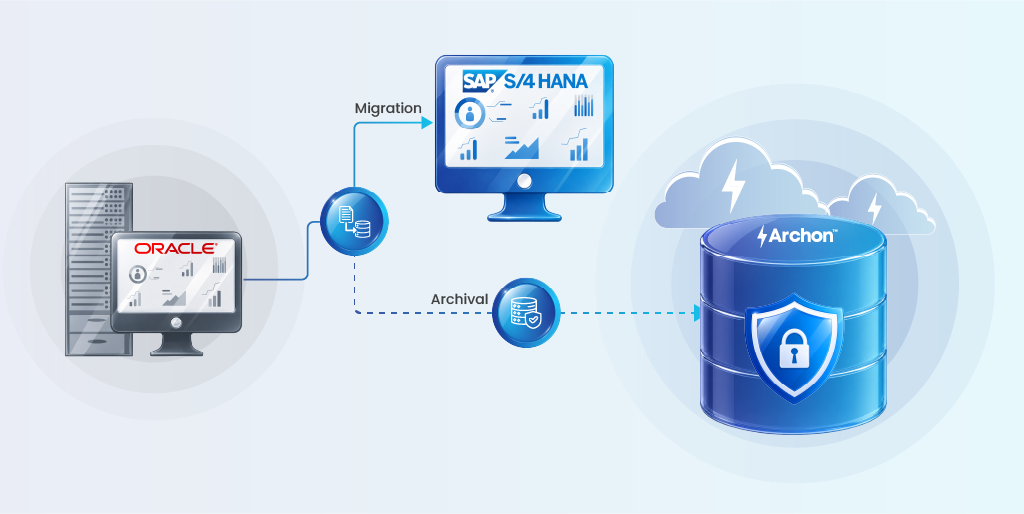
Archon Data Store addresses this directly by providing a structured archive of historical records from the source Oracle environment before decommissioning.
Teams use Archon to archive inactive SAP transactional data (orders beyond the operational retention window, resolved support cases, closed financial periods, and historical customer interaction records) into a structured, searchable format that remains accessible for audit, legal, and business intelligence purposes without requiring the Oracle system to remain live.
This separation of active migration data from historical archive also reduces total migration scope, cutting both project risk and the data volumes that must pass through the cutover window.
To learn how Archon supports Oracle system decommissioning as part of your SAP migration program, book a demo.