


Key Points
- SOFFCONT1 often becomes one of the largest SAP tables because every attachment, workflow document, and GOS file gets stored directly inside the database by default.
- Most SAP environments never configure external content storage through OAC0, causing years of unmanaged attachment growth inside SOFFCONT1.
- Large SOFFCONT1 tables increase SAP HANA memory requirements, slow backups and system refreshes, and create major challenges during S/4HANA migrations.
- Standard SAP housekeeping programs only remove orphaned objects and do not solve long-term SOFFCONT1 growth caused by active business attachments.
- Effective SOFFCONT1 management requires a combination of attachment archiving, external content repositories, retention governance, and ongoing monitoring.
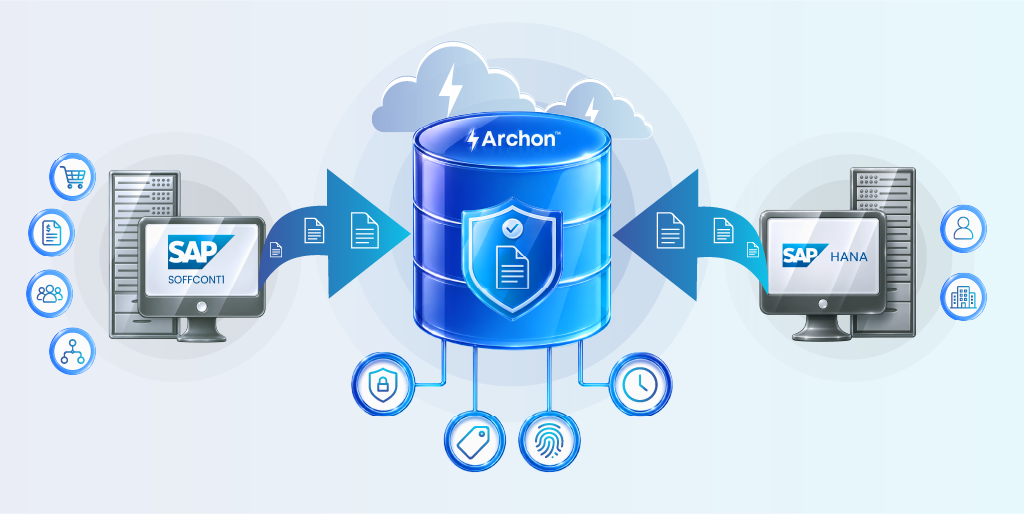
- Archon helps reduce SOFFCONT1 growth by migrating historical attachments out of SAP, redirecting new documents to external storage, and preserving secure user access through standard SAP navigation.
Ever expected that one table you overlooked is now adding up your SAP storage costs?
Every SAP Basis team eventually notices the same thing. You check the largest database tables expecting names like BSEG or BKPF, but instead you find SOFFCONT1 consuming hundreds of gigabytes and growing faster than expected.
Nobody planned it. Nobody actively monitored it. It usually goes unnoticed until an S/4HANA migration or database sizing exercise reveals a much larger footprint than anticipated. Meanwhile, SOFFCONT1 has been quietly accumulating attachments and documents since the day the SAP system went live.
Your enterprise notices it only when the problem deepens – rising database costs, larger HANA sizing requirements, backup delays, or migration roadblocks during S/4HANA assessments. By then, the table has already been growing for years and cleaning it up becomes a major project.
This article explains why SOFFCONT1 grows so quickly, why standard housekeeping is not enough, and what a long-term solution actually looks like.
What is SAP SOFFCONT1?
SOFFCONT1 is the content table within SAP’s Business Object Repository (BOR), part of the SAP Office Framework (SAPoffice). It is the physical storage layer for unstructured content, specifically the binary payload of documents and attachments created across SAP’s application layer.
Technically, SOFFCONT1 stores content in chunks, each row a segment of binary data associated with a Generic Object Services (GOS) object. Metadata lives in companion tables (SOOD, SOFM, SOOS). SOFFCONT1 is purely content: raw bytes, stored relationally in a database not built to handle them efficiently.
What Gets Stored in SOFFCONT1
The table accumulates content from nearly every corner of SAP: GOS attachments on purchase orders, invoices, and HR records; workflow attachments and decision notes; scanned documents from AP automation; output management forms and correspondence; and user-generated notes from SAPoffice.
In a mature SAP landscape, virtually every module that allows users to attach a document writes to SOFFCONT1, unless an explicit content server redirect has been configured. Most enterprises never configure that redirect.
Why SAP SOFFCONT1 Table Grows So Fast
The growth is structural. Three forces compound simultaneously.
First, SAP stores all attachment content inside the database by default. Unless a Content Management Server has been configured via transaction OAC0, every document attached through GOS lands in SOFFCONT1. Most implementations go live without this configuration.
Second, attachment volumes have intensified. A single procurement cycle can generate a dozen attachments across requisition, purchase order, goods receipt, and invoice. Multiply that across thousands of transactions per month and the arithmetic is unforgiving.
Third, no automated archiving runs by default. Unlike transactional tables regularly included in data archiving cycles, SOFFCONT1 is routinely excluded. Every byte written stays there permanently unless someone explicitly builds an archiving job. The result: SOFFCONT1 in large enterprise environments frequently exceeds 500 GB. In document-intensive industries, tables over 1 TB are not uncommon.

Why Large SOFFCONT1 Tables Become a Serious SAP Problem
A large SOFFCONT1 table affects far more than storage consumption. It increases SAP HANA memory requirements, slows backups and system refreshes, and complicates S/4HANA migration projects. At the same time, retaining years of unmanaged attachment data creates growing compliance and governance risks.
Increased SAP Database Size
As you know, storage is not cheap in licensed environments. SAP HANA charges by in-memory footprint; a bloated SOFFCONT1 does not just occupy disk; it consumes RAM. Enterprises migrating to S/4HANA frequently find SOFFCONT1 among the primary contributors to oversized database scopes, driving up hardware and migration costs.
SAP Performance Degradation
Database operations touching the Business Object Repository slow down as SOFFCONT1 grows. Workflow steps that trigger GOS lookups, approval processes loading attachment lists, backup windows, and system copies all degrade. Transport refreshes for QA systems consume time Basis teams cannot afford during sprint cycles.
Compliance and Retention Risks
Ironically, SOFFCONT1 creates two opposite compliance problems simultaneously. It retains data that should have been deleted, violating data minimization principles under GDPR, while storing it in a format that cannot be searched, produced for eDiscovery, or placed on legal hold. The table is a compliance black box: full of obligations, short on control.
Why Does SAP Still Archive SOFFCONT1 Data After Retention Periods Expire?
Retention periods mark the minimum duration data must be kept, not the point at which destruction becomes safe.
After the primary retention period closes, enterprises still need access for historical reference, dispute resolution (supplier deductions, warranty claims), tax and financial reviews (VAT reclaim investigations, transfer pricing audits), and internal investigations and governance (regulatory inquiries, forensic reviews, Board-level escalations).
This is why SAP archiving, moving content out of the SAP database while preserving accessibility, integrity, and retrievability preferred long-term strategy, rather than deletion.
How to Identify the Root Cause of SOFFCONT1 Growth
Before fixing the problem, you first need to understand what is actually driving SOFFCONT1 growth inside your SAP environment. Identifying the root cause of SOFFCONT1 growth requires looking beyond table size alone.
Analyze SAP Table Growth
Begin with transaction DB02. Review SOFFCONT1’s growth over a rolling 24-month period. Identify inflection points and cross-reference against module go-lives or workflow changes. Complement this with a TAANA run to understand distribution by object type, client, and creation date.
Review Attachment Sources
The object type stored in companion table SOOD identifies the originating business process for each attachment. Run a frequency analysis across object types, BUS2012 for purchase orders, BUS2032 for sales orders, EQUI for equipment.
In most environments, three to five object types account for the majority of SOFFCONT1 volume. Addressing those first produces the most immediate impact.
Evaluate Aged and Obsolete Content
In most enterprise SAP systems, 60–70% of SOFFCONT1 content is more than three years old, much of it tied to completed transactions that will never be accessed through the SAP interface again, strong candidates for archival rather than active database storage.

Best Practices to Reduce SAP SOFFCONT1 Table Size
Reducing SOFFCONT1 requires more than one-time cleanup activities. Your organization needs a combination of housekeeping, archiving, external storage integration, and retention governance to control long-term growth. The goal is to shrink the current table and prevent uncontrolled expansion from returning.
Implement Regular SAP Housekeeping
SAP provides standard deletion programs for orphaned SAPoffice objects, attachments that have lost their reference to the originating business document. Program RSOSREPE identifies these and flags them for deletion. Run this periodically as a baseline hygiene measure before any archiving exercise.
Archive Aged SAP Attachments
Use SAP’s Archive Development Kit (ADK) with appropriate archiving objects for GOS-managed content. Archiving moves the content payload out of SOFFCONT1 onto a defined storage tier while preserving the GOS link, users can still navigate to and open attachments from within SAP. Define archiving policies by object type and retention schedule and run jobs on a regular cycle.
Move Attachments to External Storage
For net-new attachments, configure SAP’s Content Management Service via OAC0 to redirect attachment storage to an external content repository. This intercepts the write path before content reaches SOFFCONT1, ensuring the table does not continue growing even as historical volumes are addressed through archiving.
Define Compliance and Retention Policies
No housekeeping program is sustainable without documented retention policies aligned to legal, regulatory, and contractual obligations. Without them, teams default to retaining everything indefinitely, which is how SOFFCONT1 reached its current state.
How Archon Helps Optimize SAP SOFFCONT1 Management
Archon addresses SOFFCONT1 at both ends of the problem: the historical backlog and the ongoing flow.
For live attachments, a lightweight configuration change in SAP routes the content server designation in OAC0 to Archon Data Store. From that point, nothing new writes into SOFFCONT1. Users retain full access through standard GOS navigation, the experience is unchanged; the storage location is not.
For historical content, Archon’s migration tooling systematically extracts existing SOFFCONT1 records with full metadata context and moves them to Archon with immutable storage, cryptographic hash verification, and trusted timestamps that preserve evidentiary integrity.
The migration runs in controlled batches without SAP downtime, gradually reducing SOFFCONT1 to a stable, manageable size. Once completed, new attachment growth is permanently redirected away from the table, preventing SOFFCONT1 from expanding again.
Lower SAP Infrastructure Costs
Reducing SOFFCONT1 directly lowers the HANA in-memory footprint, shortens backup windows, and improves system copy times. For enterprises sizing their S/4HANA environment, the reduction in database volume affects infrastructure specification, and budget, from day one.
Support S/4HANA Migration and SAP Data Management
SOFFCONT1 bloat is a consistent obstacle in S/4HANA migration assessments. By archiving content to Archon Data Store prior to migration, teams reduce the active database size, simplify the migration object, and carry only structured references, not binary payloads, into the new system. Historical attachments remain accessible throughout and after the transition.
Consolidate All Unstructured Data in a Single Content Repository
Across a typical enterprise SAP landscape, unstructured content is fragmented: SOFFCONT1, SAP DMS, SharePoint, legacy content servers. Archon consolidates everything into a single, searchable, governance-ready repository with consistent metadata, retention policy enforcement, and legal hold capability, regardless of originating system or vintage.
That is what genuine SAP attachment management looks like: not a quarterly housekeeping job, but a permanent architecture that keeps the database clean, the business protected, and the auditors satisfied.
Every SAP landscape is different. If your SOFFCONT1 table is growing rapidly, our experts can help assess the root cause and recommend the right archiving and storage optimization approach. Contact us to learn more.


