


Key Points
- Assess SAP data volumes, dependencies, growth patterns, and migration scope before selecting the technical migration approach.
- Cleanse and reconcile master data and open transactions early, with business owners responsible for validation and sign-off.
- Plan Azure infrastructure, network capacity, storage, and downtime based on the actual post-cleansing data volume rather than the existing SAP footprint.
- Establish clear retention, compliance, and governance policies to determine what should migrate, what should be archived, and what can be securely retired.
- Validate end-to-end business processes, conduct full-scale migration rehearsals, and use a Go/No-Go assessment before approving production cutover.
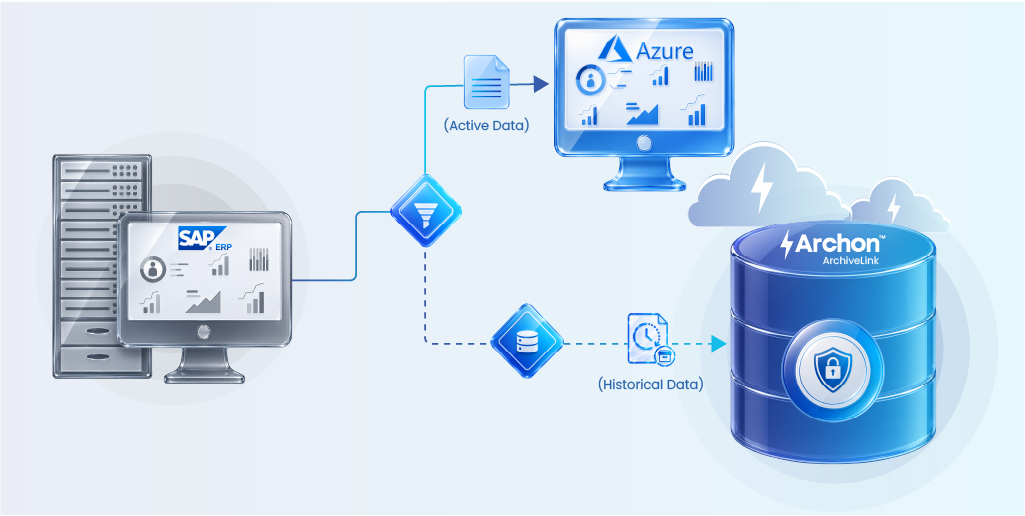
- Archon ArchiveLink helps archive historical SAP data and documents while active data moves to Azure, supporting a leaner SAP environment and continued access to historical information.
Every SAP-to-Azure migration plan looks the same on slide one: lift, shift, modernize, done in nine months. Then someone runs a database size report and finds an 8 TB ECC system where 70 percent of the tables are older than a decade. That’s the moment the timeline slips, the ExpressRoute bandwidth math stops working, and the budget conversation gets uncomfortable.
Data, not infrastructure, is the part of an SAP migration to Azure that actually breaks schedules. Azure can provision compute in minutes. It cannot make a decade of undeleted change documents, cluster tables, and idoc logs smaller on its own. That work has to happen before a single byte moves.
This checklist is built around the data management decisions that determine whether your SAP migration to Azure finishes on the date in the steering committee deck, or six months after it.
Why Data Management Makes or Breaks an SAP Migration to Azure
Azure migration guidance from Microsoft’s own Cloud Adoption Framework starts with the same question every project should ask first: what does the current database actually contain, and does all of it need to travel to the new platform? The answer is almost always no.
A few numbers explain why this matters so much:
- Data volume management programs regularly report SAP database reductions between 40 and 95 percent once historical, closed, and non-statutory data is separated before a migration.
- Sizing packages for S/4HANA conversions are priced in data tiers. Every gigabyte of unneeded data pushed into the target system inflates HANA memory sizing and the associated Azure VM and storage cost, often for the life of the contract.
- Migrating a database that has not been trimmed extends cutover windows, and cutover windows are the one variable, finance and operations teams will not forgive slipping.
According to Forrester’s Total Economic Impact™ of SAP on Microsoft Cloud, a composite organization migrating SAP workloads to Microsoft Cloud realized a projected net present value (NPV) of USD 10.52 million over three years.
While the study evaluates the overall business value of modernization, it reinforces an important lesson: organizations that enter migration with a well-defined strategy for data, governance, and operational readiness are positioned to capture significantly greater long-term returns than those treating migration as a simple infrastructure relocation.
None of this is a reason to delete anything. It’s a reason to sort data into what runs the business today and what exists only for audit, tax, or legal defensibility. That sorting decision is the actual checklist.
Data Management Checklist Before SAP to Azure Migration
Use this actionable checklist to assess your SAP landscape, prepare your data, and eliminate unnecessary migration overhead. Completing these steps before cutover helps reduce risk, shorten migration windows, and improve post-migration performance.
Step 1: Run a Data Volume Assessment Before You Touch a Migration Tool
Before selecting a migration approach, get a clear read on what is sitting in the source system. SAP’s own Data Volume Management (DVM) tooling, available through SAP for Me and Solution Manager, will show table-level growth by module: finance documents, material movements, HR time data, IDocs, change logs, and spool/print data are consistently the biggest offenders.
Actionable steps:
- Pull a DVM report segmented by module and table, not just total database size.
- Flag tables where more than 60 percent of records fall outside your legal retention window.
- Identify which tables are growing fastest month over month, since those will dictate ongoing Azure storage cost even after go-live.
- Share the report with finance, tax, and legal stakeholders before finalizing scope. Retention obligations, not IT preference, should decide what stays hot.
Step 2: Decide the Migration Approach Based on What You Found
The assessment output feeds directly into a decision Microsoft’s Cloud Adoption Framework treats as foundational: classical system copy versus DMO.
- Classical migration fits when the operating system and database are already Azure-compatible and no Unicode or HANA conversion is required. It’s a two-step, homogeneous or heterogeneous copy.
- DMO fits when you’re combining the Azure move with an upgrade to S/4HANA and a HANA database conversion in a single pass. This is the more common path for organizations riding the 2027 SAP ECC deadline.
Either approach performs worse, and takes longer, when it’s forced to carry uncleansed historical data through the conversion. Decide the approach after the data assessment, not before.

Step 3: Build the Cleansing and Reconciliation Plan
Data cleansing before an SAP migration is usually the single biggest driver of schedule risk. Teams that have gone through S/4HANA conversions consistently flag the same failure pattern in post-project retrospectives: cleansing was scoped as a one-week task and turned into a six-week bottleneck because master data owners were brought in too late.
Actionable steps:
- Assign a data owner per object type (customer master, vendor master, material master, cost center) who signs off on cleansed data, not just IT.
- Run a test conversion early, using an SAP Financial Data Quality service pass if available, and treat failed records as a scoping input rather than a surprise at cutover rehearsal.
- Reconcile open items (open POs, unpaid invoices, unposted documents) separately from historical, closed items. Only open items need to carry forward with full transactional fidelity.
- Document every cleansing exception. Auditors will ask why a record was excluded.
Step 4: Plan Network and Downtime Around the Real Data Volume
Once the dataset is right-sized, revisit the technical migration plan. Azure guidance is explicit that ExpressRoute bandwidth needs to be sized for medium to large database transfers, and that Azure managed disks, VM throughput limits, and network capacity all have independent quotas that can bottleneck a migration even when compute looks sufficient on paper.
Actionable steps:
- Size ExpressRoute circuits against the post-cleansing database size, not the current on-premises footprint.
- Test disk striping and managed disk throughput limits during a sandbox migration, since these are configured per disk, not per VM.
- For heterogeneous migrations (OS or DB platform change), budget more downtime than for homogeneous ones, and validate that estimate against a full-scale rehearsal, not a sample dataset.
- Confirm Azure Active Directory single sign-on and role-based access are configured and tested before cutover, so the access model doesn’t become a go-live day fire drill.
Step 5: Separate What Runs the Business from What Proves Compliance
This is the step most migration checklists skip, and it’s the one that determines whether your Azure environment stays lean after go-live or starts regrowing the same bloat within eighteen months.
Not all data belongs to the transactional system, even after cleansing. Closed fiscal year documents, terminated employee records past their legal hold, decommissioned plant history, and superseded material master versions have no operational function. They exist purely to satisfy statutory retention: tax authorities, labor law, and industry-specific regulations like 21 CFR Part 11 or GoBD.
Actionable steps:
- Map every data object against its actual retention requirement (jurisdiction-specific: tax, labor, financial, industry) rather than a generic “keep everything just in case” policy.
- Separate data with an active retention clock from data whose clock has already expired but can’t be deleted yet due to legal hold.
- Build the archiving decision into the migration plan itself, not as a post-go-live cleanup project. Retrofitting archiving after cutover means doing the data volume work twice.

Next up: RISE with SAP: Migration Paths, Challenges, and Best Practices
SAP to Azure Data Migration Checklist
Rather than treating preparation as a single activity, successful organizations approach migration as a sequence of governance decisions.
Each checkpoint below helps reduce technical complexity before workloads are moved to Azure.
| Assessment Area | Go Criteria | Evidence Required | Risk if No-Go | Go/No-Go |
|---|---|---|---|---|
| Migration Scope | All SAP systems, interfaces, third-party applications, and dependent databases are documented and approved. | Landscape inventory and dependency map. | Hidden integrations may fail after migration. | GONO-GO |
| Data Volume Assessment | Database analysis identifies active, historical, and obsolete data with agreed migration scope. | SAP DVM report or database assessment. | Oversized migration, higher Azure costs, longer downtime. | GONO-GO |
| Master Data Quality | Customer, vendor, material, finance, and HR master data have been cleansed and approved by business owners. | Business sign-off and data quality reports. | Duplicate records, reconciliation issues, failed testing. | GONO-GO |
| Historical Data Strategy | Historical SAP data has been identified for archiving, with retention requirements documented. | Data retention matrix and archival plan. | Production database remains unnecessarily large after migration. | GONO-GO |
| Compliance & Retention | Legal retention, tax regulations, audit requirements, and legal holds have been validated. | Compliance review and retention policy documentation. | Regulatory violations and audit findings. | GONO-GO |
| Custom Code Assessment | Custom ABAP programs, reports, enhancements, APIs, and integrations have been analyzed and remediated where necessary. | Custom code inventory and remediation log. | Broken reports and unsupported business processes. | GONO-GO |
| Infrastructure Readiness | Azure landing zone, networking, storage, VM sizing, security, backup, and disaster recovery have been validated. | Infrastructure readiness report. | Infrastructure bottlenecks and performance issues. | GONO-GO |
| Performance & Sizing | Azure resources have been sized using post-cleansing database estimates rather than current production size. | Capacity planning documentation. | Higher operational costs and resource overprovisioning. | GONO-GO |
| Security & Identity | Authentication, role-based access, encryption, and identity federation have been tested successfully. | Security validation report. | User access failures and security vulnerabilities. | GONO-GO |
| Business Process Validation | End-to-end processes such as Procure-to-Pay, Order-to-Cash, Record-to-Report, and Hire-to-Retire have passed business testing. | User Acceptance Testing (UAT) sign-off. | Critical business operations fail after go-live. | GONO-GO |
| Migration Rehearsal | At least one full-scale migration rehearsal has been completed within the planned cutover window. | Dry-run report with actual timings. | Unexpected downtime during production migration. | GONO-GO |
| Rollback Strategy | Rollback procedures have been documented, tested, and approved. | Rollback runbook and test results. | Extended outages if migration issues occur. | GONO-GO |
| Business Readiness | Business users, support teams, and operations teams are trained and prepared for go-live. | Training completion and operational readiness checklist. | High support volumes and slower user adoption. | GONO-GO |
| Historical Data Accessibility | Archived SAP data can be searched and retrieved without relying on the legacy production system. | Archive validation and user acceptance. | Loss of historical visibility and delayed audit responses. | GONO-GO |
Readiness Scoring Guide
Once each assessment area has been evaluated, use the scoring guide below to determine your organization’s overall migration readiness.
| Score | Readiness Level | Recommendation |
|---|---|---|
| 13–14 GO | Production Ready | The migration has met all critical technical, business, and governance requirements. Proceed with production cutover. |
| 10–12 Conditional GO | Proceed with Mitigation | Minor risks remain but have documented mitigation plans and executive approval. |
| 7–9 No-Go | Resolve Critical Gaps | Several high-risk areas remain unresolved. Delay production until corrective actions are completed. |
| Below 7 No-Go | Not Ready for Migration | Fundamental issues exist in data quality, governance, testing, or infrastructure. Restart readiness assessment after remediation. |
Executive Decision Matrix
Before authorizing production cutover, validate that each critical migration workstream meets the required level of readiness. This weighted matrix highlights where the project is on track and where additional mitigation may be required to reduce business and operational risk.
| Category | Weight | Status |
|---|---|---|
| Data Readiness | 30% | Pass Fail |
| Technical Readiness | 25% | Pass Fail |
| Security & Compliance | 20% | Pass Fail |
| Business Validation | 15% | Pass Fail |
| Operational Readiness | 10% | Pass Fail |
Decision Time
Use the final assessment below to determine whether your organization is ready to proceed with production migration or whether additional preparation is needed to reduce implementation risk.
GO – The SAP migration to Azure can proceed as planned.
CONDITIONAL GO – Proceed only after approved mitigation actions are completed.
NO-GO – Production migration should be postponed until all critical issues have been resolved.
Migration is one piece. See the full picture in our SAP modernization guide.
How Archon Supports SAP Migration to Azure
Moving SAP workloads to Azure does not require moving every record into the production environment.
In most SAP landscapes, only a portion of the database actively supports current business operations. The remaining data consists of completed transactions, historical financial records, closed projects, legacy documents, and information retained primarily for compliance or audit purposes.
Archon ArchiveLink helps organizations separate these two workloads before migration.
Active operational data continues its migration to SAP running on Azure, ensuring business users have immediate access to the information required for daily operations. Historical SAP data, together with associated business documents, is archived through Archon ArchiveLink into Archon Data Store, where it remains securely preserved, searchable, and available for compliance, audits, reporting, and historical reference.
This approach delivers several business advantages. Production SAP databases remain significantly leaner, reducing infrastructure requirements and improving system performance.
Migration timelines become shorter because fewer records require validation and testing. Long-term retention policies can be managed independently of the operational SAP environment, enabling organizations to decommission legacy SAP infrastructure without losing access to historical business information.
Archon incorporates historical data management into the overall modernization strategy, allowing organizations to migrate only what their business truly needs while supporting SAP landscape optimization and retaining complete access to historical SAP information.
Ready to Build a Smarter SAP Migration Strategy?
Modernizing SAP is about more than relocating workloads to Azure. It is an opportunity to simplify your data landscape, reduce infrastructure costs, improve application performance, and establish a long-term information governance strategy.
Ready to see what your database looks like once the historical weight comes off before Azure migration? Talk to SAP experts about data volume assessment.


