


Key Takeaways
- Annual ECC cost is 35–45% of your original license investment every year, indefinitely, until decommissioning. This non-negotiable baseline drives all migration decisions.
- The 2027 deadline forces one of three paths: extended SAP support at same cost, third-party support at 50% savings, or S/4HANA migration at 3–4x upfront cost.
- Historical data is the hidden cost driver in S/4HANA migrations. Keeping read-only ECC alive costs 5.0x your annual baseline over five years post-go-live.
- Pre-migration archiving reduces data volume 80–90%, shrinks S/4HANA footprint, cuts custom code scope, and eliminates read-only ECC costs that typically linger 5+ years.
- 60% of S/4HANA projects run over budget because they don’t plan data handling upfront. The archive decision separates managed costs from unmanaged surprises.
- Archon enables ECC decommissioning immediately after S/4HANA go-live by making historical data accessible independently, removing the costliest post-migration liability.
Companies know they need to migrate from ECC to S/4HANA by 2027. Yet most are keeping ECC alive after go-live because they think migrating historical data to the new system is either too expensive or too risky.
Nearly 60% of S/4HANA migrations run over budget. The primary culprit: historical data handling.
- Migrate it all to S/4HANA; you’re paying for in-memory infrastructure to hold a decade of closed invoices.
- Don’t migrate it; you’re keeping ECC running read-only at $1.5–2M annually for data that should have been archived years ago.
As of Q2 2024, only 37% of ECC customers had even purchased S/4HANA licenses, the other 63% are watching the 2027 deadline approach, frozen by the false choice between data loss and unlimited cost.
The 2027 deadline isn’t a cliff but a forcing function. The three years between now and the end of mainstream support are the only window where you can make the data decision that actually saves money. After 2027, every month you keep ECC alive costs more. After 2030, SAP won’t even offer paid support, leaving you with third-party maintenance or unsupported risk.
This article breaks down what the real costs actually are, what the 2027 deadline actually forces you to do, and the data strategy that eliminates the false choice because there is a third option that most migration guides don’t address.
If your S/4HANA data migration project plan assumes ECC will decommission but doesn’t include an archive workstream, the timeline is wrong. Read on to understand what you’re actually paying for, and why pre-migration archiving is where the cost reduction actually happens.
What is SAP ECC?
SAP ECC (ERP Central Component) is the centerpiece of SAP Business Suite 7, released in 2005 and the dominant enterprise ERP platform globally for nearly two decades.
It runs as a modular system covering:
- Finance (FI)
- Controlling (CO)
- Materials Management (MM)
- Sales and Distribution (SD)
- Production Planning (PP)
- Plant Maintenance (PM)
- Human Capital Management (HCM)
The architecture is row-based, running on traditional relational databases: Oracle, IBM DB2, Microsoft SQL Server, or SAP MaxDB. This means heavy use of aggregate and index tables, with periodic batch reconciliation jobs running between modules overnight.
ECC became the workhorse because it was configurable without requiring source code modification for most scenarios, because it integrated with the broader SAP ecosystem cleanly, and because SAP’s support infrastructure for it was robust.
The current status:
- Mainstream maintenance for SAP Business Suite 7 ends 31 December 2027
- Extended maintenance is available through 31 December 2030 at a 2% premium on top of standard maintenance fees
- After 2030, SAP does not offer paid maintenance for ECC
Industry projections suggest only 57% of ECC customers will have completed their transformations to S/4HANA when mainstream maintenance ends.
What is SAP S/4HANA?
S/4HANA (SAP Business Suite 4 SAP HANA) launched in February 2015 as SAP’s next-generation ERP, and “HANA” in the name is the constraint that changes everything: it runs exclusively on the SAP HANA in-memory columnar database. Not optional.
The shift from row-based disk storage to columnar in-memory fundamentally reshapes the data model and eliminates much of the redundancy ECC required for performance.
The signature change is the Universal Journal (table ACDOCA), which consolidates Finance and Controlling postings into a single table carrying every accounting dimension on every line.
The old financial and cost posting tables no longer receive new postings. The nightly reconciliation that kept Finance and Controlling aligned is architecturally unnecessary.
The summary tables that stored pre-computed balances (GL totals, customer balances, vendor balances) are removed as physical tables and computed on the fly instead. The old table structures survive as compatibility views so legacy reports that query them don’t break, but you cannot write new data to them.
SAP Fiori is the primary user interface which is role-based, web and mobile friendly — though the classic SAP GUI remains available for some transactions. Deployment options span on-premise, S/4HANA Cloud Private Edition (the core of RISE with SAP), S/4HANA Cloud Public Edition, and hybrid. Embedded analytics, AI/ML, and IoT integration are architectural rather than bolted on as separate modules.
The Current State and Why 2027 Matters
What you’re actually paying to keep SAP ECC alive
You have a perpetual ECC license that you purchased years ago. That license never expires. But SAP’s support like security patches, tax compliance updates, regulatory changes — costs money every single year.

Your annual ECC cost breaks down like this (as a percentage of your original ECC license investment):
- SAP maintenance: 22% annually
- Database license and maintenance: 6–10% annually (Oracle is 2–3× more expensive than SQL Server)
- Infrastructure: 4–8% annually (servers, storage, backups, disaster recovery, networking)
- Operational labor: 3–5% annually (Basis administrators, security patching, compliance audits)
Total annual cost: 35–45% of your original ECC license investment, every single year.
This means if you originally spent $X on ECC, you’re now spending 0.35–0.45× that amount annually just to keep the system running. No new functionality. No business transformation. No innovation. Just the cost of maintaining a legacy system.
And this cost is non-negotiable until you decommission ECC. It happens every year without fail.
Why 2027 is a forcing function, not a cliff
At the end of 2027, SAP system doesn’t stop working but it stops getting maintained by SAP.
You have three real options, each with dramatically different costs. Understanding these costs before 2027 arrives is the single most important financial decision your IT organization will make this year.

See your actual TCO in 3 minutes!
Download our TCO whitepaper. Build your cost model based on your system size and migration path.
The Three Paths and Their True Cost
Path 1: SAP extended maintenance through 2030
SAP offers extended support from 2028 through December 31, 2030. The cost: a 2% premium on top of your standard 22% maintenance fee.
Annual cost breakdown for extended maintenance (as % of original license):
- SAP maintenance: 24% (instead of 22%)
- Database, infrastructure, labor: ~10–13% (unchanged)
- Total annual cost: ~34–37% of original license investment per year through 2030
This is roughly equivalent to your current ECC costs, maybe slightly higher due to the extended maintenance premium.
The hard deadline: December 31, 2030. After that date, SAP offers no support at any price. You must migrate or switch to option 2.
Cumulative cost, 2026–2030: Roughly 1.7–1.9× your original ECC license investment in total maintenance/infrastructure/labor costs over five years.
The advantage: stability and predictability. You know exactly when the deadline is. You have a clear timeline to plan the migration.
The disadvantage: you’re paying the full ECC cost for three more years, then forced into a migration decision regardless of whether you’re ready.
Path 2: Third-party SAP maintenance (indefinite runway)
Companies like Rimini Street, Spinnaker Support, and Support Revolution provide SAP ECC maintenance at approximately 50% of SAP’s rates. They deliver the same service: tax updates, security patches, regulatory compliance changes, bug fixes.
Annual cost breakdown (as % of original license):
- Third-party maintenance: ~11% (half of SAP’s 22%)
- Database, infrastructure, labor: ~10–13% (unchanged)
- Total annual cost: ~21–24% of original license investment per year
This is roughly 0.6× your current ECC costs — meaningful savings every single year.
There is no end date. You can stay on ECC indefinitely with third-party support. SAP historically objected to this arrangement, but courts have consistently sided with the third-party vendors. The option is legal, proven, and used by thousands of enterprise customers.
Cumulative cost, 2026–2030: Roughly 1.0–1.2× your original ECC license investment. That’s approximately 0.6× the cost of extended SAP support.
The advantage: you save real money every year, indefinitely. You buy time for a migration without financial penalty.
The trade-off: You’re no longer on SAP’s official support. If something breaks catastrophically and you can’t fix it yourself, SAP won’t help.
Path 3: Migrate to S/4HANA
This is the “solve the problem” path. But it has a significant price tag upfront.
Migration project costs (year 0–1, as multiples of your annual ECC cost):
- Consulting and system integration services: 1.5–4× your annual ECC cost
- Custom ABAP code remediation and testing: 0.3–1× your annual ECC cost
- Data migration, cleansing, and validation: 0.2–0.6× your annual ECC cost
- User training and change management: 0.25–0.7× your annual ECC cost
- Infrastructure setup and cloud commitments: 0.2–0.6× your annual ECC cost
Total migration cost: 2.5–7× your annual ECC cost depending on your approach and system complexity.
The most common migration path (Brownfield — converting your existing system) costs 3–4× your annual ECC cost for a mid-market company.
Post-migration annual costs (years 2+, as % of original license):
- RISE with SAP or cloud subscription: 12–24% of original license value annually
- Business Technology Platform (BTP) for custom extensions: 3–8% annually (new cost line, rarely budgeted upfront)
- Ongoing support and stabilization services: 4–10% annually
Total post-migration annual cost: 19–42% of original license value annually.
This is important: most companies’ post-migration costs are equal to or higher than what they paid for ECC. You’re not reducing cost but you’re restructuring it and buying modern infrastructure and capability.
Still not sure which path is right for you? Book a 30-minute architecture review. We assess your data, your timeline, and your budget.
The Honest 5-Year Financial Comparison
| Path | Upfront cost | Annual cost | Total 5-yr cost |
|---|---|---|---|
| Stay on current ECC | Baseline (0×) | 1.0× annual cost | 5.0× annual cost |
| Extended SAP support (to 2030) | Baseline (0×) | 1.0× annual cost | 5.0× annual cost |
| Third-party support (indefinite) | Baseline (0×) | 0.6× annual cost | 3.0× annual cost |
| S/4HANA migration | 3–4× annual cost | 0.8–1.2× annual cost | 7–10× annual cost |
This table is why 60% of S/4HANA projects struggle with budget approval. The migration is frontloaded, expensive, and doesn’t reduce annual cost, it restructures it. CFOs see 3–4× upfront and ask: “Why would we do this if it costs more?”
The answer is buried in a fourth option that most CFOs never see.

The Hidden Cost Nobody Budgets For: Historical Data
When you migrate to S/4HANA, you face a critical decision about your historical ECC data — a decade of invoices, purchase orders, GL postings, completed transactions, and operational records.
Most companies don’t make this decision consciously. They discover it mid-project and end up choosing the worst option by default.

Bad option 1: Migrate all historical data to S/4HANA
Your ECC database is 10–15 TB. HANA’s columnar compression reduces it to 1.5–2.5 TB. You bring all of it to S/4HANA.
Here’s what that costs: S/4HANA pricing scales with certified memory size. You’re now paying premium in-memory infrastructure costs to hold cold data that nobody queries. An invoice from 2019 is accessed once every audit cycle, maybe. You’re paying top-tier infrastructure costs for archival data.
Additional infrastructure cost: 0.05–0.15× your annual ECC cost, annually, indefinitely.
Bad option 2: Keep ECC alive as read-only
You shut down production ECC after S/4HANA go-live, but keep it running in read-only mode for historical lookups. Users can query old data, auditors can access old documents, you maintain historical records.
You’re also paying full ECC run-costs for a system processing zero new transactions.
Cost: 1.0× your annual ECC cost, annually, for a system that does nothing operationally.
Most companies think “we’ll keep this alive for just a year or two while people adjust to S/4HANA.” That year becomes three years, then five. You discover you can’t turn it off because:
- Auditors need old documents
- Tax authorities require historical records accessible
- Someone finds a report still querying ECC
- Compliance holds require data access
A read-only ECC kept alive for 5 years costs 5.0× your annual ECC cost in pure overhead.
🌟 The third option: Archive before you migrate
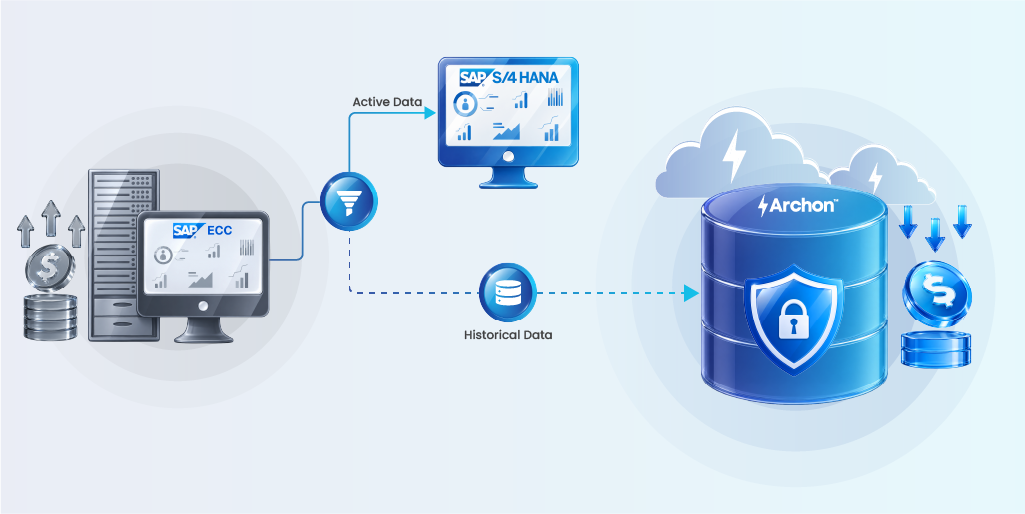
Extract closed historical data from ECC before the S/4HANA migration starts. Archive it to an independent platform, somewhere that can outlive ECC without requiring ECC to run. Bring only active operational data and master records to S/4HANA.
This approach:
- Reduces migration data volume by 80–90% (faster conversion, lower risk)
- Shrinks the resulting S/4HANA footprint (lower infrastructure cost post-go-live)
- Reduces custom code remediation scope (less data = fewer code changes)
- Lets you decommission ECC immediately after S/4HANA go-live (zero read-only costs)
One-time archive cost: 0.5–1.5× your annual ECC cost as a pre-migration project.
Savings over 5 years: 2.5–5× your annual ECC cost in eliminated read-only ECC costs plus reduced S/4HANA infrastructure.
The archive pays for itself before you even go live.
Check out this vendor evaluation guide! See how each solution performs on the 12 criteria that matter most for SAP archiving. Includes personalized recommendations.
The CFO’s Decision Framework
️ ➡ If you have 3–4× your annual ECC cost in migration budget and your business can absorb the change, migrate now. You’re buying capability and closing a cost trajectory.
➡ If you don’t have migration budget and won’t for 3+ years, switch to third-party support. You save 0.4× your annual ECC cost every single year. That’s real money. Use it to fund an archive project or build a migration case over time.
➡ If you’re going to migrate, do it before 2028. The consultant market gets tighter and more expensive every year you delay. Consultant scarcity is driving costs up 30–50% annually.
➡ If you’re going to migrate, archive historical data first. This is non-negotiable financially. Pre-migration archiving eliminates the 1–3× annual cost read-only ECC trap that kills most post-migration budgets.
The CIO’s Perspective: Making the Case to Finance
If you’re the CIO presenting this to the CFO, here’s how the decision framework actually works.
You’re not choosing between cheap and expensive. You’re choosing between managed costs and unmanaged costs.
➡ Staying on ECC with extended support: managed cost, clear endpoint, forces migration decision by 2030.
➡ Third-party support: managed cost, indefinite runway, 0.4× annual cost savings, requires commitment to long-term ECC operations.
➡ S/4HANA migration without data strategy: unmanaged cost, hidden read-only ECC expenses, scope creep, projects running 30% over initial estimates, unexpected costs emerge in year 2.
➡ S/4HANA migration with pre-migration archiving: managed cost, predictable outcomes, archive pays for itself, decommission ECC on schedule, post-migration stability.
The financially defensible position is the one where you’ve done the data planning before the migration starts. Projects that archive first finish on budget. Projects that migrate first and deal with data later run over.
Best Practices: How CFOs and CIOs Make This Decision
1. Inventory your actual ECC data before deciding
You don’t know how much of your ECC is operational vs. archival. Most companies guess. The median split is 5–10% operational, 90% historical and closed.
Before committing to any migration path, run a data profiling project. Two to four weeks, roughly 0.025–0.05× your annual ECC cost in consulting fees. You’ll know: what’s truly operational, what’s aging, what’s compliance-required, what’s dead weight.
This single project eliminates most of the “surprise” costs that derail S/4HANA budgets.
2. Separate the migration decision from the archiving decision
These are two different projects with different timelines and different vendors. Migrate with one partner, archive with another. The decisions don’t have to be bundled.
If you’re still deciding on migration, start the archiving conversation now. Pre-migration archiving happens in parallel with migration planning.
3. Get the CFO and CIO in the room with the same data
CFOs care about: total cost, timeline, risk of cost overruns. CIOs care about: feasibility, technical risk, post-go-live stability.
Both are right. Both need to agree on the data strategy before the migration starts. If you don’t have CFO buy-in on the archive cost before migration kickoff, you’ll have a surprise cost in year 2 when you realize ECC can’t be decommissioned.
4. Set a hard deadline for the 2027 decision
You have until end of 2027 to decide. After that, your options cost more and your timeline compresses. Make the call now.
5. Budget for whatyou’reactually paying
Most S/4HANA budgets under-estimate consulting, custom code remediation, and data handling. When scoping migration cost, add 30–50% contingency. The 60% over-budget statistic exists because teams don’t.
How to Approach the Decision: A Methodology
Phase 1 (Now – Q1 2026): Assessment
- Profile your ECC data (operational vs. archival split)
- Inventory your custom code and integration points
- Get three vendor quotes for S/4HANA migration
- Evaluate third-party support as a baseline option
- Decide: migrate or stay?
Phase 2 (Q1–Q3 2026): Planning
- If migrating: plan pre-migration archiving project
- If staying: transition to third-party support
- Build realistic TCO for your chosen path
- Get CFO approval on total cost, timeline, post-migration structure
Phase 3 (Q4 2026 – Q2 2027): Execution
- Pre-migration archiving project (if applicable)
- Migration planning and design
- Vendor contract negotiation (lock in costs before market tightens)
Phase 4 (Q3 2027 – Q1 2028): Migration
- Go-live on S/4HANA or execute transition to third-party support
- ECC decommissioning (if archived)
- Post-go-live stabilization
This timeline compresses if you delay. Delaying costs money.
The Data Decision is the Financial Lever
Most S/4HANA projects discover too late that historical data was the cost driver, not the migration project itself.
Companies that archive before migrating spend 0.5–1.5× your annual ECC cost upfront, then finish the migration on budget and decommission ECC on schedule.
Companies that migrate first, then discover they need to deal with data years later, end up with 1.0–1.5× annual ECC cost in read-only ECC costs that linger for five years.
The difference between these two paths is 2.5–5.0× your annual ECC cost over five years.
Also read: Greenfield, Brownfield, or Bluefield for SAP S/4HANA Migration?
An enterprise-grade archive platform — one that lets you decommission ECC completely while keeping historical data accessible for audit, compliance, and analytics — is the financial lever that most migration budgets completely miss.
Archon Data Store was built for exactly this moment: you’re deciding whether to migrate, you know data handling will make or break the budget, and you need the math to work.
Archive before you migrate. Archive after. But archive. If your S/4HANA business case doesn’t include archiving, the cost picture is incomplete.
How Archon handles ECC historical data
Most enterprises discover the archive-vs-migrate decision too late — during UAT when the HANA footprint estimate comes back 3× higher than budgeted, or six months post-go-live when someone asks where the 2019 purchase orders went. Archon was built for the scenario this article keeps returning to: you need historical ECC data accessible for audit, compliance, and lookup, but you cannot justify paying S/4HANA infrastructure costs to keep it warm.
Archon Data Store is a Lakehouse-based archive purpose-built for SAP archiving and SAP decommissioning.
- It ingests data from ECC (and S/4HANA, SAP BW, and 200+ other enterprise sources) via pre-built connectors — no custom extraction code.
- Data lands immutable at ingestion: WORM storage, cryptographic hashes, append-only logs, trusted timestamps, and ledger anchoring.
- Retention policies orchestrate across applications and jurisdictions.
- Legal hold workflow freezes data when litigation triggers.
- Cross-application search lets auditors query ECC financial documents, HR records, and procurement history in one interface without knowing which source system created them.
The architecture is source-system-independent. Once ECC data is in Archon, ECC shuts down completely. Retrieval doesn’t require spinning up a frozen ECC instance or calling SAP Basis. The archive survives the ERP, when S/4HANA itself gets replaced in ten years, the archived ECC data remains accessible.
Pre-migration archiving projects with Archon pay for themselves in migration cost reduction before go-live. Post-migration, ECC decommissions on schedule instead of lingering for years as a read-only liability accruing maintenance costs nobody wants to defend.
Next step: If your S/4HANA migration timeline assumes ECC will be decommissioned, but your project plan doesn’t include an archive workstream, the timeline is wrong.
Talk to an Archon architect to scope what a realistic pre-migration archive looks like for your ECC footprint.


