

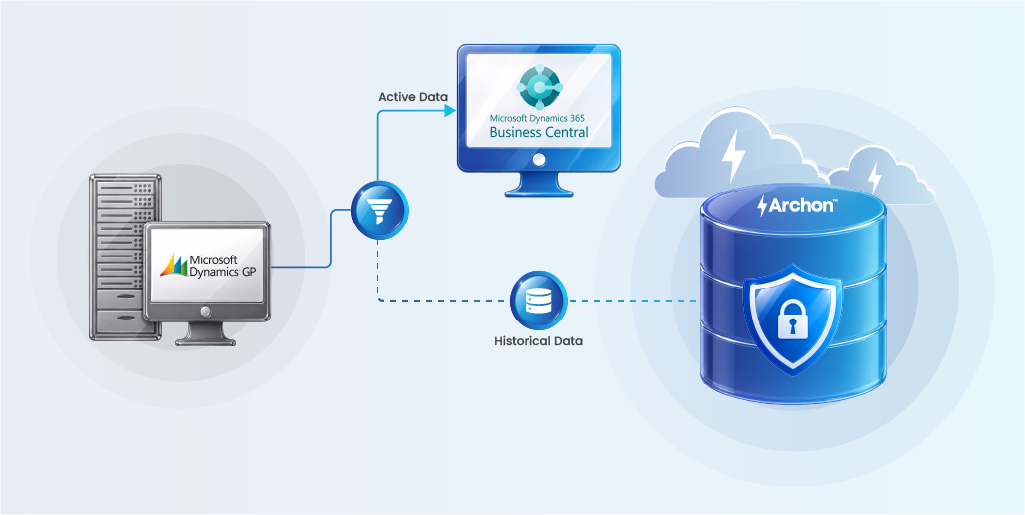

Key Points
- Dynamics GP support is winding down, making Business Central the long-term ERP platform for Microsoft customers. Planning migration early helps avoid rushed upgrades and rising maintenance costs.
- A successful migration goes beyond moving data. Customizations, third-party add-ons, integrations, and data quality issues all need to be assessed before migration begins.
- Migrating everything into Business Central isn’t always the best approach. Keeping only active operational data in the new ERP improves performance, shortens migration timelines, and reduces long-term costs.
- Historical data deserves its own strategy. Organizations should retain older records for audits, legal requests, customer service, and compliance without overloading the production ERP.
- Legacy system decommissioning should be part of the migration plan. Retiring Dynamics GP after preserving historical data reduces infrastructure, licensing, maintenance, and support costs while lowering total cost of ownership (TCO).
- Data governance and compliance cannot be overlooked. Audit trails, data integrity, retention policies, and chain of custody should be maintained throughout the migration to ensure historical records remain trustworthy and accessible.
- Archon complements the migration by helping organizations profile Dynamics GP data, migrate active records to Business Central, archive historical information, and safely decommission the legacy ERP while maintaining secure, searchable, and compliant access to historical data.
Your Dynamics GP system is old. Your data is older. And everyone from Microsoft to your implementation partner is pushing you to move to Business Central. But here’s the million-dollar question that keeps IT directors awake at night:
Do you just keep the legacy system running in read-only mode to access legacy data? At what cost?
Across Dynamics community boards, migration teams are wrestling with the same nightmare scenario: migrate everything and watch your new cloud system grind to a halt under the weight of decades-old transactions, or leave history behind and face compliance audits with no data trail.
The stakes are real. Lose critical historical data, and you’re facing regulatory penalties, failed audits, and angry customers asking about orders from 2015. This is a business continuity crisis waiting to happen.
The smarter way forward is understanding Dynamics GP migration with historical data archiving. This article explores the real challenges, strategic considerations, and practical approaches to successful migration.
What Is Dynamics GP Migration?
Dynamics GP migration is the process of moving your business operations, master data, and transactional records from Microsoft’s legacy on-premise ERP system (Dynamics GP, formerly Great Plains) to its modern cloud-based successor, Dynamics 365 Business Central. This isn’t a simple “lift and shift”; it’s a fundamental transformation of how your financial, inventory, and operational data lives and breathes.
Why Migrate from Dynamics GP to Business Central?
Dynamics GP is nearing the end of life. While Microsoft continues to provide support, innovation has stopped.
Business Central is the future of Microsoft ERP, and GP users have limited time to plan a smooth migration before support ends.
| Milestone | Date | What It Means |
|---|---|---|
| End of sales: new perpetual licenses | April 1, 2025 | New customers can no longer buy GP outright |
| End of sales: no new subscription licenses | April 1, 2026 | Existing customers can add users, but net-new GP instances are off the table |
| End of product enhancements, tax/regulatory updates, and technical support | December 31, 2029 | No more year-end updates, compliance patches, or Microsoft support tickets |
| End of security updates and SPLA subscription billing | April 30, 2031 | GP can still technically run, but with zero vendor safety net |
Compliance Pressures Are Accelerating Migration Timelines
Organizations subject to SEC, FINRA, HIPAA, or Sarbanes-Oxley regulations require current, supported systems with robust audit trails and data governance capabilities. Running unsupported software doesn’t just create technical risk, it creates regulatory exposure that auditors and compliance officers can’t ignore.
The Business Case Is Compelling
According to Forrester’s Total Economic Impact study, after migrating to Dynamics 365 Business Central, organizations achieved a net present value of $464,000 over three years.
The competitive landscape also matters. Organizations that modernize their ERP infrastructure gain advantages in talent acquisition (modern systems attract skilled workers), customer experience (integrated e-commerce and CRM), and strategic decision-making (advanced analytics and AI capabilities).
The Cost of Waiting
Every year organizations delay migration, they accumulate more technical debt, face increasing maintenance costs, and fall further behind competitors who’ve already modernized. The talent pool familiar with Dynamics GP is shrinking, making support more expensive and risky. Meanwhile, the gap between GP’s capabilities and modern business requirements continues to widen.
The Maintenance Burden
Organizations maintain dedicated staff or expensive consultants who understand the intricacies of their GP implementation. Server hardware requires periodic replacement. Database performance degrades over time, requiring optimization. Security patches and workarounds consume IT resources.
This maintenance burden has an opportunity cost; resources spent keeping legacy systems running can’t be invested in innovation, digital transformation, or strategic initiatives that drive competitive advantage.
What Actually Breaks When You Move From GP to Business Central
Practitioners who have already made the move are candid about where the friction shows up — and it’s rarely the parts vendors advertise.
| Dynamics GP Concept | Business Central Equivalent | What to Watch For |
|---|---|---|
| Account segments | Dimensions | Segments rarely map one-to-one; reporting logic often needs to be rebuilt, not just re-pointed |
| SmartLists and Crystal Reports | Power BI, Jet Reports, or native BC reporting | Custom reports almost never carry over intact — budget for a rebuild |
| Third-party ISV add-ons | Microsoft AppSource extensions | Not every GP add-on, especially in payroll and HR, has a direct BC replacement |
| On-premises SQL database | Cloud-hosted SaaS environment | Once GP is decommissioned, direct SQL queries against historical data are no longer possible unless that data has already been extracted |
Once the legacy database is gone, so is the ability to run an ad hoc query against 2016’s inventory valuations or a 2019 payroll dispute unless the data was pulled out and preserved before the switch was flipped.
Dynamics GP Migration Challenges
The most dangerous misconception about ERP migration is that it’s a straightforward data transfer.
The Hidden Costs of Technical Debt
One of the most underestimated aspects of Dynamics GP migration is the accumulated technical debt that organizations carry.
Customizations Become Anchors
Over years or decades of use, most Dynamics GP implementations accumulate extensive customizations. These might include:
- Custom reports and dashboards built with Crystal Reports or SQL Server Reporting Services
- Modified forms and workflows tailored to specific business processes
- Integration points with legacy systems, manufacturing equipment, or industry-specific applications
- Custom VBA scripts and Dexterity modifications that automate critical functions
Each customization represents a business process that someone deemed important enough to invest in. But collectively, they create a web of dependencies that makes migration daunting. The key is determining which customizations still deliver business value, which can be replaced with native Business Central capabilities, and which can be safely retired.
Third-Party Add-Ons Complicate the Picture
Many organizations rely on third-party solutions that extend Dynamics GP’s capabilities — specialized inventory management, advanced manufacturing modules, industry-specific compliance tools, or enhanced reporting platforms.
These add-ons create several challenges:
- Compatibility uncertainty: Will the vendor offer a Business Central version?
- Data migration complexity: How do you extract and transform data from proprietary add-on databases?
- Functional gaps: If no equivalent exists, what’s the replacement strategy?
- Cost implications: New licensing, implementation, and training costs for replacement solutions
Data Quality Issues Surface Immediately
Years of data accumulation in Dynamics GP often means:
- Duplicate records: Multiple customer or vendor entries for the same entity
- Inconsistent formatting: Address fields, phone numbers, and naming conventions that vary across records
- Orphaned data: Transactions or records that reference deleted or invalid master data
- Historical anomalies: Data from old business processes, acquired companies, or discontinued product lines
Integration Complexity Multiplies
Modern businesses don’t run on ERP alone. Dynamics GP typically integrates with:
- E-commerce platforms
- Customer relationship management (CRM) systems
- Warehouse management systems (WMS)
- Manufacturing execution systems (MES)
- Business intelligence and reporting tools
- Banking and payment processing systems
- Industry-specific applications
Each integration point must be re-engineered for Business Central. APIs may differ, data formats may change, and timing/sequencing of data exchanges may need adjustment. Organizations often underestimate the effort required to rebuild and test these integrations.
Downtime and Business Continuity Risks
The cutover from GP to Business Central represents a critical risk window. Organizations must:
- Complete final data migration while minimizing business disruption
- Ensure all transactions are properly captured and transferred
- Validate data integrity before going live
- Train users on new processes and interfaces
- Maintain the ability to roll back if critical issues emerge
The fear of disrupting operations, particularly during peak business periods, causes many organizations to delay migration decisions.
Underestimating Effort and Cost
Migration projects frequently exceed initial estimates because organizations fail to account for:
- The time required for thorough data cleansing and validation
- The complexity of replicating or replacing custom functionality
- The need for extensive user training and change management
- The iterative nature of testing and refinement
- The post-migration stabilization period where issues are identified and resolved
What initially appears to be a six-month project can easily extend to 12-18 months for complex implementations, with corresponding budget implications.

Compliance and Audit Risks During Migration
For regulated organizations, migration is a compliance event that requires careful planning and documentation.
Maintaining Audit Trails Through Transition
Regulatory frameworks like Sarbanes-Oxley require organizations to maintain unbroken audit trails of financial transactions. During migration, this means:
- Documenting the migration process: Creating a clear record of how data was extracted, transformed, and loaded
- Preserving transaction history: Ensuring that historical transactions remain accessible and verifiable
- Maintaining controls: Demonstrating that appropriate segregation of duties and approval workflows remained in place throughout migration
- Validating data integrity: Proving that financial data wasn’t corrupted, lost, or improperly modified during transfer
Auditors will scrutinize the migration process, particularly for any period where financial statements span both the old and new systems. Your enterprise must be prepared to demonstrate that your financial data is complete, accurate, and properly controlled.
Historical Data Retention Requirements
Different regulations impose varying data retention requirements:
- SEC: Seven years for broker-dealers
- HIPAA: Six years for healthcare records
- SOX: Seven years for audit-related documents
- IRS: Generally three to seven years, depending on circumstances
Simply migrating recent transactional data to Business Central isn’t sufficient. You must maintain access to historical data that may not be actively used but must remain available for audit, legal discovery, or regulatory examination.
The challenge is preserving historical Dynamics GP data so it remains searchable, accessible, and compliant after the system is retired.
Data Governance During Transition
Migration represents a vulnerability window where data governance can break down:
- Access controls: Who has access to data during migration, and how is that access logged?
- Data privacy: How is personally identifiable information (PII) or protected health information (PHI) secured during transfer?
- Change management: How are modifications to data or processes documented and approved?
- Validation protocols: What controls ensure data accuracy and completeness?
You must maintain your governance frameworks throughout migration, even as systems and processes are in flux. This requires careful planning, clear documentation, and often third-party validation to satisfy auditors and regulators.
Facing historical data and decommissioning challenges in Dynamics AX? Here’s what to do next.
A Comprehensive Microsoft Dynamics GP Data Migration Strategy
Here is a methodical approach to data management that addresses both immediate operational needs and long-term compliance requirements.
Phase 1: Data Profiling and Assessment
Before migrating anything, understand what your organization has:
- Data volume analysis: How much data exists across all modules and custom tables?
- Data quality assessment: What percentage of records are complete, accurate, and current?
- Dependency mapping: What relationships exist between data elements, and which are critical?
- Customization inventory: What custom fields, tables, and processes must be accommodated?
- Third-party data identification: What data resides in add-on systems or external databases?
This assessment phase often reveals surprises — undocumented customizations, data quality issues that have accumulated over years, or critical business logic embedded in stored procedures or custom code.
Phase 2: Data Cleansing and Preparation
With a clear understanding of the data landscape, begin remediation:
- Deduplication: Identifying and merging duplicate records
- Standardization: Applying consistent formatting and naming conventions
- Validation: Correcting invalid or incomplete data
- Archival: Moving inactive or historical data out of the active migration scope
- Enrichment: Adding missing information or updating outdated records
This phase is often the most time-consuming but also the most valuable. Organizations that invest in thorough data cleansing not only ease migration but also improve the quality of their ongoing business operations.
Phase 3: Defining Migration Scope
A critical strategic decision is determining what data to migrate actively versus what to archive:
- Live data: Recent transactions, active customers/vendors, current inventory, open orders and data needed for daily operations
- Historical data: Closed transactions, inactive records, legacy product information, data needed for compliance and reference but not active use
Attempting to migrate everything into Business Central creates unnecessary complexity and ongoing maintenance burden. A better migration strategy separates operational data (migrated to Business Central) from historical data (preserved in a compliant archive).
Phase 4: Transformation and Mapping
Dynamics GP and Business Central have different data structures, field definitions, and business logic. Transformation involves:
- Schema mapping: Defining how GP tables and fields correspond to Business Central entities
- Data type conversion: Ensuring data formats are compatible
- Business rule translation: Replicating or replacing GP logic in Business Central
- Custom field handling: Determining how custom GP fields map to Business Central’s extensibility model
This phase requires deep knowledge of both systems and often reveals functional differences that require process changes or custom development.
Phase 5: Validation and Testing
Before cutover, validate:
- Data completeness: All in-scope data has been successfully migrated
- Data accuracy: Values, calculations, and relationships are correct
- Functional equivalence: Business processes work as expected in Business Central
- Integration functionality: Connected systems exchange data properly
- Performance: The new system meets response time and throughput requirements
Multiple test migrations are typically necessary, with each iteration revealing issues that must be addressed before the final cutover.
Phase 6: Cutover and Stabilization
The final migration involves:
- Timing coordination: Scheduling cutover during a low-activity period
- Final data extraction: Capturing all transactions up to the cutover point
- System switchover: Redirecting users and integrations to Business Central
- Hypercare support: Providing intensive support during the initial days and weeks
- Issue resolution: Quickly addressing any data or functional problems that emerge
Even with thorough preparation, the post-migration period requires vigilance and rapid response to ensure business continuity.
Phase 7: Dynamics GP Decommissioning
Once active data has been validated in Business Central and historical records have been archived, you can begin decommissioning the legacy environment.
Before shutting down Dynamics GP, ensure:
- Historical data is archived and fully searchable
- Audit, legal, and compliance requirements are met
- Users can access legacy records without the GP application
- Integrations, reports, and dependencies have been retired or redirected
- Data retention and disposition policies are in place
Legacy ERP modernization strategy enables system decommissioning and lowers the total cost of ownership (TCO) by eliminating legacy infrastructure, licensing, maintenance, backups, and support costs while preserving governed access to historical data. The result is a leaner ERP environment with governed access to historical data whenever it’s needed.
Best Practices for Historical Data Management During Migration
The smartest Dynamics GP to Dynamics 365 Business Central migrations follow a principle that sounds simple but requires discipline: be ruthlessly selective about what you migrate into your new system.
Start With a Data Audit
Before you migrate a single record, inventory what you actually have.
- How many years of transactional data?
- What’s the volume in each module — GL, AR, AP, inventory, sales orders, purchase orders?
- Which data gets accessed regularly versus sitting dormant?
- What are your industry-specific compliance retention requirements?
A thorough data audit provides the foundation for a faster, cleaner, and more cost-effective Dynamics GP migration
Apply the 2-Year Active Data Rule
The industry consensus is clear: migrate two years of detailed transactional history into Business Central, plus all open transactions regardless of age. This gives users immediate access to recent history for customer service, trend analysis, and operational reporting without bloating the new system. Everything older becomes a candidate for archiving, not migration.
Understand ETL Principles for Data Quality
The Extract-Transform-Load process is your opportunity to clean decades of accumulated data debt.
- During the Extract phase, identify duplicate records, orphaned transactions, and data inconsistencies.
- In the Transform phase, standardize formats, reconcile custom fields, and map GP’s structure to Business Central’s schema.
- The Load phase should include validation checkpoints: do totals reconcile? Are customer balances accurate? Do inventory quantities match?
Prioritize Data Cleansing Before Migration
This is your chance to fix what’s broken. Merge duplicate customer records. Standardize vendor names. Clean up your chart of accounts. Validate addresses and contact information.
One migration expert noted that poor data quality can undermine reporting accuracy and erode trust in the new system. The time you invest in cleansing pays dividends in user adoption and system confidence.
Plan for Master Data First, Transactions Second
Migrate your foundational data — customers, vendors, items, chart of accounts — before you touch transactional history. Validate that master data thoroughly.
Then bring over open transactions (unpaid invoices, open purchase orders). Only after that foundation is solid should you consider historical transaction migration or archiving.
Document Your Data Retention Policy Explicitly
Create a clear policy that specifies: what data migrates to Dynamics 365 BC, what gets archived, how long each category is retained, who can access archived data, and how decommissioning will work.
Get sign-off from finance, legal, and IT. This isn’t just best practice — it’s your insurance policy when auditors come asking questions three years from now.
Test, Validate, Reconcile
Run parallel systems during cutover. Reconcile financial totals between GP and BC. Validate that critical reports produce identical results. Test user access to both current BC data and archived historical data. The goal isn’t perfection; it’s confidence that nothing critical was lost in translation.
If you’re not migrating all historical data into Business Central, you need to plan where the data goes and how to maintain access if the legacy system is decommissioned. This is where intelligent archiving solutions transform from “nice to have” to “mission critical.”
ROI and Long-Term Benefits
While migration requires significant investment, the long-term benefits justify the effort for most organizations.
Quantifiable Cost Savings
Forrester’s research on Business Central identified several areas of measurable savings:
- Infrastructure cost reduction: Eliminating on-premises servers, storage, and networking equipment saves $50,000–$150,000 annually for mid-size organizations
- IT labor savings: Reducing time spent on system maintenance, updates, and troubleshooting frees 20–30% of IT capacity for strategic initiatives
- Software licensing optimization: Cloud-based licensing often provides better economics than perpetual licenses with annual maintenance fees
- Reduced consultant dependency: Modern, well-documented systems require less specialized expertise for routine maintenance
Operational Efficiency Gains
Beyond direct cost savings, Business Central enables process improvements:
- Automated workflows: Reducing manual data entry and approval processes
- Real-time visibility: Eliminating delays in financial reporting and operational metrics
- Integrated analytics: Built-in Power BI integration provides insights without separate BI infrastructure
- Mobile access: Enabling remote work and field operations with full system access
Organizations typically report 15–25% improvement in finance team productivity and 10–15% reduction in order-to-cash cycle time.
Strategic Advantages
The less tangible but equally important benefits include:
- Agility: Faster deployment of new capabilities and adaptation to market changes
- Scalability: Supporting growth without proportional increases in IT infrastructure
- Innovation enablement: Integration with Microsoft’s ecosystem (Power Platform, Azure, Microsoft 365) enables rapid development of custom solutions
- Talent attraction: Modern technology stack appeals to skilled workers and reduces training burden
Compliance and Risk Reduction
For regulated organizations, the compliance benefits alone can justify migration:
- Automated audit trails: Built-in logging and tracking reduce manual compliance work
- Regular updates: Continuous compliance with evolving regulations without major upgrade projects
- Enhanced security: Cloud-based security infrastructure with advanced threat protection
- Disaster recovery: Built-in redundancy and backup capabilities reduce business continuity risk
Organizations that invest in organizational readiness through structured training, change management, and stakeholder engagement realize faster Business Central adoption and greater return on their migration investment.
Archon’s Intelligent Data Archiving Solution: Preserving Historical Data While Modernizing Operations
A successful Dynamics GP migration isn’t just about moving data to Business Central — it’s about preserving historical records without carrying the burden of a legacy ERP.
Archon’s integrated platform helps organizations classify, migrate, archive, and govern historical data while maintaining compliance and reducing long-term costs.

Archon Analyzer: Identify What Matters
Before migration begins, Archon Analyzer profiles your Dynamics GP environment to identify data volumes, dependencies, access patterns, and compliance requirements. It classifies data into active records for Business Central, historical records for archival, and obsolete data that can be safely disposed of according to business and regulatory policies.
Archon ETL: Preserve Data Integrity
Archon ETL extracts and transforms historical GP data into a query-ready archive while preserving relationships, audit trails, a documented data chain of custody and business context. Financial records, transaction history, and custom fields remain intact, ensuring historical information stays accurate and accessible long after migration.
Using Archon’s pre-built Dynamics GP Connector, organizations can efficiently extract data from Dynamics GP while preserving relationships, metadata, audit trails, and business context throughout the migration process.
Archon Data Store: Access History Without the Legacy ERP
Archon Data Store provides Lakehouse-native archiving for historical ERP data, enabling users to search records, respond to audits, and generate historical reports without relying on Dynamics GP. Historical data remains secure, searchable, and available through a governed archive while Business Central stays focused on active operations.
By separating active and historical data, organizations gain a clear path to decommissioning Dynamics GP after migration. Instead of maintaining legacy servers, licenses, backups, and support contracts solely for historical access, they can retire the application with confidence while preserving compliant access to every record they need.
The End Goal: A Retired Legacy ERP
Traditional migration approaches force a false choice: migrate everything (expensive, slow, performance-killing) or leave history behind (risky, compliance-threatening). Archon creates a third path: migrate what you need operationally, archive what you need historically, decommission what you no longer need to maintain.
This isn’t just about data — it’s about preserving institutional memory while modernizing operations.
That 2012 customer dispute that sets a precedent for your returns policy? Accessible.
The 2016 vendor contract terms that explain a pricing anomaly? Queryable.
The 2019 financial close that auditors want to review? Available in minutes.
Schedule a 20-minute Archon Platform Demo and see how intelligent archiving solves the historical data challenges that traditional migration tools ignore.


