


Key Points
- The UKG migration process involves moving an organization’s HR, payroll, and employee data from an existing UKG environment to a modern HCM platform.
- During UKG migration, moving years of inactive employee records, payroll history, and timecards to the new HCM increases project scope, testing effort, costs, and implementation timelines.
- Avoid migrating everything – migrate only the operational HR and payroll data needed for daily business while preserving historical records outside the new HCM.
- UKG Migration Process: Inventory data, classify operational and historical records, archive inactive data, migrate only active information, and validate archive access before decommissioning.
- Successful modernization includes legacy system decommissioning.
- Archived HR and payroll records must remain searchable to support audits, legal requests, compliance, employment verification, and financial reconciliation.
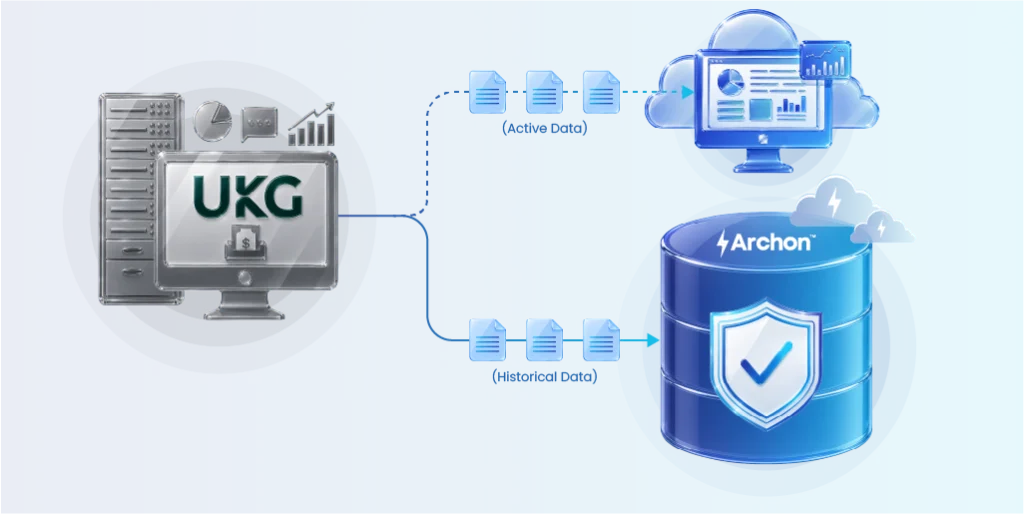
- Archon helps organizations migrate active data, archive historical records, enforce governance, and safely decommission legacy UKG systems without losing access to critical information.
Chloe left the organization five years ago. Her exit paperwork was filed, her final paycheck cleared, and her HR file sat quietly in the system, untouched.
Later, Chloe challenged the payout she received for unused leave when she left the organization. HR needed to retrieve historical leave balances, accrual history, time-off records, and payroll calculations to verify how the final settlement had been determined.
There was a problem. The organization had moved off its old Kronos Workforce Central system two years earlier. The new HCM platform held current employee data, but Chloe’s work history from her final two years was buried in old exports nobody had touched since the migration and wasn’t searchable in any meaningful way.
The support contract for the legacy Kronos system had lapsed. The one administrator who actually understood the old database structure no longer worked there.
This happens more often, and legal teams don’t accept “the old system is gone” as an answer.
If your organization is planning or already executing a move away from UKG Workforce Central, keep this scenario in mind through every stage of the project. Your organization remains accountable for every employee record, past and present, whenever someone asks for it.
Preserving that history properly is the part of the migration most organizations overlook.
What is a UKG Migration
A UKG migration is the process of moving an organization’s HR, payroll, workforce management, and employee data from an existing UKG environment, or another HCM platform to a modern HCM solution.
The migration typically includes transferring active employee records, payroll configurations, time and attendance data, integrations, and business processes while ensuring historical HR and payroll records remain accessible for compliance, audits, and reporting.
For many organizations, UKG migration is part of a broader HCM modernization initiative. Rather than moving every historical record into the new system, they migrate only the operational data needed for daily HR and payroll activities, archive historical information in a secure repository, and decommission the legacy application.
This approach reduces migration complexity, lowers costs, accelerates implementation, and eliminates long-term dependence on outdated systems.
Why Organizations Migrate from Legacy UKG Systems
Organizations are modernizing their HCM landscape for several reasons.
UKG ended engineering support for Workforce Central at the end of 2025. If your company is still on it, you are now operating without patches or fixes on a platform handling sensitive payroll data. That alone is reason enough to move.
But the deadline pressure has created a habit among organizations and even some implementation partners: focus everything on getting the new system live, and treat the old data as something to deal with later.
Many are replacing older UKG Workforce Central environments with cloud platforms such as UKG Pro Workforce Management, Workday, Oracle HCM Cloud, or SAP SuccessFactors.
Others are consolidating multiple HR applications after acquisitions or standardizing payroll processes across regions.
The global HR software market was valued at USD 16.4 billion in 2023 and is expected to reach USD 36.6 billion by 2030, growing at a CAGR of 12.2%. This growth is largely driven by the increasing adoption of cloud-based initiatives.
Modernization is clearly accelerating, and the challenge is deciding what should move with it.

Common UKG Migration Scenarios
UKG migrations don’t follow a single path. The source system, the business driver, and the data complexity vary significantly depending on where an organization is starting from.
Kronos Workforce Central to UKG Pro WFM
This is the most common migration right now, driven directly by UKG ending engineering support for Workforce Central. Organizations on the on-premise Kronos platform are moving to UKG Pro Workforce Management, UKG’s cloud-native replacement.
The challenge here isn’t the functional switch, it’s the structural difference between how the two systems store time and attendance data. WFC’s labor level transfer model, pay rule versioning, and attestation records don’t have direct equivalents in UKG Pro WFM, which means historical data needs to be archived rather than migrated if it’s going to stay defensible.
UKG Workforce Central (cloud) to UKG Pro Workforce Management
Organizations already on the hosted version of WFC face the same end-of-support deadline but often assume the migration will be simpler since they’re already in UKG’s cloud environment. It usually isn’t.
Tenant-level configurations, custom pay rules, and integration touchpoints built over years still need to be documented, mapped, and either migrated or retired. Historical data carries the same archiving requirements regardless of whether the source was on-premise or hosted.
Legacy HR and payroll platforms to UKG
Some organizations are coming to UKG from older environments: Ceridian Dayforce, ADP Workforce Now, older PeopleSoft HCM implementations, or home-grown payroll systems. These migrations carry an extra layer of complexity because the data model in the source system may look nothing like UKG’s.
Field names, pay period structures, and accrual logic all need to be mapped before anything moves, and historical records from a system UKG has no native connector for require extraction and transformation before they can be archived in a usable format.
Post-acquisition HCM consolidation
Organizations that have grown through acquisition often inherit multiple WFC instances or a mix of WFC and other workforce management tools running in parallel across different business units.
The migration isn’t just technical; it requires deciding which pay rules, labor level structures, and org hierarchies become the standard going forward, and what happens to years of historical data from the systems being retired. This is one of the more expensive migration scenarios to scope incorrectly.
HCM cloud transformation alongside ERP migration
Some organizations time their UKG migration to coincide with a broader ERP change, such as moving to SAP S/4HANA or Oracle Cloud ERP. The risk here is that both projects compete for the same IT and data resources, and historical HR and payroll data gets deprioritized in favor of financial and operational data.
Payroll history, timecards, and HR records still carry the same compliance obligations regardless of how large the surrounding project is.
The Biggest UKG Migration Mistake: Migrating Everything
When companies plan a UKG migration, the instinct is often to migrate as much historical data as possible into the new system, just to be safe. This feels responsible, but it usually backfires in three ways.
- First, it inflates the scope of the project. Every additional year of historical timecards, schedules, and pay data that gets pulled into scope adds more mapping, more testing, and more validation work. One independent UKG implementation guide notes that data migration alone can represent close to 40 percent of a typical implementation budget. Dragging years of old records into that scope multiplies the testing burden without adding any real business value, since most of that legacy data is rarely if ever accessed day to day.
- Second, it clutters the new system. UKG Pro WFM is built to run lean and fast on current operational data. Loading it down with years of inactive employee records, old shift rules, and historical timecards slows reporting and makes the system harder to validate during testing.
- Third, and most overlooked, it does not actually solve the retention problem. Migrating five years of payroll history into your new HCM does not make that data more accessible for legal or audit purposes. It just moves the same unstructured pile from one system to another, often without the metadata, search tools, or access controls a compliance team actually needs when a request like Chloe’s lands on their desk.
Why UKG Migration Projects Become More Complex
The hardest part of a UKG migration is rarely moving data into the new HCM. It is deciding what historical information should move, what should remain accessible, and how to retire the legacy system without losing years of HR and payroll history.
The smarter approach treats migration and retention as two separate decisions.
Active employee data, current pay structures, current scheduling rules, and anything tied to ongoing operations belongs to UKG Pro WFM. That is what the new system was built for.
Historical and inactive data, former employees, closed pay periods, old shift configurations, superseded policy rules, belongs to a dedicated archive built for long term access, not in your live HCM.
Migrate Everything vs Selective Migration
| Data Category | Migrate | Archive |
|---|---|---|
| Active employees | ✓ | |
| Active payroll | ✓ | |
| Open leave balances | ✓ | |
| Payroll history | ✓ | |
| Former employees | ✓ | |
| Historical timecards | ✓ | |
| Employee documents | ✓ | |
| Audit logs | ✓ |
Handling ADP migration? This is worth a look – ADP Migration: How to Securely Migrate and Archive Your Payroll Data
Common Challenges in UKG Migration
No two UKG environments are identical. Years of custom payroll rules, workforce policies, and system integrations mean every migration comes with its own set of challenges that require careful planning.
Custom pay rule complexity
Most organizations using WFC for more than a few years have accumulated a significant number of custom pay rules, shift differentials, rounding configurations, and exception handling logic built to match their specific collective bargaining agreements, state labor laws, or operational patterns. These rules rarely transfer cleanly.
They need to be documented, tested, and either rebuilt in the new system or retired, with the historical pay periods they governed preserved in the archive. Teams that underestimate this consistently run into post-migration payroll discrepancies that are expensive to investigate without proper historical records.
Integration Dependencies That Outlive the Migration
WFC is typically connected to payroll engines, ERP financials, time clock hardware, scheduling tools, and sometimes benefits platforms.
When the WFC environment is retired, any integration that fed into or out of it needs to be either rebuilt against the new platform or decommissioned.
Missing even one integration means either a broken data flow in the new system or a silent data gap that doesn’t surface until someone notices a discrepancy months later.
Data quality issues discovered mid-project
The hardest part in the WFC migration wasn’t importing data, it was auditing and validating it, tracking down missing records, and confirming supporting documentation before they could trust anything.
Organizations frequently discover duplicate employee records, gaps in pay history, and inconsistencies between WFC and payroll system records only after the migration has started, which delays go-live and inflates testing cycles.
Parallel system running longer than planned
The intention is usually to keep WFC live for a short parallel run period while the new system stabilizes. In practice, organizations keep the old system running for months or years past the original cutover date because nobody has confirmed that all historical records are accessible without it.
Every month that continues, the legacy environment keeps costing money in licensing, infrastructure, and IT attention, while also staying exposed to security risk from an unpatched system holding sensitive payroll data.
Scope creep from historical data decisions made too late
When organizations wait until late in the migration project to decide what to do with historical data, the decision almost always defaults to “migrate everything,” which inflates the scope of data cleansing, transformation, and testing.
Teams that separate the historical archiving decision from the active migration scope early in the project consistently run shorter timelines and cleaner implementations.
The Real Cost of Keeping the Old System Around
A lot of organizations end up running their old Kronos or Workforce Central system in parallel with the new platform for far longer than planned, simply because nobody wants to be the one who shut it down before confirming all the legacy data was safe. This is understandable, but it is also expensive and risky.
Every month a legacy system stays live; it keeps costing money in licensing, hosting, and the attention of whatever IT staff still remember how it works. It also stays exposed.
Old systems stop getting security patches, which makes them a soft target, and they still hold personal data covered by privacy and labor law, regardless of whether anyone is actively using the system.
The risks extend beyond operational costs. Maintaining multiple systems of record makes it more difficult to manage information consistently.
HR and compliance teams may struggle to determine which system holds the authoritative version of a record, increasing the risk of duplicate, inconsistent, or outdated information.
Compliance obligations also remain in force, regardless of whether the application is actively used. Organizations must continue to meet statutory retention requirements, respond to legal holds, support audits, fulfill employee information requests, and demonstrate that historical records are complete, accurate, and tamper resistant.
If historical data is scattered across legacy systems, exported files, and shared drives, responding to these requests becomes slower and more complex.
A centralized archive helps address these challenges by preserving historical HR and payroll records in a secure, governed repository with metadata-driven search, role-based access controls, encryption, comprehensive audit trails, and configurable retention policies.
This enables organizations to satisfy enterprise data governance and compliance requirements while giving authorized users quick access to historical information.
Why You Should Archive Historical UKG Data
A common misconception is that once a new HCM is live, the old data becomes irrelevant. In reality, historical data continues to support the business for years. Imagine these situations.
A legal request – Recall Chloe’s story. Years after an employee leaves, a wage dispute or leave payout issue may require payroll records from the legacy UKG system.
An External Audit – Auditors’ Request:
- historical payroll calculations
- overtime records
- tax forms
- employee acknowledgements
These records may no longer exist inside the operational HCM.
Employment Verification – A former employee requests proof of employment and compensation history for immigration or retirement processing. The information must still be available even though the employee left years ago.
Finance Reconciliation – Finance needs payroll data from a previous acquisition to reconcile historical financial statements. The migration project is complete, but the business still depends on historical records. These requests are routine business activities.
Historical Data Should Be Easy to Find
Archiving should not mean locking information away. Business users should still be able to search historical records without asking IT for help.
| Business Need | Archived Data Should Provide |
|---|---|
| Payroll audit | Historical payslips and payroll calculations |
| Legal request | Employment records and supporting documents |
| HR inquiry | Previous job history and compensation changes |
| Tax verification | Historical tax forms and payroll records |
| Former employee request | Employment letters and archived HR documents |
Instead of opening a legacy application, users search a centralized archive using employee name, employee ID, payroll period, or document type. The experience remains simple while the legacy application can be retired.
Is your legacy UKG system still adding value or just adding cost? A system assessment can help you identify opportunities to archive historical data, reduce migration scope, and confidently retire legacy applications.
A 5-Step UKG Migration Framework
Migrating to a new HCM is only one part of the modernization journey. The real challenge is reducing migration effort while ensuring historical HR and payroll data remains accessible for audits, reporting, and compliance. This five-step framework outlines a practical approach to modernize your HCM, preserve critical records, and retire your legacy UKG environment with confidence.
Step 1: Inventory HR and Payroll Data
Before migrating, identify all the HR and payroll data stored across your UKG environment. This includes employee master records, payroll history, timecards, tax documents, compensation records, performance reviews, benefits information, and HR documents. A complete inventory helps you understand what data exists, where it resides, and what business or compliance value it holds.
Step 2: Separate Operational and Historical Records
Not all data serves the same purpose. Classify records into two categories:
- Operational data that HR and payroll teams need for day-to-day business, such as active employees, current payroll, and open leave balances.
- Historical data that must be retained for audits, legal requests, compliance, or reporting, such as former employee records, historical payroll, tax forms, and archived documents.
This step prevents unnecessary historical data from becoming part of the migration scope.
Step 3: Archive Inactive Data Before Migration
Move historical and inactive records into a secure, searchable archive before beginning the migration. Archiving preserves data integrity while reducing the amount of information that needs to be cleansed, transformed, validated, and tested. It also ensures historical records remain accessible for future audits, reporting, and compliance without relying on the legacy application.
Step 4: Migrate Only Active Operational Data
Transfer only the data required to support ongoing HR and payroll operations into the new HCM platform. A focused migration reduces implementation complexity, shortens testing cycles, improves data quality, and helps keep the new system lean and efficient. It also minimizes the risk of introducing outdated or redundant information into the modern environment.
Step 5: Decommission the Legacy UKG Application After Validating Archived Access
Before retiring the legacy UKG environment, verify that archived records can be easily searched and retrieved by authorized users. Confirm that HR, payroll, legal, and compliance teams can access historical employee information, payroll records, and documents without depending on the old system.
Once this validation is complete, the legacy application can be safely decommissioned, reducing licensing, infrastructure, and maintenance costs while preserving long-term access to historical data.
UKG Migration Best Practices
The difference between a smooth migration and a costly one often comes down to the decisions made before implementation. These best practices can help keep your UKG migration on track.
- Define the data strategy early: Decide what to migrate and what to archive before the project begins.
- Map all integrations: Identify and plan for every system connected to UKG before decommissioning.
- Run archiving as a separate workstream: Archive and validate historical data in parallel with the migration.
- Test data retrieval: Ensure historical records are searchable and accessible before retiring the legacy system.
- Preserve data relationships: Maintain links between related payroll and HR records to support audits and compliance.
Why does Modernization Include Legacy Application Decommissioning
Many organizations consider their migration project complete once the new HCM system goes live. While go-live is a significant milestone, it is only one part of the modernization journey.
Modernization is truly complete only when the legacy HR application is no longer required to support the business. If users still need to log in to the old UKG environment to retrieve historical payslips, employee records, or compliance documents, the organization continues to bear the costs and operational burden of maintaining that system.
A complete legacy modernization strategy ensures that:
- Historical HR and payroll data have been securely preserved.
- HR, payroll, legal, and compliance teams can independently retrieve historical records when needed.
- Regulatory and retention requirements continue to be met.
- Historical reports remain available for audits, legal inquiries, and business reporting.
- The legacy UKG application, along with its supporting infrastructure, can be safely retired.
By preserving historical information outside the operational HCM, organizations can simplify their IT landscape, reduce ongoing operational costs, and eliminate dependence on outdated systems without compromising access to critical data.
Migrating to Workday instead? Learn how to retain historical payroll data while modernizing your HCM in Workday Data Migration & Conversion: How to Archive Payroll Data Safely.
How Archon Closes the HCM Modernization Loop
Archon provides an end-to-end approach that supports every stage of this journey through its Analyzer, ETL, and Data Store capabilities. This entire sequence: assess, classify, migrate, archive, govern, decommission; is what Archon is built to handle.

| Phase | What Archon Does |
|---|---|
| Assess | Archon Analyzer scans the UKG environment and inventories HR/payroll volumes, active vs. inactive records, custom objects, and dependencies, replacing guesswork with an actual scope. |
| Plan | Classifies data into active-operational vs. historical-compliance, so you migrate only what the new HCM needs. |
| Migrate | Archon ETL extracts, cleanses, maps, validates, and loads active data into Workday, UKG Pro, SAP SuccessFactors, Oracle HCM Cloud, or your target platform. |
| Archive | Historical payroll, tax, and HR records move into Archon Data Store (a Lakehouse archive) with business context intact. |
| Govern | Role-based access, encryption, audit trails, retention policies, and legal hold, built for compliance teams, not just IT. |
| Decommission | The legacy UKG instance gets switched off for real, with historical access preserved independently of it. |
Is Your Data Overstaying Its Welcome? Historical data deserves to be retained. Archive what matters and migrate only what’s needed. Start Your UKG Migration


