

Key Points:
- Dynamics 365 data migration isn’t a simple lift-and-shift. Moving years of inactive records into a new environment bloats performance, inflates Azure costs, and creates compliance risks.
- Three real-world scenarios drive D365 migration: upgrading to the latest version, improving active environment performance, and moving from legacy on-premises systems like AX or NAV to the cloud.
- A single customer invoice in Dynamics 365 can touch 30+ related tables, making naive extraction dangerous for audits, tax records, and financial reconciliations.
- The right Dynamics 365 data migration strategy separates active data from historical, migrating only what’s needed and archiving the rest before go-live.
- Archon’s schema-aware extraction preserves Dynamics 365 relationships, ledger hierarchies, and workflow histories, keeping archived records fully audit-ready and retrievable.
- Archiving before migration can reduce data volume by up to 70%, cutting project timelines, licensing costs, and compliance risk from day one.
Imagine this: Your company has been running smoothly on Dynamics 365. Sales have their leads, Finance has its invoices, and Support has its case histories neatly stored. But over time, those records pile up – thousands of inactive customers, old purchase orders, attachments, and emails. The system starts to feel… Slower! Reports take longer, and searching for one old transaction becomes a small adventure.
That’s when someone says, “Let’s migrate to the latest Dynamics 365 version. It’s faster and will be great for us.”
And they’re right. Dynamics 365 offers a modern, unified CRM and ERP platform built for scale. But here’s the catch: most enterprises approach migration as a lift-and-shift project and then move everything, as-is, into the new system.
The problem that arises here is: All that historical data doesn’t just move; it drags performance, cost, and compliance risks along with it. Each upgrade or migration carries years of unnecessary baggage: inactive accounts, completed transactions, and archived records that nobody touches, but you still can’t delete.
This results in migration timelines stretching. Azure cost skyrockets. System performance suffers. Compliance teams struggle to trace or retrieve old data during audits because it’s buried inside an overloaded production environment. The new Dynamics 365 starts behaving like the old one, but is only more expensive.
There’s a better way to modernize. You don’t have to move everything. The smarter approach is to separate what’s active from what’s historical and then migrate what your teams need every day and securely archive the rest. That’s how enterprises keep Dynamics 365 lean, compliant, and high performing from day one.
In this guide, we’ll break down exactly how to do that — from planning your Dynamics 365 data migration strategy, understanding the types of data that live inside D365, exploring different migration scenarios, and steps to implement Dynamics 365 data archival for maintaining long-term efficiency and compliance.
Understanding Dynamics 365 Data Migration
Before we talk about migration, it helps to understand what exactly Dynamics 365 is and why it tends to accumulate so much data over time.
When Microsoft launched Dynamics 365 in 2016, it wasn’t a brand-new product; it was the evolution of several systems Microsoft had acquired and integrated over the years, including Dynamics AX, NAV, GP, and CRM among them.
The idea was simple but ambitious: bring together ERP and CRM into one cloud-based platform that could manage everything from sales and finance to supply chain, HR, and customer service.
That unification gave organizations a single system of record, but it also multiplied the data footprint. Each module creates and stores vast amounts of information every day.
What Data Actually Lives Inside Dynamics 365
Dynamics 365 is a connected suite of applications, each producing its own data universe:
| Dynamics 365 Application | Common Data | Purpose of Data |
|---|---|---|
| Sales and Marketing | Leads, opportunities, quotes, campaign responses | Helps teams track the full customer journey |
| Customer Service | Cases, call logs, resolutions, feedback forms | The heart of support and service history |
| Finance and Operations | Invoices, purchase orders, journal entries, vendor details | The financial backbone of the business |
| HR and Talent | Employee records, performance reviews, onboarding data | All tied to workforce management |
| Commerce and Supply Chain | Product data, inventory, shipping info, logistics updates | The operational pulse of retail and manufacturing |
Across these apps, data typically falls into five categories:
- Master data – customers, vendors, products, employees.
- Transactional data – sales orders, invoices, service requests, journal entries.
- Operational data – workflow history, approvals, change logs, audit trails.
- Document attachments – PDFs, receipts, contracts, images, emails.
- Custom entities – user-defined tables and fields built for unique business logic.
Before we dive into migration scenarios, it’s vital to recognize the underlying technical architecture of Dynamics 365 and its source systems, which directly impact how data is migrated and archived securely and compliantly.
Dynamics 365 sits atop a distributed architecture designed for flexibility and scale, which includes:
- SQL-based AXDB for Finance & Operations, managing vast transactional tables, ledger data, journals, and batch histories
- Metadata and Model Store defining table schemas, Extended Data Types (EDTs), entity relations, and customizations
- Azure SQL with Elastic Pools delivering scale-out for performance
- Microsoft Dataverse Storage powering Customer Engagement (CE) apps with base tables, activity logs, plugin traces, and virtual entity references
- BYOD (Bring-Your-Own-Database) patterns enabling external analytics, warehousing, and custom reporting pipelines
- Azure Blob and Data Lake usage for attachments, documents, and binaries
Data migration goes well beyond merely copying tables. A deep understanding is required of cross-company data scoping (DataAreaId), table group behaviors, complex relational and virtual tables, security roles and privileges, and entity dependencies such as global address books and dual-write integrations.
A single customer invoice in Dynamics 365 F&O can touch over 30+ related tables, including:
- CustTrans / CustInvoiceJour
- LedgerTrans / SubledgerJournalAccountEntry
- InventTrans / InventSettlement
- TaxTrans / TaxWorkReg
- Workflow tracking data
- Document handling attachments
An incorrect or naive extraction risks breaking essential reports like aging, tax audits, financial reconciliations, and company-wide statements.
This diversity is what makes Dynamics 365 powerful, but also what makes it heavy. As months turn into years, these records pile up. Suddenly:
- Searches and data retrieval take longer to run
- Azure storage and licensing costs rise quietly in the background
- Sensitive or regulated information sits in production long after it’s needed, widening the compliance risk surface
A solid Dynamics 365 data migration strategy solves these problems at their core. By identifying which data is actively driving business processes and which is historical or only needed for audits, organizations can migrate just what is necessary to the new environment and archive the remainder compliantly.
10 Dynamics 365 Data Migration Best Practices
Every failed D365 migration has the same origin story: the team focused on the tooling and skipped the strategy. These ten best practices are drawn from what actually goes wrong in enterprise Dynamics 365 data migration projects.
1. Treat data migration as a business project, not an IT task
The biggest mistake in any Dynamics 365 data migration strategy is handing it entirely to the technical team. Data migration decisions are business decisions: which customer records still matter, which transaction histories carry legal obligations, which custom entities reflect processes that no longer exist. Staff your migration team with people who understand the data, not just the tools.
2. Profile your source data before you plan anything else
You cannot build a migration plan around data you haven’t inspected. Run discovery against your source systems — whether that’s AXDB, Dataverse, legacy AX/NAV SQL databases, or a combination. Profile for volume by table, identify orphaned records, flag duplicate master data, and map entity dependencies.
A single customer invoice in D365 F&O can touch 30+ related tables, including CustTrans, LedgerTrans, InventTrans, TaxTrans, workflow tracking, and document attachments. If you don’t know what’s connected to what, you’ll break something during extraction. Every migration plan should begin with a data inventory, not a project timeline.
3. Classify everything: active, historical, and sensitive
Not all data deserves the same treatment. Before you decide what moves, categorize every dataset into three buckets.
- Active data powers daily operations — it migrates.
- Historical data is rarely accessed but still needed for audits, reporting, or legal obligations — it archives.
- Sensitive data (PII, PHI, financial records) requires encryption, access controls, and regulatory-aligned handling regardless of where it ends up.
Without this classification, you’ll either migrate too much (bloating costs and timelines) or too little (breaking downstream reports and compliance workflows). Define the criteria early and get business stakeholders to sign off on them.
4. Archive historical data before you migrate
Most organizations plan to “clean up later” after migration. They never do it. The new environment launches bloated, and within months, it performs like the old one, just more expensive.
The smarter approach: move historical and inactive records out of the source system before migration extraction begins. Archiving first reduces migration volume (often by 40–60%), compresses timelines, cuts Azure storage costs from day one, and ensures the new Dynamics 365 environment launches lean. It also eliminates the risk of migrating data that carries compliance obligations you haven’t accounted for in the new environment’s retention policies.
5. Map entity relationships and cross-company dependencies
Dynamics 365’s data model is deeply relational, and this is where naive migrations fail. In F&O, data is partitioned by legal entity (DataAreaId), and archiving or migrating one entity’s transactions without accounting for shared master data, global address books, and intercompany references will break reporting across the entire tenant. In Dataverse, CRM entities share cascading relationships: archiving an Account without handling its child Contacts, Opportunities, Cases, and Activities creates orphaned records across every module.
Before you extract a single row, map every parent-child relationship, cascade rule, and cross-module dependency. If your migration tool doesn’t understand these relationships, your migration will produce data that looks complete but isn’t.
6. Define retention policies before migration
Retention is not a post-migration cleanup task. Before you decide what migrates, define how long each data category must be retained and under which regulatory framework.
The retention policies directly determine what migrates to the active environment, what archives to long-term storage, and what can be defensibly disposed of. Organizations that skip this step end up with two problems: over-retention that bloats the system, and under-retention that fails audits.
7. Validate at every stage
Migration validation is not a single checkpoint after go-live. It is a continuous process across four stages:
- Pre-extraction – source record counts and integrity checks
- Post-extraction – row counts match, no truncation or encoding corruption
- Post-transformation – field mappings are correct, lookups resolve, and guids are preserved
- Post-load – reconciliation against source, referential integrity intact, reports produce identical outputs
At each stage, maintain audit logs that document what was extracted, transformed, and loaded, and by whom. This lineage trail is not just good practice; it is a regulatory expectation for any organization subject to SOX, SEC, or HIPAA. If you can’t prove your migration didn’t alter data, an auditor won’t take your word for it.
8. Plan for rollback before you need one
No migration goes perfectly. The question isn’t whether you’ll hit an issue, it’s whether you can recover when you do.
Before go-live, define:
- Rollback triggers – what constitutes a critical failure
- Rollback procedures – how to revert to the pre-migration state)
- Rollback timelines – how long you have before downstream systems are affected
This means maintaining a clean, untouched backup of your source environment, documenting every transformation applied during migration, and testing the rollback procedure at least once in a sandbox. The organizations that recover fastest from migration failures are the ones that planned for them.
9. Don’t forget attachments, audit logs, and workflow history
These are the three most commonly overlooked data categories in D365 migrations and the three most likely to trigger compliance failures. Document attachments (PDFs, contracts, receipts) are often stored in Azure Blob separately from the records they belong to; migrating the record without its attachment breaks the chain of evidence. Audit logs are excluded from most migration tooling by default; losing them means losing the trail that regulators follow.
Workflow histories (approval chains, escalation records, state transitions) provide the operational context that gives transactional data its meaning. If your migration plan doesn’t explicitly account for all three, you’re building a compliance gap into your new environment.
10. Build continuous archiving into your post-migration operations
Migration is not the finish line but the starting point. The day your new Dynamics 365 environment goes live, data starts accumulating again. Without a continuous archiving strategy, you’ll be back in the same position within 18–24 months: bloated storage, degraded performance, rising costs, and compliance exposure.
Establish automated policies that periodically move completed transactions, closed cases, expired campaigns, and inactive master records to archival storage. The goal is a self-governing data lifecycle where active data serves the business, and historical data serves compliance — without manual intervention and without the two competing for the same resources.
The Three Real-World Dynamics 365 Data Migration Scenarios
In Dynamics 365, data migration can mean several things:
- Upgrading versions — moving from an older release of Dynamics 365 to the latest one
- Transitioning from on-premises to cloud — retiring legacy AX, NAV, or CRM deployments for Dynamics 365 Online
- Offloading inactive data — relocating older, low-usage records to external storage or an archival environment to improve active environment performance
Whatever the scenario, the principle stays the same: only business-relevant, clean data should live in the active Dynamics 365 environment, while historical data must remain accessible, secure, and compliant elsewhere.
Explore how Archon Data Store™ can simplify your Dynamics 365 data migration and archiving strategy.
A thoughtful migration strategy begins with that distinction: identifying what’s active, what’s historical, and what’s truly archival.
Let’s look at how each scenario plays out.
Scenario 1: Upgrading to the Latest Version of Dynamics 365
Upgrades sound simple on paper – move to the latest release, enjoy better performance, and take advantage of new features. In reality, most organizations carry years of accumulated data: years of invoices, archived service tickets, closed customer records, old attachments, and emails.
When all of that is migrated forward, it bloats the new system before it even goes live.
The Problem
- Migration costs spike because of unnecessary data volume
- Results in a heavy, sluggish new Dynamics 365 environment, affecting user experience
- Teams spend more time managing data issues than enjoying the upgrade benefits
Scenario 2: Archive Data for Better Performance of Active Dynamics 365 Environments
Not every organization upgrades immediately. Some prefer stability over new releases. But even when the software stays the same, the data doesn’t stop growing. Every transaction, invoice, case, and attachment adds weight.
The Problem
- Database bloat causes performance drops across reports, queries, and workflows
- Azure storage and license costs continue to climb
- Sensitive data accumulates without proper access controls
- Retrieval during audits or investigations becomes cumbersome and slow
Read More: How to Implement SharePoint Archiving the Right Way
Scenario 3: Migrating from Legacy or On-Premises Microsoft Systems to Dynamics 365 Cloud
Many enterprises still depend on older on-premises Microsoft products like Dynamics AX, NAV, or CRM, or even non-Microsoft legacy ERP and CRM systems. These tools served their purpose, but they’re nearing the end of life and lack the scalability, automation, and integration that modern businesses need.
Migrating to Dynamics 365 and decommissioning these legacy applications is a major modernization step and one that eliminates local infrastructure and opens access to real-time insights and automation.
Why Migrate:
- Cloud deployment cuts infrastructure and maintenance costs
- Seamless updates keep systems secure and compliant
- Integrations with Microsoft Power Platform, Copilot, and Azure improve analytics and productivity
- Global accessibility supports remote and distributed teams
The Challenge:
Legacy Microsoft products like AX and NAV typically run on Microsoft SQL Server databases with customized tables, modules, and stored procedures. Data from these systems can be tightly coupled to business logic.
For instance, custom invoice layouts, user-defined fields, or hard-coded workflows that don’t exist in the Dynamics 365 schema. Meanwhile, legacy CRM systems store entities such as activities, opportunities, and attachments as separate relational tables, often with plugins or integrations that make extraction complex.
From a technical perspective, extracting data from these environments can involve:
- Direct SQL queries or DMF exports (using Microsoft’s Data Management Framework)
- Flat file or staging table transfers to Azure Data Lake or third-party ETL tools like KingswaySoft or Scribe
- Managing referential integrity and metadata during transfer, ensuring lookup fields, IDs, and audit trails remain intact
️⚠️ Caution: Not to move all legacy data, which can:
- Inflate migration complexity, timelines, and storage requirements
- Schema and format incompatibility with Dynamics 365
- Increase performance and security risks in the cloud environment
- Create compliance gaps with modern regulations
💡Best Practice is to migrate only active and operational data; archive legacy historical or audit-mandated records separately before decommissioning.
A strategic guide to retire aging systems without risk. Learn how to reduce technical debt, control costs, and maintain compliance while keeping historical data accessible.
The Common Solution for Every Scenario: Smarter Data Management Through Archiving
Regardless of whether you’re upgrading to a new version of Dynamics 365, maintaining your current environment, or migrating from legacy systems, one truth remains: the most sustainable way to modernize legacy systems while ensuring performance, compliance, and cost efficiency is to archive historical or inactive data outside of the active Dynamics 365 instance.
You have three primary options for moving this data out of Dynamics 365:
-
On-Premises Servers:
✅ Allows maximum control over data security
⚠️ Often costly and complex to maintain. It also lacks automated compliance enforcement and requires dedicated infrastructure and IT resources. -
Cloud Storage Options:
✅ Scalable and cost-effective, using services like Azure Blob Storage or Data Lake
⚠️ Less overhead in hardware management, but may lack built-in compliance visibility or advanced retention enforcement -
Purpose-Built Archival Solutions (Recommended ⭐):
✅ Archival solutions provide specialized metadata-driven archiving
✅ Ensure regulatory compliance with tamper-proof WORM storage, encryption, and automated retention policies
✅ Deliver tiered storage that reduces overall cost by optimizing cold and active data storage costs
✅ Provide fast, searchable retrieval capabilities critical for audits and investigations
✅ Seamlessly integrate with Dynamics 365 upgrades and migrations, automating classification, indexing, and secure data retention without disrupting daily business operations
Each option offloads inactive data, but only archival platforms preserve accessibility, compliance, and security while keeping Dynamics 365 lean and high performing.
Archiving strategies address these common pain points:
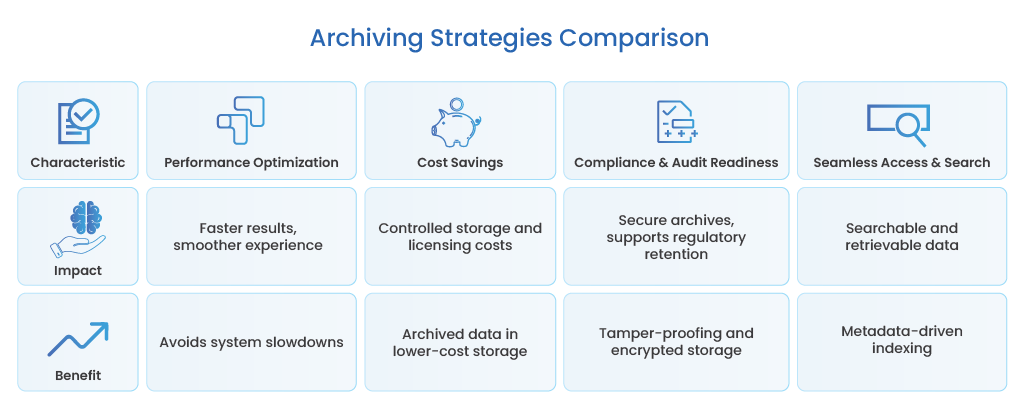
- Performance Optimization: By moving dormant data off your live environment, you avoid system slowdowns, sluggish search, and report lags. This helps the users get faster results and a smoother experience.
- Cost Savings: Storing only business-critical, active records in Dynamics 365 keeps Azure storage and licensing costs under control. Archived data sits in lower-cost storage tiers without sacrificing access when needed.
- Compliance and Audit Readiness: Secure archives support regulatory retention, tamper-proofing (WORM), and encrypted storage, ensuring you can quickly produce historical records during audits or litigation.
- Seamless Access & Search: Archived data is still searchable and retrievable through metadata-driven indexing, so you never lose oversight or governance capabilities.
With archiving as a core pillar, your Dynamics 365 data migration strategy becomes future-proof, compliant, and optimized for business growth, no matter which migration scenario you face.
Building a Future-Proof Dynamics 365 Data Migration Strategy
Data migration isn’t a one-time project but a foundation for everything that comes next. A poorly planned migration can transfer years of inefficiencies into your new Dynamics 365 environment. A well-planned one becomes the first step toward long-term data governance, performance, and compliance.
Here’s how to build it right.
1. Start with Data Discovery and Profiling
Before moving anything, know what you have. This begins with profiling your source systems; running discovery queries on AX or NAV SQL databases, exporting CRM entities through DMF or Power Automate connectors, and mapping where sensitive or redundant data resides.
Profiling tools or ETL scripts reveal duplicate records, orphaned entities, and inactive data that no longer adds value. Discovery and profiling help you see patterns like duplicate records, orphaned entities, and inactive data that no longer adds value.
2. Classify Data: Active, Historical, and Sensitive
Once visibility is established, categorize your data based on usage and compliance requirements:
- Active data: required for daily operations and must migrate to or stay on Dynamics 365
- Historical data: older, rarely accessed information still needed for audits or business reference
- Sensitive data: personally identifiable or regulated records requiring special handling or encryption
This classification helps define what moves, what archives, and what retires.
3. Define Retention Policies Early
Don’t wait until after migration to decide how long data should live. Establish retention rules aligned with legal, financial, and industry regulations like SOX, HIPAA, GDPR, or IRDAI.
A clear retention framework ensures compliance and prevents over-retention that bloats your system later.
4. Archive Before You Migrate
Migration is faster, cleaner, and safer when historical data is moved out beforehand. Archiving inactive records ensures only relevant and high-value data enters the new Dynamics 365 environment.
This not only reduces migration time but also minimizes licensing and cloud storage costs.
5. Test for Validation, Lineage, and Rollback
Validate every stage: pre-migration counts, post-migration reconciliation, and data lineage tracking. Ensure every record has traceability from source to destination, with audit logs intact. Always plan rollback mechanisms so teams can recover quickly if an issue appears in mid-migration.
6. Establish Continuous Archiving Post-Migration
Data management doesn’t end after go-live. Transactions, communications, and attachments keep growing daily.
Set up ongoing archiving to automatically offload older data, keeping Dynamics 365 lean. This continuous lifecycle approach ensures performance stays consistent, and compliance never lapses.
Dynamics 365 Archiving: Enterprise Compliance & Retention Strategy
Discover how to archive Dynamics 365 CRM and F&O data into Archon Data Store with policy-driven retention, legal hold orchestration, and independent retrieval without the query limits or licensing gates of native tools.
The Smarter Path Forward: Migrating, Archiving, and Governing Data Together with Archon™
Most so-called “archiving tools” simply move data from one table to another. Archon™ does something entirely different; it understands how Dynamics 365 is built and does intelligent archiving.
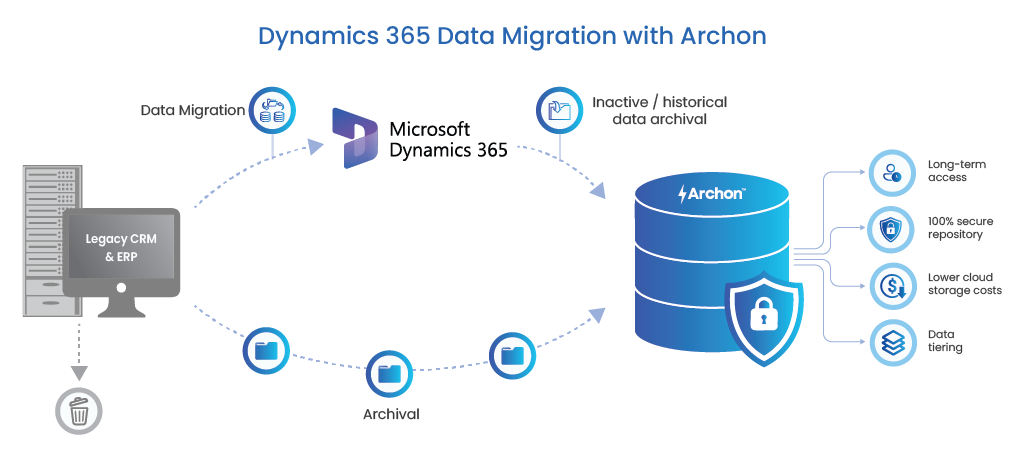
By reading Dynamics 365’s metadata, relationships, and data models, Archon™ performs schema-aware extraction, ensuring that nothing about the business logic or dependencies is lost in translation.
See how Archon™ can simplify Dynamics 365 migration and long-term data management.
1. Schema-Aware Extraction for AXDB and Dataverse
Archon™ doesn’t rely on naive table copies or bulk exports. It reads:
- AX metadata from the Model Store, SysDict, EDTs, and relations
- Table groups (Main, Transaction, Parameter, Group, etc.)
- Many-to-one and one-to-many cascade rules
- Cross-company (DataAreaId) references
Using that information, Archon™ builds a dependency-aware extraction path that maintains data lineage, relationships, and referential integrity, across AXDB and Dataverse simultaneously.
2. Full Preservation of Functional Context
Data without context loses business value. Archon™ maintains:
- Posting sequences and ledger dimension hierarchies
- Tax and subledger detail integrity
- Workflow histories and approval chains
- Document attachments with GUID-level linking
This ensures that audits, reconciliations, and financial reviews remain fully reproducible years after Dynamics 365 is retired or upgraded.
3. Immutable, Compliance-First Archiving
Every extracted object is stored with enterprise-grade protection, including:
- Append-only immutability — no edits, no overwrites
- Cryptographic hashing to verify data authenticity
- Audit-grade timestamps with full traceability
- Configurable retention aligned with SEC 17a-4, GDPR, and HIPAA requirements
Your archived Dynamics 365 data isn’t just stored but is secured, certified, and defensible in any compliance audit.
4. High-Performance Retrieval for Any Dynamics 365 Entity
Archon™ delivers fast, metadata-driven access to any archived record. You can instantly search and retrieve:
- Vendors, customers, and journals
- Ledger entries and tax records
- Sales orders, purchase order histories, and inventory transactions
- Attachments, notes, and workflow data
That means full visibility, even if the source system no longer exists.
5. Decommissioning-Ready for Dynamics 365 or ERP Transitions
Archon™ isn’t just built for Dynamics 365 archiving; it’s designed for system evolution. It supports:
- D365 F&O → new D365 tenant migrations
- AX 2009 / 2012 → D365 F&O modernizations
- D365 CE → Salesforce transitions
- Hybrid retention for partial module sunsets
Your historical data stays intact, accessible, and compliant even as your business systems move forward.
Setting the Foundation for the Next Decade of Data Modernization
Modernizing Dynamics 365 is about building a cleaner, smarter, and more compliant data foundation that can scale with your business. Enterprises that separate active from historical data before migrating don’t just save on time and cost but unlock long-term agility.
With Archon™, migration isn’t just a one-time project. It becomes the foundation for sustainable, governed, and future-ready data management. It acts as an intelligent bridge between legacy systems, modern Dynamics 365 environments, and your organization’s future data needs.
See how Archon™ can simplify your Dynamics 365 migration and long-term data management strategy. Talk to us now!
Frequently Asked Questions
Migration from Dynamics AX or NAV to Dynamics 365 involves three main stages: assessment, data preparation, and migration execution.
First, profile and map all legacy data stored in the on-prem SQL databases used by AX or NAV. Identify active business data like open invoices, active vendors, and current inventory that must move to Dynamics 365.
Next, clean and transform data using Microsoft’s Data Management Framework (DMF) or Azure Data Factory to align with Dynamics 365 schema.
Finally, migrate validated datasets to Dynamics 365 Finance & Operations or Business Central, while archiving inactive or historical records in Archon Data Store™ to keep the new environment lean and high performing.
A successful migration depends on a structured, repeatable approach. Key best practices include:
- Discover and profile data across all source systems (AX, NAV, CRM).
- Classify data as active, historical, or sensitive before migration.
- Clean and validate to eliminate duplicates and orphaned records.
- Archive before you migrate to keep D365 lean and compliant.
- Test thoroughly for data lineage, reconciliation, and rollback readiness.
- Enable continuous archiving post-migration to prevent performance degradation over time.
Together, these best practices help enterprises migrate faster, maintain compliance, and ensure their Dynamics 365 environments stay scalable for the long run.